需求:文章添加分享功能(包括微信、微博、QQ空间)
话不多说直接代码(可以封装成组件)
<template>
  <div class="shareBox">
    分享到:
    <span class="hover-pointer" @click="shareToMicroblog()">
      <img src="@/assets/img/weibo.png" alt="" />
    </span>
    <span class="qqIcon hover-pointer" @click="shareToQQRom()">
      <img src="@/assets/img/QQKJ.png" alt="" />
    </span>
    <span class="hover-pointer" @click="shareToWeChat()">
      <img src="@/assets/img/weixin.png" alt="" />
    </span>
  </div>
</template>

<script>
export default {
  props: ["sysInfo"],  //父组件传过来的文章数据
  data() {
    return {
      shareUrl: location.href,
    };
  },
  methods: {
    /**
     * 分享到微博
     */
    shareToMicroblog() {
      //跳转地址
      window.open(
        "https://service.weibo.com/share/share.php?url=" +
          encodeURIComponent(this.shareUrl) +
          "&title=" +
          this.sysInfo
      );
    },
    /**
     * 分享到qq空间
     */
    shareToQQRom() {
      //跳转地址
      window.open(
        "https://sns.qzone.qq.com/cgi-bin/qzshare/cgi_qzshare_onekey?url=" +
          encodeURIComponent(this.shareUrl) +
          "&title=" +
          this.sysInfo +
          "&summary=" +
          this.sysInfo
      );
    },
    /**
     * 分享到微信:需要单独画页面
     */
    shareToWeChat() {
      localStorage.setItem("shareUrl", this.shareUrl); // 存储当前页面地址,前端页面直接根据URL链接生成二维码
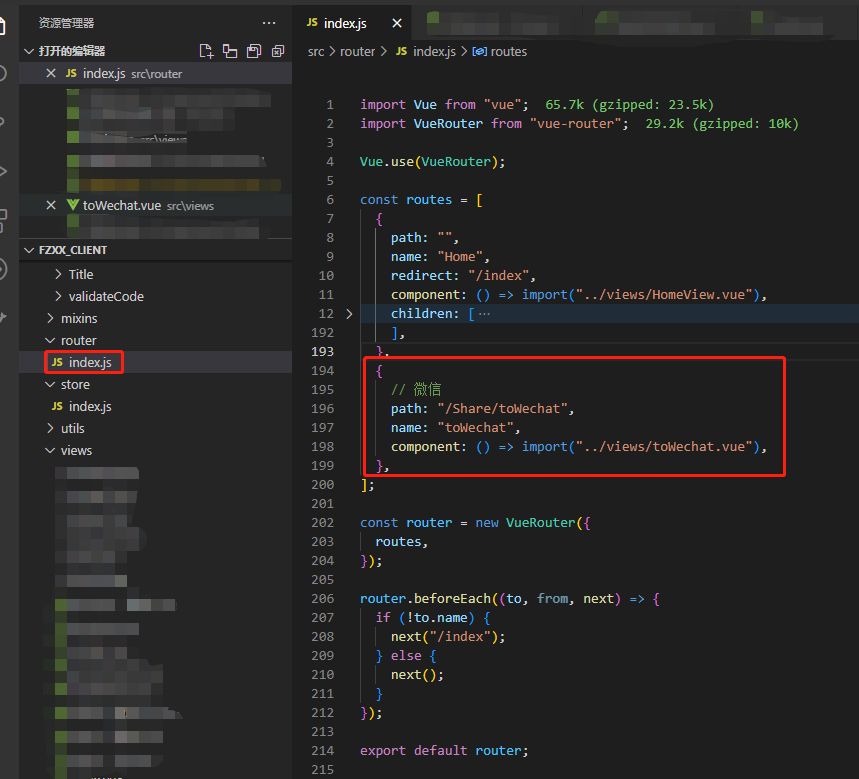
      let url = location.href.split("#")[0] + "#/Share/toWechat"; // 注意:#/Share/toWechat: 自己定义的路由
      window.open(url);
    },
  },
};
</script>

<style lang="scss" scoped>
.shareBox {
  .iconfont {
    font-size: 22px !important;
  }
  .qqIcon {
    display: inline-block;
    margin: 0 10px;
  }
}
</style>
注意:
1.微信分享需要加另外画页面 加前端页面根据URL链接生成二维码功能
参考:Vue中qrcode的使用方法(生成二维码插件) / 前端页面根据URL链接生成二维码 – 微微一笑绝绝子 – 博客园 (cnblogs.com)
2.橙色字体需要换成你自己定义的变量(包括图片 路由 props中的值 )
3.注意微信分享页面的路由设置,最好放在根路由中 (如下图 )并同步到代码中
