声明:仅供学习交流,勿作他用。
CSM影视原理
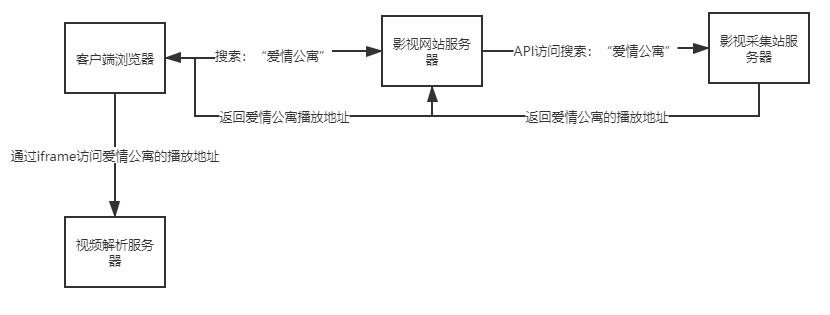
- 最开始做一个影视网站成本是很高的,需要把电影都存起来还要巨大的带宽。近几年影视采集站的兴起,影视网站也如同雨后春笋般崛起。
下图为市面上的cms影视站的原理
纯前端影视搜索站原理
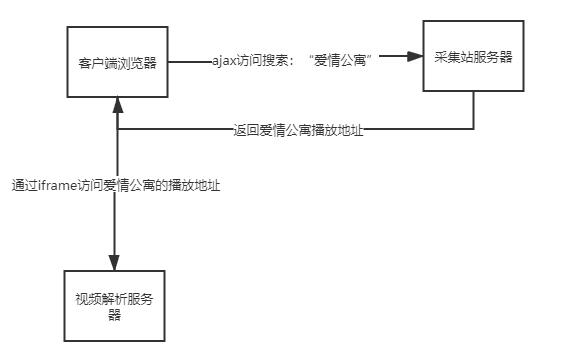
- 我们做的这个影视搜索网站也是建立在影视采集站的基础之上的,通过采集站提供的API来获取各个电影电视剧的播放地址,然后在我们的页面嵌入一个iframe把地址放进去就能愉快的追剧了。
- 但是我们不是通过服务器去访问采集站的API,而是通过客户端浏览器自己去发送ajax请求去访问采集站的数据。获取到播放地址之后直接在页面上显示出来。
- 但是这里就会涉及到跨域请求的问题了,我们的域名和采集站的域名是不一致的,js访问会报错。解决办法就是在服务器端设置允许跨域访问,可是采集站的服务器又不是我们控制的,我们该怎么办呢?
- 于是我找了十几家采集站,试了非常多的API终于找到了一个允许跨域访问的API接口(接口地址在下面的源码中)。
下图为纯前端影视搜索站原理。
总体功能和框架
博主比较懒只写了一些比较基本的功能。如果感兴趣的可以复制源码自行修改。
- 引用类库:bootstrap4、jquery3.5
- 基本UI设计:搜索框、搜索按钮、历史记录标签、播放剧集列表、视频播放区域。
- 功能实现:影视搜索、搜索敏感词过滤、播放选集、上一集下一集、本地保存历史播放记录
- 演示站点:http://www.kubuku.cool/
源码
为了方便新手看得明白,博主在关键的地方都加了注释。————————————————
<!DOCTYPE html>
<html lang="en">
<head>
<meta charset="UTF-8">
<meta name="viewport" content="width=device-width, initial-scale=1.0">
<title>酷不酷影视</title>
<script src="https://cdn.bootcss.com/jquery/3.5.0/jquery.min.js"></script>
<link href="https://cdn.bootcss.com/twitter-bootstrap/4.4.1/css/bootstrap.min.css" rel="stylesheet">
</head>
<body>
<!-- 头部的搜索区域开始 -->
<div class="card text-center">
<div class="card-header">
酷不酷影视
</div>
<div class="card-body">
<p class="card-text"><input onkeypress="if(event.keyCode==13){search()}" placeholder="请输入你要看的电影/电视剧" class="form-control form-control-lg" id='wd'/></p>
<button class="btn btn-primary" onclick="search()">搜索</button>
<p class="card-text" id="his_content"></p>
</div>
</div>
<!-- 头部的搜索区域结束 -->
<!-- 中间的播放器区域开始(默认不显示) -->
<div class="container" id="play" style="display:None">
<div class="row" id="play_name">
</div>
<div class="row">
<iframe id="playframe"
src=""
allowfullscreen="true"
width="100%"
>
</iframe>
</div>
<div class="row">
<div class="col">
<a class="page-link" onclick="lastone()" href="#"><</a>
</div>
<div class="col"></div><div class="col"></div><div class="col"></div><div class="col"></div><div class="col"></div><div class="col"></div><div class="col"></div><div class="col"></div><div class="col"></div>
<div class="col">
<a class="page-link" onclick="nextone()" href="#">></a>
</div>
</div>
</div>
<!-- 中间的播放器区域结束 -->
<!-- 按搜索按钮时会出现下面的这个转圈圈的加载动画 -->
<div id="spinner" class="spinner-border" role="status" style="display:None">
<span class="sr-only">Loading...</span>
</div>
<!-- 搜索的结果和选集的div -->
<div id="vod_name">
</div>
<div id="list">
</div>
</body>
</html>
<script>
// 定义全局对象,搜索出来的json数据列表,播放历史数据列表,当前播放的vod对象
vodlist = [];
hislist = [];
currvod = {};
//搜索加载数据时,显示这个加载的圈圈
function spinLoad(action){
if(action){
$('#spinner').attr('style','');
}else{
$('#spinner').attr('style','display:None');
}
}
//清空播放列表
function init(){
$('#list').html('');
$('#vod_name').html('');
}
//根据关键词搜剧
function search(){
//如果关键字为空就直接返回
var wd = $('#wd').val();
if(wd==null || wd=="" || wd=='undefined'){
return false;
}
init();//清空播放列表
spinLoad(true);//显示加载的圈圈
//开始发送ajax请求搜索影视
$.ajax({ url: "https://api.okzy.tv/api.php/provide/vod/at/json/?ac=detail&wd="+wd,
dataType:"json",
success: function(data){
vodlist = data.list;
//将返回的数据拼接html渲染到页面
innerhtml = "<ul class=\"list-group\">";
for(var i=0;i<vodlist.length;i++){
//屏蔽词
if(vodlist[i].vod_name.indexOf("日韩") == -1){
innerhtml += '<li class=\"list-group-item\"><a οnclick="playvodlist('+vodlist[i].vod_id+')">' + vodlist[i].vod_name + '</a></li>';
}
}
innerhtml += "</ul>";
$('#list').html(innerhtml);
spinLoad(false);//关闭加载的圈圈
}
});
}
//根据id列出这部剧的播放列表(集数)
function playvodlist(vid) {
//这个方法是从搜索的结果中选中了一个,然后要展示剧集
init();
var vod_play_url = "";
var currvod = {};
var vod = {};
vod.playlist=[];
//把播放地址拿出来
for (var i=0;i<vodlist.length;i++)
{
if(vodlist[i].vod_id == vid){
vod_play_url = vodlist[i].vod_play_url;
currvod = vodlist[i];
break;
}
}
vod.vod_id = currvod.vod_id;
vod.vod_name = currvod.vod_name;
vod.progress = 0;
$('#vod_name').html(vod.vod_name);
vod_play_url += "";
vod_play_url = vod_play_url.split('$$$')[0].split('#');
innerhtml = "<ol class=\"list-group\">";
for(var i=0; i<vod_play_url.length;i++){
v = vod_play_url[i].split('$');
url = encodeURIComponent(v[1]);
url = url.trim();
innerhtml += '<li class=\"list-group-item\"><a οnclick=\'playvod(\"'+vod.vod_id+'\",\"'+i+'\")\'>' + v[0] + '</a></li>';
var obj={};
obj.name = v[0];
obj.url = url;
vod.playlist.push(obj);
}
innerhtml += "</ol>";
$('#list').html(innerhtml);
addhistory(vod);//保存这个播放的对象到历史记录列表中
}
//添加到历史播放记录中
function addhistory(vod){
for(var v of hislist) {
if(v.vod_id == vod.vod_id){
return;
}
}
// 最多只保留3条播放记录
if(hislist.length>4){
hislist.pop();
}
hislist.splice(0, 0, vod);
writelocal();
}
//将播放历史写入本地
function writelocal(){
localStorage.setItem('hislist',JSON.stringify(hislist));
}
//更新播放进度
function updateprogress(vid,progress){
var vod = findvod(vid);
vod.progress = progress;
writelocal();
}
//根据id从历史记录列表对象中查找电视剧
function findvod(vid){
var vod = {};
for(var i=0; i<hislist.length;i++){
if(hislist[i].vod_id==vid){
vod = hislist[i];
break;
}
}
return vod;
}
//根据电视剧id和集数来播放电视
function playvod(vid,progress){
var vod = findvod(vid);
currvod = vod;
progress = parseInt(progress);
$('#play_name').html("正在播放:"+vod.vod_name+"----"+vod.playlist[progress].name);
//有些url是m3u8后缀的,有些又不是,需要分别判断一下
url = decodeURIComponent(vod.playlist[progress].url);
if(url.indexOf(".m3u8") != -1){
url = 'https://www.playm3u8.cn/jiexi.php?url='+url;
}
$('#play').attr('style','');
$('#playframe').attr('src',url);
updateprogress(vid,progress);
updatehisUI();
updateplaylistUI();
}
//上一集
function lastone(){
if(currvod.progress==0){
progress = 0;
}else{
progress = currvod.progress-1;
}
playvod(currvod.vod_id,progress);
}
//下一集
function nextone(){
if(currvod.progress==currvod.playlist.length-1){
progress = currvod.playlist.length-1;
}else{
progress = currvod.progress+1;
}
playvod(currvod.vod_id,progress);
}
//页面加载时自动加载上次保存的历史记录
$(document).ready(function() {
$('#play').contents().find('body').attr('oncontextmenu',"javascript:return false;");
$(document).bind("contextmenu",function(e) {
return false;
});
vodlist = [];
hislist = localStorage.getItem('hislist')==null?[]:JSON.parse(localStorage.getItem('hislist'));
updatehisUI();
});
//更新播放列表的UI
function updateplaylistUI(){
innerhtml = "<ol class=\"list-group\">";
for(var i=0; i<currvod.playlist.length;i++){
innerhtml += '<li class=\"list-group-item\"><a οnclick=\'playvod(\"'+currvod.vod_id+'\",\"'+i+'\")\'>' + currvod.playlist[i].name + '</a></li>';
}
innerhtml += "</ol>";
$('#list').html(innerhtml);
}
//更新历史记录的UI
function updatehisUI(){
innerhtml = '';
for(var i=0; i<hislist.length;i++){
innerhtml += '<a class="badge badge-success" οnclick=\'playvod(\"'+hislist[i].vod_id+'\",\"'+hislist[i].progress+'\")\'>'+hislist[i].vod_name+'</a> ';
}
$('#his_content').html(innerhtml);
}
</script>