分类: Uniapp

  • Uniapp打包成apk之后运行到ipad平板上无法横屏竖屏

    使用自定义基座可以自动通过重力感应横屏竖屏,但是打成APK之后就不生效…

    已解决了,manifest文件里加上,我感觉这个应该作为默认配置才好,而不应该额外开发,毕竟自动旋转是个基础功能.

    "app-plus" : {  
        "screenOrientation" : [  
             "portrait-primary",  
             "portrait-secondary",  
             "landscape-primary",  
             "landscape-secondary"  
        ],  
    }

    pagesjson文件里加上下列代码:

    "globalStyle": {  
            "pageOrientation": "auto"  
        },  
        "app-plus": {  
            "screenOrientation": [  
                "portrait-primary",     //可选,字符串类型,支持竖屏  
                "portrait-secondary",   //可选,字符串类型,支持反向竖屏  
                "landscape-primary",    //可选,字符串类型,支持横屏  
                "landscape-secondary"   //可选,字符串类型,支持反向横屏  
            ]  
        },
  • uniapp popup常用弹窗

    uniapp popup常用弹窗

    1. 上、下、左、右、中间弹出层

    <view>
        <button class="button" type="primary" @click="toggle('top')"><text class="button-text">点击触发</text></button>
        <!-- 普通弹窗 -->
        <uni-popup ref="popup" background-color="#fff" @change="change">
            <view class="popup-content" :class="{ 'popup-height': type === 'left' || type === 'right' }">
            <text>popup 内容</text></view>
        </uni-popup>
    </view>
    
    return {
        type: 'center',
    }
    methods: {
        // 显示/关闭弹出层的监听
        change(e) {
            console.log('当前模式:' + e.type + ',状态:' + e.show);
        },
        // type 取值范围:left、right、top、bottom、center
        toggle(type) {
            this.type = type
            this.$refs.popup.open(type) // open 方法传入参数 等同在 uni-popup 组件上绑定 type属性
        },
    }
    
    <style lang="scss">
        @mixin flex {
            /* #ifndef APP-NVUE */
            display: flex;
            /* #endif */
            flex-direction: row;
        }
    
        @mixin height {
            /* #ifndef APP-NVUE */
            height: 100%;
            /* #endif */
            /* #ifdef APP-NVUE */
            flex: 1;
            /* #endif */
        }
        .popup-content {
            @include flex;
            align-items: center;
            justify-content: center;
            padding: 15px;
            height: 50px;
            background-color: #fff;
        }
    
        .popup-height {
            @include height;
            width: 200px;
        }
    </style>
    

    2. 上方成功、失败、警告、信息 提示消息

    <view>
        <button class="button popup-success" @click="messageToggle('success')"><text class="button-text success-text">成功</text></button>
        <!-- 提示信息弹窗 -->
        <uni-popup ref="message" type="message">
            <uni-popup-message :type="msgType" :message="messageText" :duration="2000"></uni-popup-message>
        </uni-popup>
    </view>
    
    return {
        msgType: 'success',
        messageText: '这是一条成功提示',
    }
    methods: {
        // type 取值范围:success、error、warn、info
        messageToggle(type) {
            this.msgType = type
            this.messageText = `这是一条${type}消息提示`
            this.$refs.message.open()
        },
    }
    
    <style lang="scss">
        @mixin flex {
            /* #ifndef APP-NVUE */
            display: flex;
            /* #endif */
            flex-direction: row;
        }
        .button {
            @include flex;
            align-items: center;
            justify-content: center;
            flex: 1;
            height: 35px;
            margin: 0 5px;
            border-radius: 5px;
        }
        .button-text {
            color: #fff;
            font-size: 12px;
        }
        .popup-success {
            color: #fff;
            background-color: #e1f3d8;
        }
        
        .popup-warn {
            color: #fff;
            background-color: #faecd8;
        }
        
        .popup-error {
            color: #fff;
            background-color: #fde2e2;
        }
        
        .popup-info {
            color: #fff;
            background-color: #f2f6fc;
        }
        .success-text {
            color: #09bb07;
        }
        
        .warn-text {
            color: #e6a23c;
        }
        
        .error-text {
            color: #f56c6c;
        }
        
        .info-text {
            color: #909399;
        }
        
    </style>
    

    3. confirm 对话框弹窗

    <view>
        <button class="button popup-success" @click="dialogToggle('success')"><text class="button-text success-text">成功</text></button>
        <!-- 提示窗示例 -->
        <uni-popup ref="alertDialog" type="dialog">
            <uni-popup-dialog :type="msgType" cancelText="关闭" confirmText="同意" title="通知" content="欢迎使用 uni-popup!" @confirm="dialogConfirm"
                @close="dialogClose"></uni-popup-dialog>
        </uni-popup>
    </view>
    
    return {
        msgType: 'success',
        messageText: '这是一条成功提示',
    }
    methods: {
        // type 取值范围:success、error、warn、info
        dialogToggle(type) {
            this.msgType = type
            this.$refs.alertDialog.open()
        },
        // 确认
        dialogConfirm() {
            console.log('点击确认')
            this.messageText = `点击确认了 ${this.msgType} 窗口`
        },
        // 关闭
        dialogClose() {
            console.log('点击关闭')
        },
    }
    
    <style lang="scss">
        @mixin flex {
            /* #ifndef APP-NVUE */
            display: flex;
            /* #endif */
            flex-direction: row;
        }
        .button {
            @include flex;
            align-items: center;
            justify-content: center;
            flex: 1;
            height: 35px;
            margin: 0 5px;
            border-radius: 5px;
        }
        .button-text {
            color: #fff;
            font-size: 12px;
        }
        .popup-success {
            color: #fff;
            background-color: #e1f3d8;
        }
        
        .popup-warn {
            color: #fff;
            background-color: #faecd8;
        }
        
        .popup-error {
            color: #fff;
            background-color: #fde2e2;
        }
        
        .popup-info {
            color: #fff;
            background-color: #f2f6fc;
        }
        .success-text {
            color: #09bb07;
        }
        
        .warn-text {
            color: #e6a23c;
        }
        
        .error-text {
            color: #f56c6c;
        }
        
        .info-text {
            color: #909399;
        }
    </style>
    

    4. prompt 输入框弹窗

    <view>
        <button class="button" type="primary" @click="inputDialogToggle"><text class="button-text">输入对话框</text></button>
        <!-- 输入框示例 -->
        <uni-popup ref="inputDialog" type="dialog">
            <uni-popup-dialog ref="inputClose"  mode="input" title="输入内容" value="对话框预置提示内容!"
                placeholder="请输入内容" @confirm="dialogInputConfirm"></uni-popup-dialog>
        </uni-popup>
    </view>
    
    return {
        value: '',
    }
    methods: {
        inputDialogToggle() {
            this.$refs.inputDialog.open()
        },
        dialogInputConfirm(val) {
            uni.showLoading({
                title: '3秒后会关闭'
            })
        
            setTimeout(() => {
                uni.hideLoading()
                console.log(val)
                this.value = val
                // 关闭窗口后,恢复默认内容
                this.$refs.inputDialog.close()
            }, 3000)
        },
    }
    
    <style lang="scss">
        @mixin flex {
            /* #ifndef APP-NVUE */
            display: flex;
            /* #endif */
            flex-direction: row;
        }
        .button {
            @include flex;
            align-items: center;
            justify-content: center;
            flex: 1;
            height: 35px;
            margin: 0 5px;
            border-radius: 5px;
        }
        .button-text {
            color: #fff;
            font-size: 12px;
        }
    </style>


  • 【uniapp】十分钟带你封装uniapp的api请求

    【uniapp】十分钟带你封装uniapp的api请求

    封装前的准备

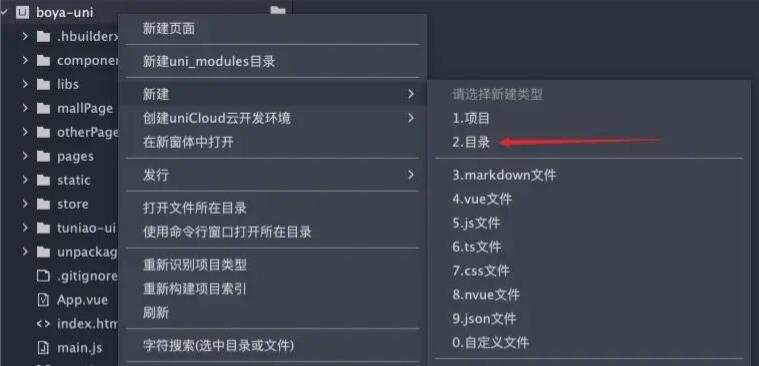
    先在项目目录上右键 – 新建目录(用于存放封装的API请求文件)

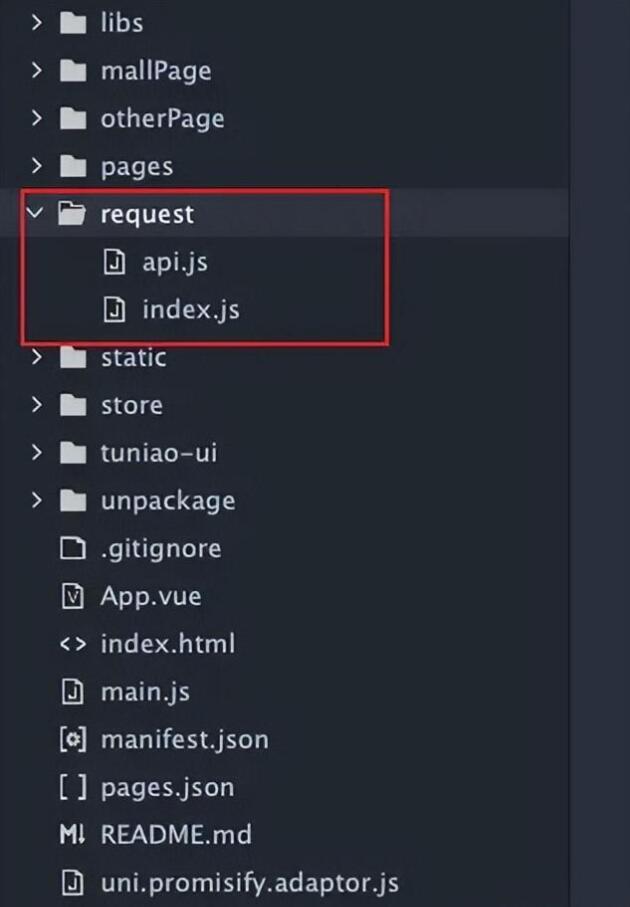
    • 名称大家可以随意取,我这里给的是request

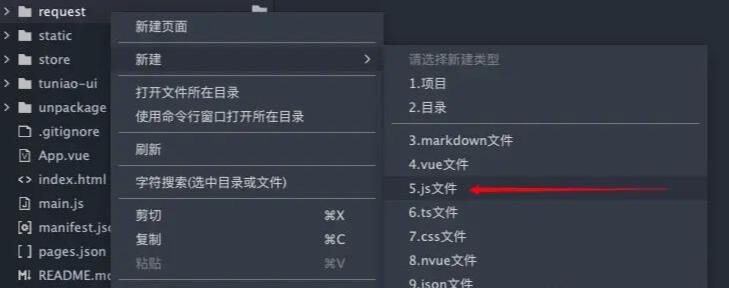
    目录新建完成之后,还需要至少两个js文件

    • index.js 封装get、post请求,接收参数并返回数据
    • api.js 封装后台接口,便于页面调用和后期维护

    为啥这里说的是至少两个js文件呢?那是因为可能因为权限的原因,亦或者模块的分类等,可以把api.js文件给拆分出去,按照不同的权限、模块来进行分类,最终可以通过一个总的js文件合并,这样更利于后期维护。

    封装第一步:index.js

    定义请求参数

    • 必备参数:url、method、header、data
    • 可选参数:hideLoading
    • export default class Request {
    http(param) {
    let url = param.url;
    let method = param.method;
    let header = param.header || {};
    let data = Object.assign(param.data || {});
    let hideLoading = param.hideLoading || false;
    // 第一步的代码均在此处展示,后面示例代码就不写外层 class 和 http方法了。
    ....
    }
    }
    • hideLoading主要是后面用于显示加载toast状态的

    请求地址

    • 其实请求地址可以单独封装成一个js文件的,比如开发环境、正式环境、测试环境都用不同的请求地址。
    let requestUrl = 'https://www.juejin.cn/' + url;

    请求方式

    • 此处仅封装GET、POST两种方式,其他的请求方式可以根据需求去进行封装
    if (method) {
    if (method == "POST") {
    header = Object.assign({
    'content-type': "application/x-www-form-urlencoded"
    }, param.header)
    } else {
    header = Object.assign({
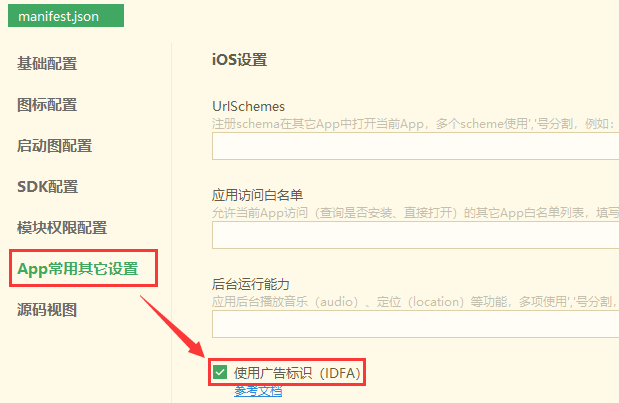
    'content-type': "application/json"
    }, param.header)
    }
    }
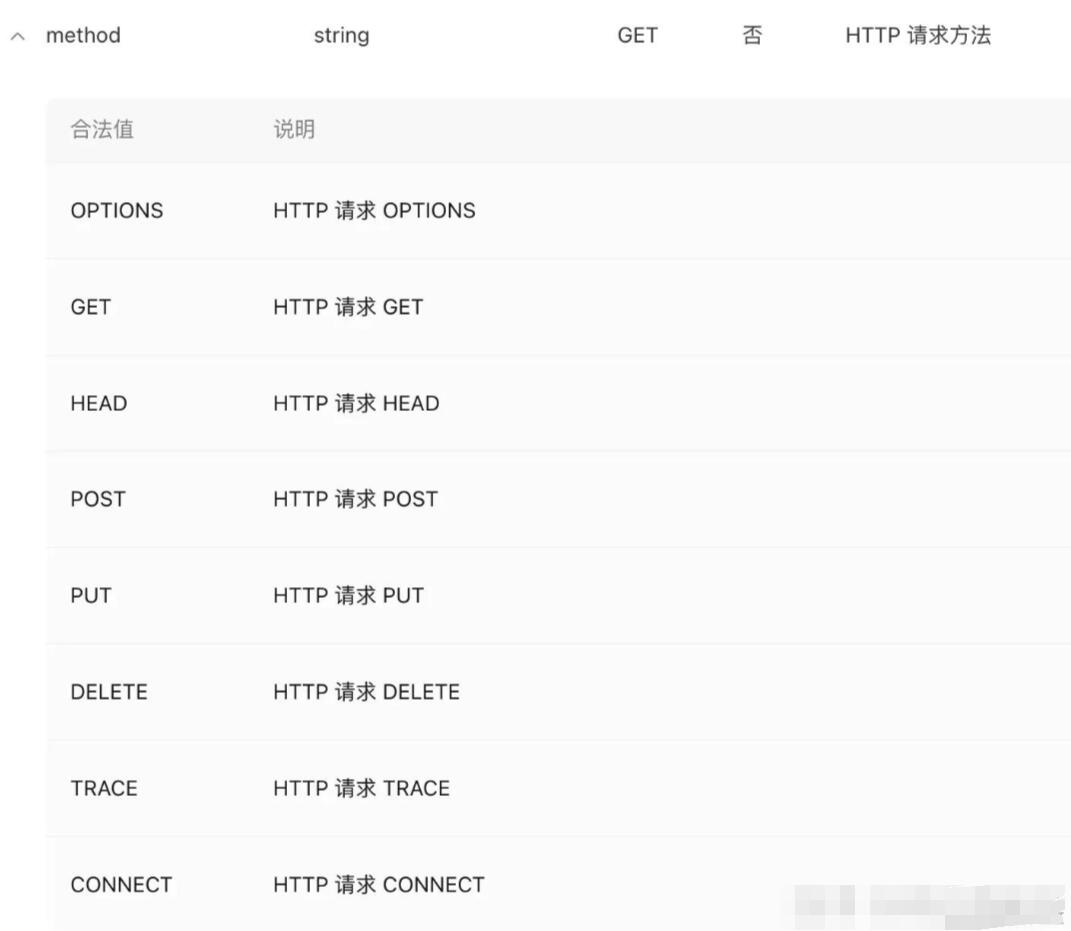
    • method参数必须是大写的哦~(微信小程序和uniapp均有文档查阅)
    • 将content-type和用户传递的header数据进行合并,组成一个新的header参数

    请求加载(这里是可选的配置项)

    • 数据配置完成后,可以给用户一个loading的等待效果
    if (!hideLoading) { uni.showLoading() }

    返回Promise

    • 通过promise返回数据,可以在页面上请求接口的时候,直接使用.then来拿到数据(也算是目前前端常用的写法了吧)
    return new Promise((resolve, reject) => {
    uni.request({
    url: requestUrl,
    data: data,
    method: method,
    header: header,
    success: (res) => {
    // 下面会直接写请求成功的代码
    ......
    },
    fail: (err) => {
    // 下面会直接写请求失败的代码
    ......
    },
    })
    })
    • 在promise中写上请求方法,并接收上面定义的参数
    // success里面的逻辑代码
    // 如果有显示loading的话,可以在这里选择隐藏
    if (!hideLoading) {
    uni.hideLoading();
    }
    // 判断请求是否成功(通过后端接口返回的状态进行判断)
    // code:0 即成功,不为 0 的话就是请求错误/失败
    if(res.data.code === 0){
    resolve(res.data)
    return true
    } else {
    if(res.data.code === -1){
    // 这里是由于token过期导致的错误码
    // 可以直接跳转到login页面,也可以直接刷新token
    uni.navigateTo({
    url: '/pages/login/login'
    })
    }
    // 其他错误时,直接通过toast提示
    uni.showToast({
    title:res.data.msg,
    icon:'none'
    })
    return false;
    }
    // fail里面的逻辑代码
    // 如果有显示loading,同样需要隐藏
    if (!hideLoading) {
    uni.hideLoading();
    }
    return false;

    封装第二步:api.js

    引用封装好的index.js文件

    import Request from './index.js' let request = new Request().http

    get、post请求方法

    function get(url, data, hideLoading, header) {
    return request({
    url: url,
    method: 'GET',
    data: data,
    header: header
    })
    }
    
    function post(url, data, hideLoading, header) {
    return request({
    url: url,
    method: 'POST',
    data: data,
    header: header,
    hideLoading: hideLoading,
    })
    }

    封装api对象

    • 通过上面的方法,来确定请求类型
    let api = {
    login: data => post('loginapi', data, true, true)
    }
    
    export default api;
    • 为了能够在全局进行使用,需要在main.js文件中进行配置
    • $http是自定义名称,可以根据自己的需要去修改
    • 在引入文件中,我们只需要引入api.js即可
    import api from "./request/api.js"
    Vue.prototype.$http = api;

    使用方法

    onLoad(){
    this.$http.login().then(res=>{
    console.log(res)
    })
    }
    • 在页面上使用的时候,直接通过this.$http找到对应的api方法
    • 如果需要传参,可以在login方法中直接传递login({name: ‘xxx’, sex: ‘yyy’})

    总结

    在uniapp中封装请求方法,其实和vue里面的axios封装方式差不多,通过一次封装,改变之后的开发模式和维护成本是很重要的。

    由于兼职的后端还没开始写接口,所以就不在这里展示具体的请求数据了,大家可以自行尝试一下。

    uniapp常用组件及api使用方法:https://blog.csdn.net/weixin_43664855/article/details/131409406

    如何调用API:https://blog.csdn.net/p_s_p/article/details/130880583

    天气参考:https://blog.csdn.net/Red_sevenWord/article/details/135019087

    uni-app 超详细教程(一)(从菜鸟到大佬):https://blog.csdn.net/zhousenshan/article/details/131351310?utm_medium=distribute.pc_relevant.none-task-blog-2~default~baidujs_baidulandingword~default-4-131351310-blog-128123590.235^v43^pc_blog_bottom_relevance_base2&spm=1001.2101.3001.4242.3&utm_relevant_index=7

    uni-app 超详细教程(二)(从菜鸟到大佬):

    https://blog.csdn.net/m0_64875238/article/details/128123590

    文章来源:https://juejin.cn/post/7249228528573694013

  • uniapp怎么挂第三方的广告

    uniapp怎么挂第三方的广告

    1、首先,在uniapp中挂载第三方广告,需要在项目中引入第三方广告SDK,比如穿山甲、百度移动联盟等;

    2、然后,在项目中创建一个文件夹,用来存放第三方广告SDK,并在项目中引入SDK;

    3、接着,在项目中创建一个文件夹,用来存放第三方广告代码,并在项目中引入代码;

    4、最后,在项目中添加第三方广告代码,并在项目中调用第三方广告代码,实现第三方广告的挂载。

  • Vue 项目中实现的微信、微博、QQ空间分享功能(亲测有效)

    Vue 项目中实现的微信、微博、QQ空间分享功能(亲测有效)

    需求:文章添加分享功能(包括微信、微博、QQ空间)

    话不多说直接代码(可以封装成组件)

    <template>
      <div class="shareBox">
        分享到:
        <span class="hover-pointer" @click="shareToMicroblog()">
          <img src="@/assets/img/weibo.png" alt="" />
        </span>
        <span class="qqIcon hover-pointer" @click="shareToQQRom()">
          <img src="@/assets/img/QQKJ.png" alt="" />
        </span>
        <span class="hover-pointer" @click="shareToWeChat()">
          <img src="@/assets/img/weixin.png" alt="" />
        </span>
      </div>
    </template>
     
    <script>
    export default {
      props: ["sysInfo"],  //父组件传过来的文章数据
      data() {
        return {
          shareUrl: location.href,
        };
      },
      methods: {
        /**
         * 分享到微博
         */
        shareToMicroblog() {
          //跳转地址
          window.open(
            "https://service.weibo.com/share/share.php?url=" +
              encodeURIComponent(this.shareUrl) +
              "&title=" +
              this.sysInfo
          );
        },
        /**
         * 分享到qq空间
         */
        shareToQQRom() {
          //跳转地址
          window.open(
            "https://sns.qzone.qq.com/cgi-bin/qzshare/cgi_qzshare_onekey?url=" +
              encodeURIComponent(this.shareUrl) +
              "&title=" +
              this.sysInfo +
              "&summary=" +
              this.sysInfo
          );
        },
        /**
         * 分享到微信:需要单独画页面
         */
        shareToWeChat() {
          localStorage.setItem("shareUrl", this.shareUrl); // 存储当前页面地址,前端页面直接根据URL链接生成二维码
          let url = location.href.split("#")[0] + "#/Share/toWechat"; // 注意:#/Share/toWechat: 自己定义的路由
          window.open(url);
        },
      },
    };
    </script>
     
    <style lang="scss" scoped>
    .shareBox {
      .iconfont {
        font-size: 22px !important;
      }
      .qqIcon {
        display: inline-block;
        margin: 0 10px;
      }
    }
    </style>


    注意:

    1.微信分享需要加另外画页面 加前端页面根据URL链接生成二维码功能

    参考:Vue中qrcode的使用方法(生成二维码插件) / 前端页面根据URL链接生成二维码 – 微微一笑绝绝子 – 博客园 (cnblogs.com)

    2.橙色字体需要换成你自己定义的变量(包括图片 路由 props中的值 )

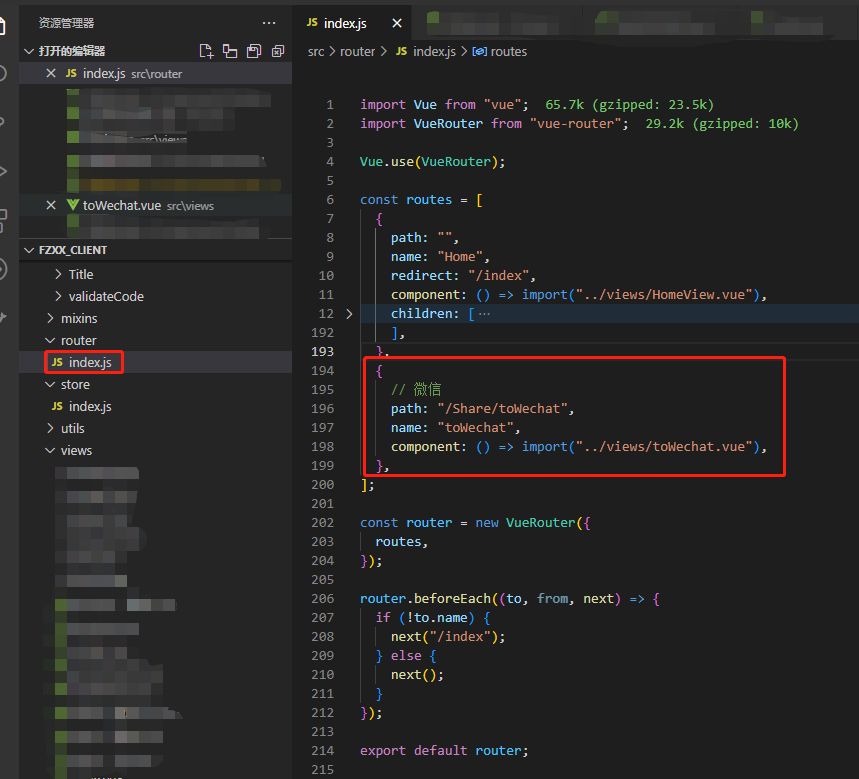
    3.注意微信分享页面的路由设置,最好放在根路由中 (如下图 )并同步到代码中

  • UNIapp 切片,便民查询代码参考备份1

    UNIapp 切片,便民查询代码参考备份1

    便民查询页面VUE.js代码参考:

    完整的vue.js代码如下:

    [content_hide]

    <template>
        <view class="flex-col homepage">
            <view class="flex-col wrapper">
                <text class="text">
                    今日新发现
                </text>
                <view class="flex-row wraper-row">
                    <navigator url="/pages/web-view/web-view?url=https://top.baidu.com/board"><image class="img" src="http://cha.pmself.com/images/chaxun/baidu.png"></image></navigator>
                    <navigator url="/pages/web-view/web-view?url=https://s.weibo.com/top/summary?cate=realtimehot&uc_biz_str=OPT%3ABACK_BTN_STYLE%400%7COPT%3ATOOLBAR_STYLE%401"><image class="img-two" src="http://cha.pmself.com/images/chaxun/weibo2.png"></image></navigator>
                    <navigator url="/pages/web-view/web-view?url=https://m.toutiao.com/?W2atIF=1"><image class="img-three" src="http://cha.pmself.com/images/chaxun/toutiao.png"></image></navigator>
                    <navigator url="/pages/web-view/web-view?url=https://tophub.today/n/DpQvNABoNE"><image class="img-four" src="http://cha.pmself.com/images/chaxun/douyin.png"></image></navigator>
                </view>
                <view class="flex-row wraper-row-two">
                    <text class="text-two">
                <navigator url="/pages/web-view/web-view?url=https://top.baidu.com/board">百度热搜</navigator>
                    </text> <text class="text-three">
                <navigator url="/pages/web-view/web-view?url=https://s.weibo.com/top/summary?cate=realtimehot&uc_biz_str=OPT%3ABACK_BTN_STYLE%400%7COPT%3ATOOLBAR_STYLE%401">微博热搜</navigator>
                    </text> <text class="text-four">
                <navigator url="/pages/web-view/web-view?url=https://m.toutiao.com/?W2atIF=1">头条新闻</navigator>
                    </text> <text class="text-five">
                <navigator url="/pages/web-view/web-view?url=https://tophub.today/n/DpQvNABoNE">抖音热榜</navigator>
                    </text>
                </view>
            </view>
            <view class="flex-col wrapper-two">
                <text class="text-six">
                    常用便民查询
                </text>
                <view class="flex-row wraper-row-three">
                    <navigator url="/pages/web-view/web-view?url=https://map.baidu.com/mobile/webapp/third/transit"><image class="img-five" src="http://cha.pmself.com/images/chaxun/gongjiao.png"></image></navigator>
                    <navigator url="/pages/web-view/web-view?url=https://m.baidu.com/ssid=204c637261776c70773408/s?word=%E6%9F%A5%E5%BF%AB%E9%80%92"><image class="img-six" src="http://cha.pmself.com/images/chaxun/kuaidi.png"></image></navigator>
                    <navigator url="/pages/web-view/web-view?url=https://map.baidu.com/mobile/webapp/third/peccancy"><image class="img-seven" src="http://cha.pmself.com/images/chaxun/weizhang.png"></image></navigator>
                    <navigator url="/pages/web-view/web-view?url=https://touch.train.qunar.com/train_touch/index.html#/"><image class="img-eight" src="http://cha.pmself.com/images/chaxun/huoche.png"></image></navigator>
                </view>
                <view class="flex-row wraper-row-four">
                    <text class="text-seven">
                 <navigator url="/pages/web-view/web-view?url=https://map.baidu.com/mobile/webapp/third/transit">查公交</navigator>
                    </text> <text class="text-eight">
                <navigator url="/pages/web-view/web-view?url=https://m.baidu.com/ssid=204c637261776c70773408/s?word=%E6%9F%A5%E5%BF%AB%E9%80%92">查快递</navigator>
                    </text> <text class="text-nine">
                 <navigator url="/pages/web-view/web-view?url=https://map.baidu.com/mobile/webapp/third/peccancy">查违章</navigator>
                    </text> <text class="text-ten">
                 <navigator url="/pages/web-view/web-view?url=https://touch.train.qunar.com/train_touch/index.html#/">火车票</navigator>
                    </text>
                </view>
                <view class="flex-row wraper-row-five">
                    <navigator url="/pages/web-view/web-view?url=https://touch.qunar.com/h5/flight/?bd_source=hao12302&__rewrite=true"><image class="img-nine" src="http://cha.pmself.com/images/chaxun/feiji.png"></image></navigator>
                    <navigator url="/pages/web-view/web-view?url=https://m.baidu.com/ssid=204c637261776c70773408/s?word=%E5%A4%A9%E6%B0%94"><image class="img-ten" src="http://cha.pmself.com/images/chaxun/tianqi.png"></image></navigator>
                    <navigator url="/pages/web-view/web-view?url=https://m.baidu.com/ssid=204c637261776c70773408/s?word=%E5%8F%8C%E8%89%B2%E7%90%83"><image class="img-eleven" src="http://cha.pmself.com/images/chaxun/ssq.png"></image></navigator>
                    <navigator url="/pages/web-view/web-view?url=https://m.baidu.com/ssid=204c637261776c70773408/s?word=%E6%88%BF%E8%B4%B7%E8%AE%A1%E7%AE%97%E5%99%A8"><image class="img-twelve" src="http://cha.pmself.com/images/chaxun/fangdai.png"></image></navigator>
                </view>
                <view class="flex-row wraper-row-six">
                    <text class="text-eleven">
                <navigator url="/pages/web-view/web-view?url=https://touch.qunar.com/h5/flight/?bd_source=hao12302&__rewrite=true">查航班</navigator>
                    </text> <text class="text-twelve">
                <navigator url="/pages/web-view/web-view?url=https://m.baidu.com/ssid=204c637261776c70773408/s?word=%E5%A4%A9%E6%B0%94">查天气</navigator>
                    </text> <text class="text-thirteen">
                 <navigator url="/pages/web-view/web-view?url=https://m.baidu.com/ssid=204c637261776c70773408/s?word=%E5%8F%8C%E8%89%B2%E7%90%83">双色球</navigator>
                    </text> <text class="text-fourteen">
                 <navigator url="/pages/web-view/web-view?url=https://m.baidu.com/ssid=204c637261776c70773408/s?word=%E6%88%BF%E8%B4%B7%E8%AE%A1%E7%AE%97%E5%99%A8">房贷计算</navigator>
                    </text>
                </view>
            </view>
            <view class="flex-col wrapper-three">
                <text class="text-fifteen">
                    新鲜有趣一览
                </text>
                <view class="flex-row wraper-row-seven">
                    <navigator url="/pages/web-view/web-view?url=https://m.baidu.com/from=1020854c/s?word=%E6%89%8B%E6%9C%BA%E5%A3%81%E7%BA%B8"><image class="img-thirteen" src="http://cha.pmself.com/images/chaxun/bizhi.png"></image></navigator>
                    <navigator url="/pages/web-view/web-view?url=https://m.hao123.com/sitecards/?pt=1"><image class="img-fourteen" src="http://cha.pmself.com/images/chaxun/doutu.png"></image></navigator>
                    <navigator url="/pages/web-view/web-view?url=https://m.youlai.cn/jijiu"><image class="img-fifteen" src="http://cha.pmself.com/images/chaxun/jijiu.png"></image></navigator>
                    <navigator url="/pages/web-view/web-view?url=https://web.shanbay.com/words/op/honor-words"><image class="img-sixteen" src="http://cha.pmself.com/images/chaxun/shanbei.png"></image></navigator>
                </view>
                <view class="flex-row wraper-row-eight">
                    <text class="text-sixteen">
                    <navigator url="/pages/web-view/web-view?url=https://m.baidu.com/from=1020854c/s?word=%E6%89%8B%E6%9C%BA%E5%A3%81%E7%BA%B8">手机壁纸</navigator>
                    </text> <text class="text-seventeen">
                    <navigator url="/pages/web-view/web-view?url=https://m.hao123.com/sitecards/?pt=1">斗图装X</navigator>
                    </text> <text class="text-eighteen">
                    <navigator url="/pages/web-view/web-view?url=https://m.youlai.cn/jijiu">有来急救</navigator>
                    </text> <text class="text-nineteen">
                    <navigator url="/pages/web-view/web-view?url=https://web.shanbay.com/words/op/honor-words">扇贝记单词</navigator>
                    </text>
                </view>
                <view class="flex-row wraper-row-nine">
                    <navigator url="/pages/web-view/web-view?url=https://h5.codefuture.top/widgetbox-h5/quickcard/poetry"><image class="img-seventeen" src="http://cha.pmself.com/images/chaxun/shici2.png"></image></navigator>
                    <navigator url="/pages/web-view/web-view?url=https://ask.dxy.com/index#/activity/honor?dxa_adplatform=honorcardh5&position=1"><image class="img-eighteen" src="http://cha.pmself.com/images/chaxun/dingxiang.png"></image></navigator>
                    <navigator url="/pages/web-view/web-view?url=https://m.smzdm.com/top/?scene=deeplink/"><image class="img-nineteen" src="http://cha.pmself.com/images/chaxun/zdm.png"></image></navigator>
                    <navigator url="/pages/web-view/web-view?url=https://m.baidu.com/sf/vsearch?pd=image_content&atn=page&fr=tab&tn=vsearch&ss=100&sa=tb&rsv_sug4=1512&oq=%E7%BE%8E%E5%A5%B3&word=%E7%BE%8E%E5%A5%B3"><image class="img-twenty" src="http://cha.pmself.com/images/chaxun/meinv.png"></image></navigator>
                </view>
                <view class="flex-row wraper-row-ten">
                    <text class="text-twenty">
                    <navigator url="/pages/web-view/web-view?url=https://h5.codefuture.top/widgetbox-h5/quickcard/poetry">诗词卡片</navigator>
                    </text> <text class="text-20">
                   <navigator url="/pages/web-view/web-view?url=https://ask.dxy.com/index#/activity/honor?dxa_adplatform=honorcardh5&position=1">丁香大实话</navigator>
                    </text> <text class="text-21">
                    <navigator url="/pages/web-view/web-view?url=https://m.smzdm.com/top/?scene=deeplink/">好物值得买</navigator>
                    </text> <text class="text-22">
                    <navigator url="/pages/web-view/web-view?url=https://m.baidu.com/sf/vsearch?pd=image_content&atn=page&fr=tab&tn=vsearch&ss=100&sa=tb&rsv_sug4=1512&oq=%E7%BE%8E%E5%A5%B3&word=%E7%BE%8E%E5%A5%B3">美女图片</navigator>
                    </text>
                </view>
            </view>
    				
            <view class="flex-col wrapper-four">
                <text class="text-23">
                    快递服务查询
                </text>
                <view class="flex-row wraper-row-eleven">
                    <navigator url="/pages/web-view/web-view?url=https://m.baidu.com/ssid=204c637261776c70773408/s?word=%E9%A1%BA%E9%A3%8E%E5%BF%AB%E9%80%92"><image class="img-20" src="http://cha.pmself.com/images/chaxun/shunfeng.png"></image></navigator>
                    <navigator url="/pages/web-view/web-view?url=https://m.baidu.com/ssid=204c637261776c70773408/s?word=%E5%9C%86%E9%80%9A%E5%BF%AB%E9%80%92"><image class="img-21" src="http://cha.pmself.com/images/chaxun/yuantong.png"></image></navigator>
                    <navigator url="/pages/web-view/web-view?url=https://m.baidu.com/ssid=204c637261776c70773408/s?word=%E7%94%B3%E9%80%9A%E5%BF%AB%E9%80%92"><image class="img-22" src="http://cha.pmself.com/images/chaxun/shentong.png"></image></navigator>
                    <navigator url="/pages/web-view/web-view?url=https://m.baidu.com/ssid=204c637261776c70773408/s?word=%E9%9F%B5%E8%BE%BE%E5%BF%AB%E9%80%92"><image class="img-23" src="http://cha.pmself.com/images/chaxun/yunda.png"></image></navigator>
                </view>
                <view class="flex-row wraper-row-twelve">
                    <text class="text-24">
                    <navigator url="/pages/web-view/web-view?url=https://m.baidu.com/ssid=204c637261776c70773408/s?word=%E9%A1%BA%E9%A3%8E%E5%BF%AB%E9%80%92">顺风快递</navigator>
                    </text> <text class="text-25">
                    <navigator url="/pages/web-view/web-view?url=https://m.baidu.com/ssid=204c637261776c70773408/s?word=%E5%9C%86%E9%80%9A%E5%BF%AB%E9%80%92">圆通快递</navigator>
                    </text> <text class="text-26">
                    <navigator url="/pages/web-view/web-view?url=https://m.baidu.com/ssid=204c637261776c70773408/s?word=%E7%94%B3%E9%80%9A%E5%BF%AB%E9%80%92">申通快递</navigator>
                    </text> <text class="text-27">
                    <navigator url="/pages/web-view/web-view?url=https://m.baidu.com/ssid=204c637261776c70773408/s?word=%E9%9F%B5%E8%BE%BE%E5%BF%AB%E9%80%92">韵达快递</navigator>
                    </text>
                </view>
                <view class="flex-row wraper-row-thirteen">
                    <navigator url="/pages/web-view/web-view?url=https://m.baidu.com/ssid=204c637261776c70773408/s?word=%E4%BA%AC%E4%B8%9C%E5%BF%AB%E9%80%92"><image class="img-24" src="http://cha.pmself.com/images/chaxun/jdkd.png"></image></navigator>
                    <navigator url="/pages/web-view/web-view?url=https://m.baidu.com/ssid=204c637261776c70773408/s?word=%E5%BE%B7%E9%82%A6%E5%BF%AB%E9%80%92"><image class="img-25" src="http://cha.pmself.com/images/chaxun/debang.png"></image></navigator>
                    <navigator url="/pages/web-view/web-view?url=https://m.baidu.com/ssid=204c637261776c70773408/s?word=%E9%82%AE%E6%94%BF%E5%BF%AB%E9%80%92"><image class="img-26" src="http://cha.pmself.com/images/chaxun/youzheng.png"></image></navigator>
                    <navigator url="/pages/web-view/web-view?url=https://www.ip138.com/tel.htm"><image class="img-27" src="http://cha.pmself.com/images/chaxun/dianhua.png"></image></navigator>
                </view>
                <view class="flex-row wraper-row-fourteen">
                    <text class="text-28">
                    <navigator url="/pages/web-view/web-view?url=https://m.baidu.com/ssid=204c637261776c70773408/s?word=%E4%BA%AC%E4%B8%9C%E5%BF%AB%E9%80%92">京东快递</navigator>
                    </text> <text class="text-29">
                    <navigator url="/pages/web-view/web-view?url=https://m.baidu.com/ssid=204c637261776c70773408/s?word=%E5%BE%B7%E9%82%A6%E5%BF%AB%E9%80%92">德邦快递</navigator>
                    </text> <text class="text-30">
                    <navigator url="/pages/web-view/web-view?url=https://m.baidu.com/ssid=204c637261776c70773408/s?word=%E9%82%AE%E6%94%BF%E5%BF%AB%E9%80%92">邮政快递</navigator>
                    </text> <text class="text-31">
                     <navigator url="/pages/web-view/web-view?url=https://www.ip138.com/tel.htm">便民电话</navigator>
                    </text>
                </view>
            </view>
            <view class="flex-col wrapper-five">
                <text class="text-32">
                    我的附近区域
                </text>
                <view class="flex-row wraper-row-fifteen">
                    <navigator url="/pages/web-view/web-view?url=https://map.baidu.com/mobile/webapp/index/more/?fromhash=1"><image class="img-28" src="http://cha.pmself.com/images/chaxun/fujin.png"></image></navigator>
                    <navigator url="/pages/web-view/web-view?url=https://map.baidu.com/mobile/webapp/index/index"><image class="img-29" src="http://cha.pmself.com/images/chaxun/meishi.png"></image></navigator>
                    <navigator url="/pages/web-view/web-view?url=https://map.baidu.com/mobile/webapp/index/index"><image class="img-30" src="http://cha.pmself.com/images/chaxun/jiudian.png"></image></navigator>
                    <navigator url="/pages/web-view/web-view?url=https://map.baidu.com/mobile/webapp/index/index"><image class="img-31" src="http://cha.pmself.com/images/chaxun/dianying.png"></image></navigator>
                </view>
                <view class="flex-row wraper-row-sixteen">
                    <text class="text-33">
                 <navigator url="/pages/web-view/web-view?url=https://map.baidu.com/mobile/webapp/index/more/?fromhash=1">查附近</navigator>
                    </text> <text class="text-34">
                 <navigator url="/pages/web-view/web-view?url=https://map.baidu.com/mobile/webapp/index/index">美食</navigator>
                    </text> <text class="text-35">
                 <navigator url="/pages/web-view/web-view?url=https://map.baidu.com/mobile/webapp/index/index">酒店</navigator>
                    </text> <text class="text-36">
                 <navigator url="/pages/web-view/web-view?url=https://map.baidu.com/mobile/webapp/index/index">电影</navigator>
                    </text>
                </view>
                <view class="flex-row wraper-row-seventeen">
                    <navigator url="/pages/web-view/web-view?url=https://map.baidu.com/mobile/webapp/index/moretravel"><image class="img-32" src="http://cha.pmself.com/images/chaxun/fujin.png"></image></navigator>
                    <navigator url="/pages/web-view/web-view?url=https://map.baidu.com/mobile/webapp/index/index"><image class="img-33" src="http://cha.pmself.com/images/chaxun/yinhang.png"></image></navigator>
                    <navigator url="/pages/web-view/web-view?url=https://map.baidu.com/mobile/webapp/index/index"><image class="img-34" src="http://cha.pmself.com/images/chaxun/yiyuan.png"></image></navigator>
                    <navigator url="/pages/web-view/web-view?url=https://map.baidu.com/mobile/webapp/index/index"><image class="img-35" src="http://cha.pmself.com/images/chaxun/jigndian.png"></image></navigator>
                </view>
                <view class="flex-row wraper-row-eighteen">
                    <text class="text-37">
                  <navigator url="/pages/web-view/web-view?url=https://map.baidu.com/mobile/webapp/index/moretravel">查出行</navigator>
                    </text> <text class="text-38">
                  <navigator url="/pages/web-view/web-view?url=https://map.baidu.com/mobile/webapp/index/index">银行</navigator>
                    </text> <text class="text-39">
                   <navigator url="/pages/web-view/web-view?url=https://map.baidu.com/mobile/webapp/index/index">医院</navigator>
                    </text> <text class="text-40">
                   <navigator url="/pages/web-view/web-view?url=https://map.baidu.com/mobile/webapp/index/index">景点</navigator>
                    </text>
                </view>
            </view>
            <view class="flex-col wrapper-six">
                <text class="text-41">
                    其他类别
                </text>
                <image class="img-36" src="http://cha.pmself.com/images/chaxun/it.png"></image></navigator>
                <image class="img-37" src="http://cha.pmself.com/images/chaxun/sina.png"></image></navigator>
                <image class="img-38" src="http://cha.pmself.com/images/chaxun/huanqiu.png"></image></navigator>
                <image class="img-39" src="http://cha.pmself.com/images/chaxun/zhibo8.png"></image></navigator>
                <view class="flex-row wraper-row-nineteen">
                    <text class="text-42">
                <navigator url="/pages/web-view/web-view?url=https://img.ithome.com/app/calendar/event_list.html">IT事件日历</navigator>
                    </text> <text class="text-43">
                  <navigator url="/pages/web-view/web-view?url=https://finance.sina.cn/honor/set.shtml#/hq/">新浪行情</navigator>
                    </text> <text class="text-44">
                <navigator url="/pages/web-view/web-view?url=https://m.zhibo8.cc/news/web/zuqiu/2022-12-05/match878160date2022v.htm">直播8</navigator>
                    </text> <text class="text-45">
                <navigator url="/pages/web-view/web-view?url=https://3w.huanqiu.com/">环球国际</navigator>
                    </text>
                </view>
            </view>
    
    		<view class="flex-col wrapper-four">
    		    <text class="text-23">
    		        民俗星座查询
    		    </text>
    		    <view class="flex-row wraper-row-eleven">
    		        <navigator url="/pages/web-view/web-view?url=https://m.baidu.com/from=1020854c/s?word=%E7%94%9F%E8%82%96"><image class="img-20" src="http://cha.pmself.com/images/chaxun/shengxiao.png"></image></navigator>
    		        <navigator url="/pages/web-view/web-view?url=https://m.baidu.com/from=1020854c/s?word=%E8%A7%A3%E6%A2%A6"><image class="img-21" src="http://cha.pmself.com/images/chaxun/meng.png"></image></navigator>
    		        <navigator url="/pages/web-view/web-view?url=https://m.baidu.com/from=1020854c/s?word=%E6%98%9F%E5%BA%A7"><image class="img-22" src="http://cha.pmself.com/images/chaxun/xingzuo2.png"></image></navigator>
    		        <navigator url="/pages/web-view/web-view?url=https://m.baidu.com/from=1020854c/s?word=24%E8%8A%82%E6%B0%94"><image class="img-23" src="http://cha.pmself.com/images/chaxun/24jieqi.png"></image></navigator>
    		    </view>
    		    <view class="flex-row wraper-row-twelve">
    		        <text class="text-24">
    		        <navigator url="/pages/web-view/web-view?url=https://m.baidu.com/from=1020854c/s?word=%E7%94%9F%E8%82%96">十二生肖</navigator>
    		        </text> <text class="text-25">
    		        <navigator url="/pages/web-view/web-view?url=https://m.baidu.com/from=1020854c/s?word=%E8%A7%A3%E6%A2%A6">周公解梦</navigator>
    		        </text> <text class="text-26">
    		        <navigator url="/pages/web-view/web-view?url=https://m.baidu.com/from=1020854c/s?word=%E6%98%9F%E5%BA%A7">星座图谱</navigator>
    		        </text> <text class="text-27">
    		        <navigator url="/pages/web-view/web-view?url=https://m.baidu.com/from=1020854c/s?word=24%E8%8A%82%E6%B0%94">节气查询</navigator>
    		        </text>
    		    </view>
    		    <view class="flex-row wraper-row-thirteen">
    		        <navigator url="/pages/web-view/web-view?url=http://sm.fatelist.com/?ac=xydd"><image class="img-24" src="http://cha.pmself.com/images/chaxun/qfdd.png"></image></navigator>
    		        <navigator url="/pages/web-view/web-view?url=http://dsqm.fatelist.com/?ac=dashi"><image class="img-25" src="http://cha.pmself.com/images/chaxun/qiming.png"></image></navigator>
    		        <navigator url="/pages/web-view/web-view?url=http://xlcs.biuhealth.com/Exam"><image class="img-26" src="http://cha.pmself.com/images/chaxun/xlcs.png"></image></navigator>
    		        <navigator url="/pages/web-view/web-view?url=https://m.youlai.cn/jijiu"><image class="img-27" src="http://cha.pmself.com/images/chaxun/jijiu.png"></image></navigator>
    		    </view>
    		    <view class="flex-row wraper-row-fourteen">
    		        <text class="text-28">
    		        <navigator url="/pages/web-view/web-view?url=http://sm.fatelist.com/?ac=xydd">祈福点灯</navigator>
    		        </text> <text class="text-29">
    		        <navigator url="/pages/web-view/web-view?url=http://dsqm.fatelist.com/?ac=dashi">从龙起名</navigator>
    		        </text> <text class="text-30">
    		        <navigator url="/pages/web-view/web-view?url=http://xlcs.biuhealth.com/Exam">心理评测</navigator>
    		        </text> <text class="text-31">
    		        <navigator url="/pages/web-view/web-view?url=https://m.youlai.cn/jijiu">有来急救</navigator>
    		        </text>
    		    </view>
    			
    			
    		</view>
    		
        </view>
    </template>
    <script>
        export default {
            data() {
                return {}
            },
            methods: {
    
            }
        }
    </script>
    <style lang="scss" scoped>
        /** 全局样式-开始,建议放在公共css样式文件中,比如common.css 或app.vue文件 */
    
        html,
        body {
            margin: 0;
            width: 100%;
            height: 100%;
            font-size: 16px
        }
    
        view,
        text,
        image {
            position: relative;
            box-sizing: border-box;
            flex-shrink: 0;
        }
    
        .flex-col {
            display: flex;
            align-items: flex-start;
            flex-direction: column;
        }
    
        .flex-row {
            display: flex;
            align-items: flex-start;
        }
    
        .flex-col .flex-row {
            width: 100%
        }
    
        /** 全局样式-结束*/
    
        .homepage {
            padding: 41rpx 24rpx 0rpx 24rpx;
    
            .wrapper {
                width: 100%;
                margin-bottom: 24rpx;
                padding: 30rpx 0rpx 40rpx 40.2rpx;
                border-width: 2rpx;
                border-style: solid;
                border-color: #f8f7f7;
                border-radius: 20rpx;
                background: #F6F6F4;
    
                .text {
                    width: 140rpx;
                    margin-bottom: 24rpx;
                    font-size: 28rpx;
                    line-height: 28rpx;
                }
    
                .wraper-row {
                    width: 578rpx;
                    justify-content: space-between;
                    margin: 0rpx 0rpx 14rpx 20rpx;
                    padding-right: 2rpx;
    
                    .img {
                        width: 100rpx;
                        height: 100rpx;
                        margin-top: 4rpx;
                        border-radius: 60rpx;
                    }
    
                    .img-two {
                        width: 96rpx;
                        height: 100rpx;
                        border-radius: 60rpx;
                    }
    
                    .img-three {
                        width: 96rpx;
                        height: 100rpx;
                        border-radius: 60rpx;
                    }
    
                    .img-four {
                        width: 96rpx;
                        height: 100rpx;
                        border-radius: 60rpx;
                    }
                }
    
                .wraper-row-two {
                    width: 577rpx;
                    justify-content: space-between;
                    margin-left: 20rpx;
                    padding-right: 3rpx;
    
                    .text-two {
                        font-size: 24rpx;
                        line-height: 28rpx;
                    }
    
                    .text-three {
                        font-size: 24rpx;
                        line-height: 28rpx;
                    }
    
                    .text-four {
                        font-size: 24rpx;
                        line-height: 28rpx;
                    }
    
                    .text-five {
                        font-size: 24rpx;
                        line-height: 28rpx;
                    }
                }
            }
    
            .wrapper-two {
                width: 100%;
                height: 450rpx;
                margin-bottom: 24rpx;
                padding: 30rpx 0rpx 0rpx 41rpx;
                border-radius: 20rpx;
                background: #ffffff;
    
                .text-six {
                    width: 168rpx;
                    margin-bottom: 24rpx;
                    font-size: 28rpx;
                    line-height: 28rpx;
                }
    
                .wraper-row-three {
                    width: 580.2rpx;
                    justify-content: space-between;
                    margin: 0rpx 0rpx 10rpx 18rpx;
                    padding-right: 4.2rpx;
    
                    .img-five {
                        width: 100rpx;
                        height: 100rpx;
                        margin-top: 6rpx;
                        border-radius: 60rpx;
                    }
    
                    .img-six {
                        width: 100rpx;
                        height: 100rpx;
                        margin-top: 6rpx;
                        border-radius: 60rpx;
                    }
    
                    .img-seven {
                        width: 100rpx;
                        height: 100rpx;
                        border-radius: 60rpx;
                    }
    
                    .img-eight {
                        width: 100rpx;
                        height: 100rpx;
                        border-radius: 60rpx;
                    }
                }
    
                .wraper-row-four {
                    width: 552.2rpx;
                    justify-content: space-between;
                    margin: 0rpx 0rpx 30rpx 32rpx;
                    padding-right: 4.2rpx;
    
                    .text-seven {
                        font-size: 24rpx;
                        line-height: 28rpx;
                    }
    
                    .text-eight {
                        font-size: 24rpx;
                        line-height: 28rpx;
                    }
    
                    .text-nine {
                        font-size: 24rpx;
                        line-height: 28rpx;
                    }
    
                    .text-ten {
                        font-size: 24rpx;
                        line-height: 28rpx;
                    }
                }
    
                .wraper-row-five {
                    width: 580.2rpx;
                    justify-content: space-between;
                    margin: 0rpx 0rpx 16rpx 18rpx;
                    padding-right: 4.2rpx;
    
                    .img-nine {
                        width: 100rpx;
                        height: 100rpx;
                        border-radius: 60rpx;
                    }
    
                    .img-ten {
                        width: 100rpx;
                        height: 100rpx;
                        border-radius: 60rpx;
                    }
    
                    .img-eleven {
                        width: 100rpx;
                        height: 100rpx;
                        border-radius: 60rpx;
                    }
    
                    .img-twelve {
                        width: 100rpx;
                        height: 100rpx;
                        border-radius: 60rpx;
                    }
                }
    
                .wraper-row-six {
                    width: 567.2rpx;
                    justify-content: space-between;
                    margin: 1rpx 0rpx 0rpx 32rpx;
                    padding-right: 3.2rpx;
    
                    .text-eleven {
                        font-size: 24rpx;
                        line-height: 28rpx;
                    }
    
                    .text-twelve {
                        font-size: 24rpx;
                        line-height: 28rpx;
                    }
    
                    .text-thirteen {
                        font-size: 24rpx;
                        line-height: 28rpx;
                    }
    
                    .text-fourteen {
                        width: 100rpx;
                        font-size: 24rpx;
                        line-height: 28rpx;
                    }
                }
            }
    
            .wrapper-three {
                width: 100%;
                margin-bottom: 24rpx;
                padding: 30rpx 0rpx 31rpx 41rpx;
                border-radius: 20rpx;
                background: #ffffff;
    
                .text-fifteen {
                    width: 168rpx;
                    margin-bottom: 30rpx;
                    font-size: 28rpx;
                    line-height: 28rpx;
                }
    
                .wraper-row-seven {
                    width: 585rpx;
                    justify-content: space-between;
                    margin: 0rpx 0rpx 24rpx 20rpx;
                    padding-right: 1rpx;
    
                    .img-thirteen {
                        width: 100rpx;
                        height: 100rpx;
                        border-radius: 60rpx;
                    }
    
                    .img-fourteen {
                        width: 100rpx;
                        height: 100rpx;
                        border-radius: 60rpx;
                    }
    
                    .img-fifteen {
                        width: 100rpx;
                        height: 100rpx;
                        border-radius: 60rpx;
                    }
    
                    .img-sixteen {
                        width: 100rpx;
                        height: 100rpx;
                        border-radius: 60rpx;
                    }
                }
    
                .wraper-row-eight {
                    width: 595rpx;
                    justify-content: space-between;
                    margin: 0rpx 0rpx 36rpx 20rpx;
                    padding-right: 1rpx;
    
                    .text-sixteen {
                        width: 100rpx;
                        font-size: 24rpx;
                        line-height: 28rpx;
                    }
    
                    .text-seventeen {
                        font-size: 24rpx;
                        line-height: 28rpx;
                    }
    
                    .text-eighteen {
                        width: 100rpx;
                        font-size: 24rpx;
                        line-height: 28rpx;
                    }
    
                    .text-nineteen {
                        font-size: 24rpx;
                        line-height: 28rpx;
                    }
                }
    
                .wraper-row-nine {
                    width: 580rpx;
                    justify-content: space-between;
                    margin: 0rpx 0rpx 14rpx 20rpx;
                    padding-right: 1rpx;
    
                    .img-seventeen {
                        width: 100rpx;
                        height: 100rpx;
                        border-radius: 60rpx;
                    }
    
                    .img-eighteen {
                        width: 100rpx;
                        height: 100rpx;
                        border-radius: 60rpx;
                    }
    
                    .img-nineteen {
                        width: 100rpx;
                        height: 100rpx;
                        border-radius: 60rpx;
                    }
    
                    .img-twenty {
                        width: 100rpx;
                        height: 100rpx;
                        border-radius: 60rpx;
                    }
                }
    
                .wraper-row-ten {
                    width: 581rpx;
                    justify-content: space-between;
                    margin-left: 20rpx;
                    padding-right: 2rpx;
    
                    .text-twenty {
                        width: 100rpx;
                        font-size: 24rpx;
                        line-height: 28rpx;
                    }
    
                    .text-20 {
                        font-size: 24rpx;
                        line-height: 28rpx;
                    }
    
                    .text-21 {
                        font-size: 24rpx;
                        line-height: 28rpx;
                    }
    
                    .text-22 {
                        width: 100rpx;
                        font-size: 24rpx;
                        line-height: 28rpx;
                    }
                }
            }
    
            .wrapper-four {
                width: 100%;
                margin-bottom: 24rpx;
                padding: 30rpx 0rpx 39rpx 41rpx;
                border-radius: 20rpx;
                background: #ffffff;
    
                .text-23 {
                    width: 168rpx;
                    margin-bottom: 30rpx;
                    font-size: 28rpx;
                    line-height: 28rpx;
                }
    
                .wraper-row-eleven {
                    width: 581rpx;
                    justify-content: space-between;
                    margin: 0rpx 0rpx 12rpx 18rpx;
                    padding-right: 1rpx;
    
                    .img-20 {
                        width: 100rpx;
                        height: 100rpx;
                        border-radius: 60rpx;
                    }
    
                    .img-21 {
                        width: 96rpx;
                        height: 100rpx;
                        margin-top: 2rpx;
                        border-radius: 60rpx;
                    }
    
                    .img-22 {
                        width: 96rpx;
                        height: 100rpx;
                        margin-top: 2rpx;
                        border-radius: 60rpx;
                    }
    
                    .img-23 {
                        width: 96rpx;
                        height: 100rpx;
                        margin-top: 2rpx;
                        border-radius: 60rpx;
                    }
                }
    
                .wraper-row-twelve {
                    width: 581rpx;
                    justify-content: space-between;
                    margin: 0rpx 0rpx 40rpx 20rpx;
                    padding-right: 1rpx;
    
                    .text-24 {
                        font-size: 24rpx;
                        line-height: 28rpx;
                    }
    
                    .text-25 {
                        font-size: 24rpx;
                        line-height: 28rpx;
                    }
    
                    .text-26 {
                        font-size: 24rpx;
                        line-height: 28rpx;
                    }
    
                    .text-27 {
                        font-size: 24rpx;
                        line-height: 28rpx;
                    }
                }
    
                .wraper-row-thirteen {
                    width: 581rpx;
                    justify-content: space-between;
                    margin: 0rpx 0rpx 12rpx 20rpx;
    
                    .img-24 {
                        width: 96rpx;
                        height: 100rpx;
                        border-radius: 60rpx;
                    }
    
                    .img-25 {
                        width: 96rpx;
                        height: 100rpx;
                        border-radius: 60rpx;
                    }
    
                    .img-26 {
                        width: 96rpx;
                        height: 100rpx;
                        border-radius: 60rpx;
                    }
    
                    .img-27 {
                        width: 96rpx;
                        height: 100rpx;
                        border-radius: 60rpx;
                    }
                }
    
                .wraper-row-fourteen {
                    width: 580rpx;
                    justify-content: space-between;
                    margin-left: 20rpx;
    
                    .text-28 {
                        font-size: 24rpx;
                        line-height: 28rpx;
                    }
    
                    .text-29 {
                        font-size: 24rpx;
                        line-height: 28rpx;
                    }
    
                    .text-30 {
                        font-size: 24rpx;
                        line-height: 28rpx;
                    }
    
                    .text-31 {
                        font-size: 24rpx;
                        line-height: 28rpx;
                    }
                }
            }
    
            .wrapper-five {
                width: 100%;
                margin-bottom: 24rpx;
                padding: 30rpx 0rpx 41rpx 40rpx;
                border-radius: 20rpx;
                background: #ffffff;
    
                .text-32 {
                    width: 168rpx;
                    margin-bottom: 30rpx;
                    font-size: 28rpx;
                    line-height: 28rpx;
                }
    
                .wraper-row-fifteen {
                    width: 582rpx;
                    justify-content: space-between;
                    margin: 0rpx 0rpx 16rpx 20rpx;
    
                    .img-28 {
                        width: 100rpx;
                        height: 100rpx;
                        border-radius: 60rpx;
                    }
    
                    .img-29 {
                        width: 100rpx;
                        height: 100rpx;
                        border-radius: 60rpx;
                    }
    
                    .img-30 {
                        width: 100rpx;
                        height: 100rpx;
                        border-radius: 60rpx;
                    }
    
                    .img-31 {
                        width: 100rpx;
                        height: 100rpx;
                        border-radius: 60rpx;
                    }
                }
    
                .wraper-row-sixteen {
                    width: 544rpx;
                    margin: 0rpx 0rpx 32rpx 32rpx;
    
                    .text-33 {
                        margin-right: 96rpx;
                        font-size: 24rpx;
                        line-height: 28rpx;
                    }
    
                    .text-34 {
                        margin-right: 120rpx;
                        font-size: 24rpx;
                        line-height: 28rpx;
                    }
    
                    .text-35 {
                        margin-right: 112rpx;
                        font-size: 24rpx;
                        line-height: 28rpx;
                    }
    
                    .text-36 {
                        font-size: 24rpx;
                        line-height: 28rpx;
                    }
                }
    
                .wraper-row-seventeen {
                    width: 582rpx;
                    justify-content: space-between;
                    margin: 0rpx 0rpx 16rpx 20rpx;
    
                    .img-32 {
                        width: 100rpx;
                        height: 100rpx;
                        border-radius: 60rpx;
                    }
    
                    .img-33 {
                        width: 100rpx;
                        height: 100rpx;
                        border-radius: 60rpx;
                    }
    
                    .img-34 {
                        width: 100rpx;
                        height: 100rpx;
                        border-radius: 60rpx;
                    }
    
                    .img-35 {
                        width: 100rpx;
                        height: 100rpx;
                        border-radius: 60rpx;
                    }
                }
    
                .wraper-row-eighteen {
                    width: 544rpx;
                    margin-left: 32rpx;
    
                    .text-37 {
                        margin-right: 94rpx;
                        font-size: 24rpx;
                        line-height: 28rpx;
                    }
    
                    .text-38 {
                        margin-right: 120rpx;
                        font-size: 24rpx;
                        line-height: 28rpx;
                    }
    
                    .text-39 {
                        margin-right: 112rpx;
                        font-size: 24rpx;
                        line-height: 28rpx;
                    }
    
                    .text-40 {
                        font-size: 24rpx;
                        line-height: 28rpx;
                    }
                }
            }
    
            .wrapper-six {
                width: 100%;
                height: 294rpx;
                padding: 30rpx 0rpx 0rpx 40rpx;
                border-radius: 20rpx;
                background: #ffffff;
    
                .text-41 {
                    width: 112rpx;
                    margin-bottom: 30rpx;
                    font-size: 28rpx;
                    line-height: 28rpx;
                }
    
                .img-36 {
                    width: 100rpx;
                    height: 100rpx;
                    margin: 0rpx 0rpx -100rpx 20rpx;
                    border-radius: 60rpx;
                }
    
                .img-37 {
                    width: 100rpx;
                    height: 100rpx;
                    margin: 0rpx 0rpx -100rpx 176rpx;
                    border-radius: 60rpx;
                }
    
                .img-38 {
                    width: 100rpx;
                    height: 100rpx;
                    margin: 0rpx 0rpx -100rpx 502rpx;
                    border-radius: 60rpx;
                }
    
                .img-39 {
                    width: 100rpx;
                    height: 100rpx;
                    margin: 0rpx 0rpx 16rpx 338rpx;
                    border-radius: 60rpx;
                }
    
                .wraper-row-nineteen {
                    width: 587rpx;
                    margin-left: 10rpx;
    
                    .text-42 {
                        margin-right: 46rpx;
                        font-size: 24rpx;
                        line-height: 28rpx;
                    }
    
                    .text-43 {
                        width: 100rpx;
                        margin-right: 84rpx;
                        font-size: 24rpx;
                        line-height: 28rpx;
                    }
    
                    .text-44 {
                        margin-right: 80rpx;
                        font-size: 24rpx;
                        line-height: 28rpx;
                    }
    
                    .text-45 {
                        width: 100rpx;
                        font-size: 24rpx;
                        line-height: 28rpx;
                    }
                }
            }
        }
    </style>
    <script>
    	export default{
    		data(){
    			return{
    				term:[],
    				posts:[],
    				pages:0,
    				paged:1,
    				loadingStatus:true,
    				loadmore:'waiting',
    				loadLocked:false
    			}
    		},
    		onReady() {
    			uni.setNavigationBarColor({
    				frontColor: "#000000",	//文字颜色
    				backgroundColor: "#ffffff"	//底部背景色
    			})
    			uni.setNavigationBarTitle({
    				title:this.opt.mNames.circle_name
    			})
    		},
    		computed:{
    			opt(){
    				return this.$store.state.opt
    			}
    		},
    		onShareAppMessage(res){
    			return {
    			  title: this.opt.mNames.circle_name,
    			  path: '/pages/circle/index'
    			}
    		},
    
    
    	}
    </script>

    [/content_hide]

  • UNIapp 切片,轻应用页面代码参考备份1

    UNIapp 切片,轻应用页面代码参考备份1

    卡片服务快应用VUE.js代码参考:

    完整的vue.js代码如下:

    [content_hide]

    
    <template>
        <view class="flex-col homepage">
            <view class="flex-col wrapper">
                <text class="txt01">
                    快捷服务
                </text>
                <view class="flex-row wraper-row">
                    <navigator url="/pages/web-view/web-view?url=http://wnl.fatelist.com/wnl/"><image class="icon10" src="http://cha.pmself.com/images/kyinyon/wnl.png"></image></navigator>
                    <navigator url="/pages/web-view/web-view?url=https://weatherat.com/#/"><image class="icon10" src="http://cha.pmself.com/images/kyinyon/tianqi.png"></image></navigator>
                    <navigator url="/pages/web-view/web-view?url=http://xlcs.biuhealth.com/Exam"><image class="icon10" src="http://cha.pmself.com/images/kyinyon/xlcs.png"></image>
    </navigator>
                    <navigator url="/pages/web-view/web-view?url=https://m.baidu.com/ssid=204c637261776c70773408/s?word=%E5%B0%8F%E8%AF%B4"><image class="icon10" src="http://cha.pmself.com/images/kyinyon/xiaoshuo.png"></image></navigator>
                    <navigator url="/pages/web-view/web-view?url=http://wnl.fatelist.com/faxian/chisha/"><image class="icon10" src="http://cha.pmself.com/images/kyinyon/chisha.png"></image></navigator>
                </view>
                <view class="flex-row wraper-row-two">
                    <text class="txt010">
                    <navigator url="/pages/web-view/web-view?url=http://wnl.fatelist.com/wnl/">日历黄历</navigator>
                    </text> <text class="txt010">
                    <navigator url="/pages/web-view/web-view?url=https://weatherat.com/#/">新天气象</navigator>
                    </text> <text class="txt010">
                    <navigator url="/pages/web-view/web-view?url=http://xlcs.biuhealth.com/Exam">心理评测</navigator>
                    </text> <text class="txt010">
                    <navigator url="/pages/web-view/web-view?url=https://m.baidu.com/ssid=204c637261776c70773408/s?word=%E5%B0%8F%E8%AF%B4">免费小说</navigator>
                    </text> <text class="txt010">
                    <navigator url="/pages/web-view/web-view?url=http://wnl.fatelist.com/faxian/chisha/">今天吃啥</navigator>
                    </text>
                </view>
                <view class="flex-row wraper-row-three">
                    <navigator url="/pages/web-view/web-view?url=https://h5.codefuture.top/widgetbox-h5/quickcard/poetry"><image class="icon10" src="http://cha.pmself.com/images/kyinyon/yulu.png"></image></navigator>
                    <navigator url="/pages/web-view/web-view?url=http://m.hao123.com/next/website"><image class="icon10" src="http://cha.pmself.com/images/kyinyon/wzdq.png"></image></navigator>
                    <navigator url="/pages/web-view/web-view?url=https://www.hipdf.cn/all-tools"><image class="icon10" src="http://cha.pmself.com/images/kyinyon/pdf.png"></image></navigator>
                    <navigator url="/pages/web-view/web-view?url=https://finance.sina.cn/honor/set.shtml#/hq/"><image class="icon10" src="http://cha.pmself.com/images/kyinyon/sina.png"></image></navigator>
                    <navigator url="/pages/web-view/web-view?url=https://piaofang.maoyan.com/box-office"><image class="icon10" src="http://cha.pmself.com/images/kyinyon/maoyan.png"></image></navigator>
                </view>
                <view class="flex-row wraper-row-four">
                    <text class="txt010">
                    <navigator url="/pages/web-view/web-view?url=https://h5.codefuture.top/widgetbox-h5/quickcard/poetry">每日诗词</navigator>
                    </text> <text class="txt010">
                    <navigator url="/pages/web-view/web-view?url=http://m.hao123.com/next/website">网址大全</navigator>
                    </text> <text class="txt010">
                    <navigator url="/pages/web-view/web-view?url=https://www.hipdf.cn/all-tools">文档转换</navigator>
                    </text> <text class="txt010">
                    <navigator url="/pages/web-view/web-view?url=https://finance.sina.cn/honor/set.shtml#/hq/">财经行情</navigator>
                    </text> <text class="txt010">
                    <navigator url="/pages/web-view/web-view?url=https://piaofang.maoyan.com/box-office">猫眼票房</navigator>
                    </text>
                </view>
            </view><text class="txt02">
                卡片服务
            </text>
            <view class="flex-row wrapper-two">
                <view class="flex-col ka1">
                    <image class="pic001" src="http://cha.pmself.com/images/kyinyon/xlcs.png"></image><text class="text013">
                        不好的心情随时有
                    </text> <text class="text014">
                        娱乐却常在
                    </text>
                    <view class="box">
                        <text class="text015">
                            <navigator url="/pages/web-view/web-view?url=http://xlcs.biuhealth.com/Exam">去评测</navigator>
                        </text>
                    </view><text class="text011">
                        <navigator url="/pages/web-view/web-view?url=http://xlcs.biuhealth.com/Exam">心理评测</navigator>
                    </text>
                </view>
                <view class="flex-col ka2">
                    <view class="flex-row box-two">
                        <text class="text012">
                        <navigator url="/pages/web-view/web-view?url=https://img.ithome.com/app/calendar/event_list.html">IT事件日历</navigator>
                        </text>
                        <image class="pic002" src="http://cha.pmself.com/images/kyinyon/it.png"></image>
                    </view><text class="text016">
                        <navigator url="/pages/web-view/web-view?url=https://img.ithome.com/app/calendar/event_list.html">互联网耀新品发布大会...</navigator>
                    </text> <text class="text02">
                        12:09 19:25 线上
                    </text> <text class="text017">
                        <navigator url="/pages/web-view/web-view?url=https://img.ithome.com/app/calendar/event_list.html">寒冬之日投资该如何做...</navigator>
                    </text> <text class="text04">
                        12:09 19:25 线上
                    </text>
                </view>
            </view>
            <view class="flex-row wrapper-three">
                <navigator url="/pages/web-view/web-view?url=https://m.baidu.com/ssid=204c637261776c70773408/s?word=%E6%98%9F%E5%BA%A7"><view class="ka3"></view></navigator>
                <view class="wraper-col">
                    <navigator url="/pages/web-view/web-view?url=https://m.cctv.com/"><view class="ka4"></view></navigator>
                    <navigator url="/pages/web-view/web-view?url=http://sm.fatelist.com/?ac=bazijp"><view class="ka5"></view></navigator>
                </view>
            </view>
            <view class="flex-row wrapper-four">
                <navigator url="/pages/web-view/web-view?url=http://scm.artupu.com"><view class="ka6"></view></navigator>
                <navigator url="/pages/web-view/web-view?url=https://m.baidu.com/ssid=204c637261776c70773408/s?word=%E7%BE%8E%E5%A5%B3%E5%A3%81%E7%BA%B8"><view class="ka7"></view></navigator>
            </view>
            <view class="flex-col ka8">
                <text class="text021">
                    <navigator url="/pages/web-view/web-view?url=http://dsxinli.fatelist.com/?ac=dashi">岁月如水,心事如何述说...</navigator>
                </text> <text class="text">
                    人生一场,输了什么,不能输了心情
                </text> <text class="text021">
                    <navigator url="/pages/web-view/web-view?url=http://dsxinli.fatelist.com/?ac=dashi">倾听心声,世界与你同在...</navigator>
                </text> <text class="text-two">
                    倾听师一对一只为与你交流
                </text>
                <image class="pic003" src="http://cha.pmself.com/images/kyinyon/xlcs.png"></image><text class="text019">
                <navigator url="/pages/web-view/web-view?url=http://dsxinli.fatelist.com/?ac=dashi">倾听烦恼有谁说 - 倾愈</navigator>
                </text>
                <navigator url="/pages/web-view/web-view?url=http://dsxinli.fatelist.com/?ac=dashi"><image class="pic002-two" src="http://cha.pmself.com/images/kyinyon/hxq.png"></image></navigator>
            </view><text class="text035">
                生活服务
            </text>
            <view class="flex-row wrapper-five">
                <view class="flex-row ka9">
    				<navigator url="/pages/web-view/web-view?url=https://m.baidu.com/ssid=204c637261776c70773408/s?word=%E8%87%B4%E6%95%AC%E6%88%91%E4%BB%AC%E7%9A%84%E5%A9%9A%E5%A7%BB%E5%92%8C%E6%9B%BE%E7%BB%8F%E5%B9%B4%E8%BD%BB%E5%8B%87%E6%95%A2%E7%9A%84%E6%88%91%E4%BB%AC&ts=0&t_kt=0&ie=utf-8&rsv_iqid=2711515598&rsv_t=9a0agJrBqUdPDLgj3AR5yg1qZPj9XwUWqfqA8VqClS2HMQKQADMg&sa=ib&rsv_pq=2711515598&rsv_sug4=1670490223683&tj=1&ss=110&inputT=1670490224075&sugid=5832823035201"><image class="pic0006" src="http://cha.pmself.com/images/kyinyon/pic/hunyin.jpg"></image></navigator>
                    <text class="text022">
                        <navigator url="/pages/web-view/web-view?url=https://m.baidu.com/ssid=204c637261776c70773408/s?word=%E8%87%B4%E6%95%AC%E6%88%91%E4%BB%AC%E7%9A%84%E5%A9%9A%E5%A7%BB%E5%92%8C%E6%9B%BE%E7%BB%8F%E5%B9%B4%E8%BD%BB%E5%8B%87%E6%95%A2%E7%9A%84%E6%88%91%E4%BB%AC&ts=0&t_kt=0&ie=utf-8&rsv_iqid=2711515598&rsv_t=9a0agJrBqUdPDLgj3AR5yg1qZPj9XwUWqfqA8VqClS2HMQKQADMg&sa=ib&rsv_pq=2711515598&rsv_sug4=1670490223683&tj=1&ss=110&inputT=1670490224075&sugid=5832823035201">致敬我们的婚姻和曾经年轻勇敢的我们</navigator>
                    </text>
                </view>
                <navigator url="/pages/web-view/web-view?url=http://dsqm.fatelist.com/?ac=dashi"><view class="ka10">
                </view></navigator>
            </view>
            <view class="flex-col ka11">
                <view class="flex-row wraper-row-five">
                    <view class="flex-col flex-row box-three">
                        <view class="flex-row box-row">
                            <image class="pic009" src="http://cha.pmself.com/images/kyinyon/jijiu.png"></image><text class="text025">
                                <navigator url="/pages/web-view/web-view?url=https://m.youlai.cn/jijiu">急救百科</navigator>
                            </text>
                        </view><text class="text026">
                            人生必学急救术
                        </text>
                    </view>
                    <navigator url="/pages/web-view/web-view?url=http://m.douyu.com/"><image class="icon20" src="http://cha.pmself.com/images/kyinyon/douyu.png"></image></navigator>
                    <navigator url="/pages/web-view/web-view?url=http://sm.fatelist.com/?ac=xydd"><image class="icon21" src="http://cha.pmself.com/images/kyinyon/qfdd.png"></image></navigator>
                </view>
                <view class="flex-row wraper-row-six">
                    <text class="text027">
                        心肺复苏 海姆立克
                    </text>
                    <navigator url="/pages/web-view/web-view?url=http://wnl.fatelist.com/wnl/"><image class="icon22" src="http://cha.pmself.com/images/kyinyon/wnl.png"></image></navigator>
                    <navigator url="/pages/web-view/web-view?url=http://dsqm.fatelist.com/?ac=dashi"><image class="icon23" src="http://cha.pmself.com/images/kyinyon/qiming.png"></image></navigator>
                </view>
                <view class="wraper-row-seven">
                    <text class="text028">
                        <navigator url="/pages/web-view/web-view?url=https://m.youlai.cn/jijiu">GET急救技能</navigator>
                    </text>
                </view>
            </view>
            <view class="flex-col ka12">
                <view class="flex-row wraper-row-eight">
                    <image class="pic009" src="http://cha.pmself.com/images/kyinyon/yunshi.png"></image><text class="text030">
                        禅定心神
                    </text>
                </view>
                <view class="flex-row wraper-row-nine">
                    <navigator url="/pages/web-view/web-view?url=http://xinli.biuhealth.com/mx/chanding.html"><image class="icon13" src="http://cha.pmself.com/images/kyinyon/chanyin.png"></image></navigator>
                    <navigator url="/pages/web-view/web-view?url=http://xlcs.biuhealth.com/Exam"><image class="icon13" src="http://cha.pmself.com/images/kyinyon/xlcs.png"></image></navigator>
                    <navigator url="/pages/web-view/web-view?url=http://dsxinli.fatelist.com/?ac=dashi"><image class="icon13" src="http://cha.pmself.com/images/kyinyon/qingyu.png"></image></navigator>
                    <navigator url="/pages/web-view/web-view?url=http://xinli.biuhealth.com/mx/muyu.html"><image class="icon14" src="http://cha.pmself.com/images/kyinyon/muyu.png"></image></navigator>
                </view>
                <view class="flex-row wraper-row-ten">
                    <text class="text039">
                        <navigator url="/pages/web-view/web-view?url=http://xinli.biuhealth.com/mx/chanding.html">禅音缭绕</navigator>
                    </text> <text class="text039">
                        <navigator url="/pages/web-view/web-view?url=http://xlcs.biuhealth.com/Exam">心理评测</navigator>
                    </text> <text class="text039">
                        <navigator url="/pages/web-view/web-view?url=http://dsxinli.fatelist.com/?ac=dashi">倾听语聊</navigator>
                    </text> <text class="text039">
                        <navigator url="/pages/web-view/web-view?url=http://xinli.biuhealth.com/mx/muyu.html">电子木鱼</navigator>
                    </text>
                </view>
            </view><text class="text035">
                更多应用
            </text>
            <view class="flex-row wrapper-six">
                <navigator url="/pages/web-view/web-view?url=http://game.qvkanwen.com/allegoricalIndex"><view class="ka14"></view></navigator>
                <view class="flex-col ka13">
                    <view class="flex-row box-four">
                        <navigator url="/pages/web-view/web-view?url=http://sm.fatelist.com/"><image class="icon18" src="http://cha.pmself.com/images/kyinyon/cesuan-logo.png"></image></navigator>
                        <navigator url="/pages/web-view/web-view?url=http://wnl.fatelist.com/wnl/"><image class="icon18" src="http://cha.pmself.com/images/kyinyon/wnl.png"></image></navigator>
                    </view>
                    <view class="flex-row box-five">
                        <text class="text039">
                            <navigator url="/pages/web-view/web-view?url=http://sm.fatelist.com/">永乐测算</navigator>
                        </text> <text class="text039">
                            <navigator url="/pages/web-view/web-view?url=http://wnl.fatelist.com/wnl/">万年历</navigator>
                        </text>
                    </view>
                </view>
            </view>
            <view class="flex-row wrapper-seven">
                <view class="flex-col ka15">
                    <view class="flex-row box-six">
                        <navigator url="/pages/web-view/web-view?url=http://dsqm.fatelist.com/?ac=dashi"><image class="icon18" src="http://cha.pmself.com/images/kyinyon/qiming.png"></image></navigator><text class="text040">
                        <navigator url="/pages/web-view/web-view?url=http://dsxinli.fatelist.com/?ac=dashi">倾愈倾诉</navigator>
                        </text>
                    </view>
                    <view class="flex-row box-seven">
                        <text class="text039">
                        <navigator url="/pages/web-view/web-view?url=http://dsqm.fatelist.com/?ac=dashi">从龙起名</navigator>
                        </text>
                        <navigator url="/pages/web-view/web-view?url=http://dsxinli.fatelist.com/?ac=dashi"><image class="icon18" src="http://cha.pmself.com/images/kyinyon/qingyu.png"></image></navigator>
                    </view>
                </view>
                <navigator url="/pages/web-view/web-view?url=https://m.baidu.com/from=1020854c/s?word=%E4%B8%AD%E5%8C%BB"><view class="ka16"></view></navigator>
            </view>
            <view class="flex-row wrapper-eight">
                <navigator url="/pages/web-view/web-view?url=https://m.kanabc.com/mf/list?aid=3a4g78zb"><view class="ka17"></view></navigator>
                <navigator url="/pages/web-view/web-view?url=https://m.baidu.com/ssid=204c637261776c70773408/s?word=%E6%9D%A8%E5%B9%82"><view class="ka18"></view></navigator>
            </view>
    		<text class="text035">
    	
    		</text>
        </view>
    </template>
    <script>
        export default {
            data() {
                return {}
            },
            methods: {
    
            }
        }
    </script>
    <style lang="scss" scoped>
        /** 全局样式-开始,建议放在公共css样式文件中,比如common.css 或app.vue文件 */
    
        html,
        body {
            margin: 0;
            width: 100%;
            height: 100%;
            font-size: 16px
        }
    
        view,
        text,
        image {
            position: relative;
            box-sizing: border-box;
            flex-shrink: 0;
        }
    
        .flex-col {
            display: flex;
            align-items: flex-start;
            flex-direction: column;
        }
    
        .flex-row {
            display: flex;
            align-items: flex-start;
        }
    
        .flex-col .flex-row {
            width: 100%
        }
    
        /** 全局样式-结束*/
    
        .homepage {
            padding: 24rpx 24rpx 0rpx 24rpx;
    
            .wrapper {
                width: 100%;
                height: 412rpx;
                margin-bottom: 112rpx;
                padding: 20rpx 0rpx 0rpx 31rpx;
                border-radius: 20rpx;
                background: #ffffff;
    
                .txt01 {
                    width: 128rpx;
                    margin-bottom: 26rpx;
                    font-size: 32rpx;
                    font-weight: 700;
                }
    
                .wraper-row {
                    width: 601.6rpx;
                    justify-content: space-between;
                    margin: 0rpx 0rpx 10rpx 18rpx;
                    padding-right: 1.6rpx;
    
                    .icon10 {
                        width: 80rpx;
                        height: 80rpx;
                        border-radius: 20rpx;
                        box-shadow: 1px 2px 5px #BCBEBE;
                    }
                }
    
                .wraper-row-two {
                    width: 618.6rpx;
                    justify-content: space-between;
                    margin: 0rpx 0rpx 40rpx 10rpx;
                    padding-right: 2.6rpx;
    
                    .txt010 {
                        font-size: 24rpx;
                        line-height: 28rpx;
                    }
                }
    
                .wraper-row-three {
                    width: 602.6rpx;
                    justify-content: space-between;
                    margin: 0rpx 0rpx 10rpx 18rpx;
                    padding-right: 2.6rpx;
    
                    .icon10 {
                        width: 80rpx;
                        height: 80rpx;
                        border-radius: 20rpx;
                        box-shadow: 1px 2px 5px #BCBEBE;
                    }
                }
    
                .wraper-row-four {
                    width: 618.6rpx;
                    justify-content: space-between;
                    margin-left: 10rpx;
                    padding-right: 2.6rpx;
    
                    .txt010 {
                        font-size: 24rpx;
                        line-height: 28rpx;
                    }
                }
            }
    
            .wrapper-two {
                width: 670rpx;
                justify-content: space-between;
                margin-right: auto;
                margin-bottom: 30rpx;
                margin-left: auto;
    
                .ka1 {
                    width: 320rpx;
                    height: 320rpx;
                    padding: 24rpx 0rpx 0rpx 25rpx;
                    border-radius: 40rpx;
                    background: #67CFCD;
                    box-shadow: 1px 2px 5px #BCBEBE;
    
                    .pic001 {
                        width: 40rpx;
                        height: 40rpx;
                        margin: 0rpx 0rpx 34rpx 220rpx;
                        border-radius: 40rpx;
                    }
    
                    .text013 {
                        width: 192rpx;
                        margin-bottom: 20rpx;
                        font-size: 24rpx;
                        line-height: 28rpx;
                        color: #ffffff;
                    }
    
                    .text014 {
                        width: 120rpx;
                        margin-bottom: 34rpx;
                        font-size: 24rpx;
                        line-height: 28rpx;
                        color: #ffffff;
                    }
    
                    .box {
                        width: 200rpx;
                        margin-left: 30rpx;
                        padding: 11rpx 0rpx;
                        border-radius: 40rpx;
                        background: #ffffff;
                        text-align: center;
    
                        .text015 {
                            font-size: 28rpx;
                            line-height: 28rpx;
                            color: #67CFCD;
                        }
                    }
    
                    .text011 {
                        top: 30rpx;
                        left: 24rpx;
                        font-size: 28rpx;
                        position: absolute;
                        line-height: 28rpx;
                        font-weight: 600;
                        color: #ffffff;
                    }
                }
    
                .ka2 {
                    width: 320rpx;
                    height: 320rpx;
                    padding: 24rpx 0rpx 0rpx 25rpx;
                    border-width: 2rpx;
                    border-color: #f0e0e0;
                    border-radius: 40rpx;
                    background: #ffffff url(http://cha.pmself.com/images/kyinyon/pic/it.png);
                    box-shadow: 1px 1px 5px #BCBEBE;
    
                    .box-two {
                        width: 261rpx;
                        justify-content: space-between;
                        margin-bottom: 36rpx;
                        padding-right: 1rpx;
    
                        .text012 {
                            margin-top: 6rpx;
                            font-size: 28rpx;
                            line-height: 28rpx;
                            font-weight: 600;
                            color: #000000;
                        }
    
                        .pic002 {
                            width: 40rpx;
                            height: 40rpx;
                            border-radius: 20rpx;
                        }
                    }
    
                    .text016 {
                        width: 262rpx;
                        margin-bottom: 6rpx;
                        font-size: 24rpx;
                        line-height: 28rpx;
                        font-weight: 600;
                        color: #000000;
                    }
    
                    .text02 {
                        width: 188rpx;
                        margin-bottom: 24rpx;
                        font-size: 20rpx;
                        line-height: 28rpx;
                        color: #a5a1a1;
                    }
    
                    .text017 {
                        width: 262rpx;
                        margin-bottom: 8rpx;
                        font-size: 24rpx;
                        line-height: 28rpx;
                        font-weight: 600;
                        color: #000000;
                    }
    
                    .text04 {
                        width: 188rpx;
                        font-size: 20rpx;
                        line-height: 28rpx;
                        color: #a5a1a1;
                    }
                }
            }
    
            .wrapper-three {
                width: 670rpx;
                justify-content: space-between;
                margin-right: auto;
                margin-bottom: 30rpx;
                margin-left: auto;
    
                .ka3 {
                    width: 320rpx;
                    height: 320rpx;
                    border-radius: 40rpx;
                    background: #C1EAEC url(http://cha.pmself.com/images/kyinyon/pic/xingzuo.jpg);
                    background-size: 100% 100%;
                    box-shadow: 1px 2px 5px #BCBEBE;
                }
    
                .wraper-col {
                    width: 320rpx;
    
                    .ka4 {
                        width: 100%;
                        height: 144rpx;
                        margin-bottom: 30rpx;
                        border-radius: 40rpx;
                        background: #ffffff url(http://cha.pmself.com/images/kyinyon/pic/yangshi.jpg);
                        background-size: 100% 100%;
                        box-shadow: 1px 1px 5px #BCBEBE;
                    }
    
                    .ka5 {
                        width: 100%;
                        height: 146rpx;
                        border-radius: 40rpx;
                        background: #ffffff url(http://cha.pmself.com/images/kyinyon/pic/jinnang2022.jpg);
                        background-size: 100% 100%;
                        box-shadow: 1px 1px 5px #BCBEBE;
                    }
                }
            }
    
            .wrapper-four {
                width: 670rpx;
                justify-content: space-between;
                margin-right: auto;
                margin-bottom: 30rpx;
                margin-left: auto;
    
                .ka6 {
                    width: 320rpx;
                    height: 320rpx;
                    border-radius: 40rpx;
                    background: #BCBEBE url(http://cha.pmself.com/images/kyinyon/pic/shici.jpg);
                    background-size: 100% 100%;
                    box-shadow: 1px 2px 5px #BCBEBE;
                }
    
                .ka7 {
                    width: 320rpx;
                    height: 320rpx;
                    border-radius: 40rpx;
                    background: #C1EAEC url(http://cha.pmself.com/images/kyinyon/pic/hmz_b.jpg);
                    background-size: 100% 100%;
                    box-shadow: 1px 1px 5px #BCBEBE;
                }
            }
    
            .ka8 {
                width: 670rpx;
                margin-right: auto;
                margin-bottom: 40rpx;
                margin-left: auto;
                padding: 98rpx 0rpx 48rpx 25rpx;
                border-radius: 40rpx;
                background: #ffffff url(http://cha.pmself.com/images/kyinyon/pic/xinqing.png);
                box-shadow: 1px 2px 5px #BCBEBE;
    
                .text021 {
                    width: 332rpx;
                    margin-bottom: 10rpx;
                    font-size: 28rpx;
                    line-height: 28rpx;
                    font-weight: 600;
                    color: #000000;
                }
    
                .text {
                    width: 384rpx;
                    margin-bottom: 32rpx;
                    font-size: 24rpx;
                    line-height: 28rpx;
                    color: #b2aeae;
                }
    
                .text-two {
                    width: 288rpx;
                    font-size: 24rpx;
                    line-height: 28rpx;
                    color: #a39f9f;
                }
    
                .pic003 {
                    width: 40rpx;
                    height: 40rpx;
                    border-radius: 40rpx;
                    top: 30rpx;
                    left: 24rpx;
                    position: absolute;
                }
    
                .text019 {
                    top: 36rpx;
                    left: 84rpx;
                    font-size: 28rpx;
                    position: absolute;
                    line-height: 28rpx;
                    font-weight: 700;
                    color: #000000;
                }
    
                .pic002-two {
                    width: 160rpx;
                    height: 160rpx;
                    border-radius: 20rpx;
                    bottom: 70rpx;
                    right: 90rpx;
                    box-shadow: 1px 2px 5px #BCBEBE;
                    position: absolute;
                }
            }
    
            .text035 {
                width: 128rpx;
                margin: 0rpx 0rpx 40rpx 26rpx;
                font-size: 32rpx;
                font-weight: 700;
            }
    
            .wrapper-five {
                width: 670rpx;
                justify-content: space-between;
                margin-right: auto;
                margin-bottom: 30rpx;
                margin-left: auto;
    
                .ka9 {
                    width: 320rpx;
                    height: 320rpx;
                    padding: 20rpx 0rpx 0rpx 18rpx;
                    border-radius: 40rpx;
                    background: #E5625A;
                    box-shadow: 1px 2px 5px #BCBEBE;
    
                    .pic0006 {
                        width: 282rpx;
                        height: 180rpx;
                        border-radius: 40rpx;
                    }
    
                    .text022 {
                        bottom: 46rpx;
                        left: 20rpx;
                        font-size: 28rpx;
                        position: absolute;
                        line-height: 28rpx;
                        color: #ffffff;
                    }
                }
    
                .ka10 {
                    width: 320rpx;
                    height: 320rpx;
                    border-radius: 40rpx;
                    background: #C1EAEC url(http://cha.pmself.com/images/kyinyon/pic/qmad.jpg);
                    background-size: 100% 100%;
                    box-shadow: 1px 1px 5px #BCBEBE;
                }
            }
    
            .ka11 {
                width: 670rpx;
                height: 310rpx;
                margin-right: auto;
                margin-bottom: 30rpx;
                margin-left: auto;
                padding: 24rpx 0rpx 0rpx 24rpx;
                border-radius: 40rpx;
                background: #9DA1EB;
                box-shadow: 1px 2px 5px #BCBEBE;
    
                .wraper-row-five {
                    width: 576rpx;
                    margin-bottom: 10rpx;
    
                    .box-three {
                        width: 252rpx;
                        margin-right: 104rpx;
    
                        .box-row {
                            width: 172rpx;
                            justify-content: space-between;
                            margin-bottom: 44rpx;
    
                            .pic009 {
                                width: 40rpx;
                                height: 40rpx;
                                border-radius: 40rpx;
                            }
    
                            .text025 {
                                margin-top: 6rpx;
                                font-size: 28rpx;
                                line-height: 28rpx;
                                font-weight: 700;
                                color: #ffffff;
                            }
                        }
    
                        .text026 {
                            font-size: 36rpx;
                            line-height: 28rpx;
                            color: #ffffff;
                        }
                    }
    
                    .icon20 {
                        width: 100rpx;
                        height: 100rpx;
                        margin: 22rpx 20rpx 0rpx 0rpx;
                        border-radius: 20rpx;
                        box-shadow: 1px 2px 5px #BCBEBE;
                    }
    
                    .icon21 {
                        width: 100rpx;
                        height: 100rpx;
                        margin-top: 22rpx;
                        border-radius: 20rpx;
                        box-shadow: 1px 2px 5px #BCBEBE;
                    }
                }
    
                .wraper-row-six {
                    width: 576rpx;
    
                    .text027 {
                        margin-right: 156rpx;
                        font-size: 24rpx;
                        line-height: 28rpx;
                        color: #ffffff;
                        outline: 0rpx;
                    }
    
                    .icon22 {
                        width: 100rpx;
                        height: 100rpx;
                        margin: 10rpx 20rpx 0rpx 0rpx;
                        border-radius: 20rpx;
                        box-shadow: 1px 2px 5px #BCBEBE;
                    }
    
                    .icon23 {
                        width: 100rpx;
                        height: 100rpx;
                        margin-top: 10rpx;
                        border-radius: 20rpx;
                        box-shadow: 1px 2px 5px #BCBEBE;
                    }
                }
    
                .wraper-row-seven {
                    width: 200rpx;
                    padding: 9rpx 0rpx 13rpx 0rpx;
                    border-radius: 40rpx;
                    bottom: 40rpx;
                    left: 40rpx;
                    background: #ffffff;
                    position: absolute;
                    text-align: center;
    
                    .text028 {
                        font-size: 24rpx;
                        line-height: 28rpx;
                        color: #9DA1EB;
                    }
                }
            }
    
            .ka12 {
                width: 670rpx;
                height: 310rpx;
                margin-right: auto;
                margin-bottom: 40rpx;
                margin-left: auto;
                padding: 24rpx 0rpx 0rpx 30rpx;
                border-radius: 40rpx;
                background: #ffffff url(http://cha.pmself.com/images/kyinyon/pic/chan.png);
                box-shadow: 1px 2px 5px #BCBEBE;
    
                .wraper-row-eight {
                    width: 178rpx;
                    justify-content: space-between;
                    margin-bottom: 40rpx;
    
                    .pic009 {
                        width: 40rpx;
                        height: 40rpx;
                        border-radius: 40rpx;
                    }
    
                    .text030 {
                        margin-top: 6rpx;
                        font-size: 28rpx;
                        line-height: 28rpx;
                        font-weight: 700;
                    }
                }
    
                .wraper-row-nine {
                    width: 550rpx;
                    justify-content: space-between;
                    margin: 0rpx 0rpx 16rpx 20rpx;
                    padding-right: 2rpx;
    
                    .icon13 {
                        width: 100rpx;
                        height: 100rpx;
                        border-radius: 20rpx;
                        box-shadow: 1px 2px 5px #BCBEBE;
                    }
    
                    .icon14 {
                        width: 100rpx;
                        height: 100rpx;
                        border-radius: 20rpx;
                        box-shadow: 11px 2px 5px #BCBEBEpx 1px 2px #EFF1F9;
                    }
                }
    
                .wraper-row-ten {
                    width: 562rpx;
                    justify-content: space-between;
                    margin: 1rpx 0rpx 0rpx 14rpx;
                    padding-right: 2rpx;
    
                    .text039 {
                        font-size: 28rpx;
                        line-height: 28rpx;
                    }
                }
            }
    
            .wrapper-six {
                width: 670rpx;
                justify-content: space-between;
                margin-right: auto;
                margin-bottom: 30rpx;
                margin-left: auto;
    
                .ka14 {
                    width: 320rpx;
                    height: 320rpx;
                    border-radius: 40rpx;
                    background: #fff url(http://cha.pmself.com/images/kyinyon/pic/kaixin001.jpg);
                    background-size: 100% 100%;
                    box-shadow: 1px 2px 5px #BCBEBE;
                }
    
                .ka13 {
                    width: 320rpx;
    				height: 320rpx;
                    padding: 100rpx 0rpx 58rpx 28rpx;
                    border-radius: 40rpx;
                    background: #C1EAEC;
                    box-shadow: 1px 1px 5px #BCBEBE;
    
                    .box-four {
                        width: 250rpx;
                        justify-content: space-between;
                        margin: 0rpx 0rpx 24rpx 2rpx;
    
                        .icon18 {
                            width: 110rpx;
                            height: 110rpx;
                            border-radius: 20rpx;
                            box-shadow: 1px 2px 5px #BCBEBE;
                        }
                    }
    
                    .box-five {
                        width: 239rpx;
                        justify-content: space-between;
                        padding-right: 1rpx;
    
                        .text039 {
                            font-size: 28rpx;
                            line-height: 28rpx;
                        }
                    }
                }
            }
    
            .wrapper-seven {
                width: 670rpx;
                justify-content: space-between;
                margin-right: auto;
                margin-bottom: 30rpx;
                margin-left: auto;
    
                .ka15 {
                    width: 320rpx;
    				height: 320rpx;
                    padding: 30rpx 0rpx 40rpx 29rpx;
                    border-radius: 40rpx;
                    background: #9DA1EB;
                    box-shadow: 1px 2px 5px #BCBEBE;
    
                    .box-six {
                        width: 249rpx;
                        justify-content: space-between;
                        margin: 0rpx 0rpx 30rpx 2rpx;
                        padding-right: 1rpx;
    
                        .icon18 {
                            width: 110rpx;
                            height: 110rpx;
                            border-radius: 20rpx;
                            box-shadow: 1px 2px 5px #BCBEBE;
                        }
    
                        .text040 {
                            margin-top: 82rpx;
                            font-size: 28rpx;
                            line-height: 28rpx;
                        }
                    }
    
                    .box-seven {
                        width: 251rpx;
                        justify-content: space-between;
                        padding-right: 1rpx;
    
                        .text039 {
                            font-size: 28rpx;
                            line-height: 28rpx;
                        }
    
                        .icon18 {
                            width: 110rpx;
                            height: 110rpx;
                            border-radius: 20rpx;
                            box-shadow: 1px 2px 5px #BCBEBE;
                        }
                    }
                }
    
                .ka16 {
                    width: 320rpx;
                    height: 320rpx;
                    border-radius: 40rpx;
                    background: #eef1ef url(http://cha.pmself.com/images/kyinyon/pic/zhongyi.jpg);
                    background-size: 100% 100%;
                    box-shadow: 1px 1px 5px #BCBEBE;
                }
            }
    
            .wrapper-eight {
                width: 670rpx;
                justify-content: space-between;
                margin-right: auto;
                margin-left: auto;
    
                .ka17 {
                    width: 320rpx;
                    height: 320rpx;
                    border-radius: 40rpx;
                    background: #BCBEBE url(http://cha.pmself.com/images/kyinyon/pic/kaixin002.jpg);
                    background-size: 100% 100%;
                    box-shadow: 1px 2px 5px #BCBEBE;
                }
    
                .ka18 {
                    width: 320rpx;
                    height: 320rpx;
                    border-radius: 40rpx;
                    background: #FCEEE1 url(http://cha.pmself.com/images/kyinyon/pic/ymi.jpg);
                    background-size: 100% 100%;
                    background-position: 0% 0%;
                    box-shadow: 1px 1px 5px #BCBEBE;
                }
            }
    
            .txt02 {
                top: 466rpx;
                left: 50rpx;
                font-size: 32rpx;
                position: absolute;
                font-weight: 700;
            }
        }
    </style>
    <script>
    	export default{
    		data(){
    			return{
    				term:[],
    				posts:[],
    				pages:0,
    				paged:1,
    				loadingStatus:true,
    				loadmore:'waiting',
    				loadLocked:false
    			}
    		},
    		onReady() {
    			uni.setNavigationBarColor({
    				frontColor: "#000000",	//文字颜色
    				backgroundColor: "#ffffff"	//底部背景色
    			})
    			uni.setNavigationBarTitle({
    				title:this.opt.mNames.shop_name
    			})
    		},
    		computed:{
    			opt(){
    				return this.$store.state.opt
    			}
    		},
    		onShareAppMessage(res){
    			return {
    			  title: this.opt.mNames.shop_name,
    			  path: '/pages/shop/index'
    			}
    		},
    
    
    	}
    </script>

    [/content_hide]

  • 苹果审核不过出现”您的 App 包含 NSUserTrackingUsageDescription….”解决办法

    苹果审核不过出现”您的 App 包含 NSUserTrackingUsageDescription….”解决办法

    最近在提交苹果APP进行审核,提交审核版本的时候,就提交不了。主要报错:

    您的 App 包含 NSUserTrackingUsageDescription,这表示您将会请求追踪用户。要在 App 产品页上更新此信息,您必须注明哪些数据类型会追踪用户。如果此描述有误,请更新您的 App 二进制文件,并将新的构建版本上传到 App Store Connect。

    具体原因:

    12年9月份iOS6发布,IDFA面世,主要用于给开发者跟踪应用中广告的投放效果,但很多应用(或三方SDK)会获取IDFA作为设备唯一标识使用。

    iOS14.5 发布之后,苹果要求应用获取 IDFA 时,需弹出用户许可收集跟踪数据的授权框,如果没有弹出授权框则可能会被App Store审核拒绝,提示违反5.1.2规则:

    解决办法:取消勾选该服务

    配置开启广告标识(IDFA)

    在 manifest.json 文件的 “App常用其它设置” 中可勾选开启(注意HBuilder X 2.4以上为默认勾选),需提交云端打包才会生效

    在低版本的HBuilder是默认勾选,可以将这个勾选给去掉,重新打包后提交应用到AppStore。

    Guideline 5.1.2 - Legal - Privacy - Data Use and Sharing
    
    
    We noticed you do not use App Tracking Transparency to request the user's permission before tracking their activity across apps and websites. The app privacy information you provided in App Store Connect indicates you collect data in order to track the user, including Device ID and Precise Location.
    
    Starting with iOS 14.5, apps on the App Store need to receive the user’s permission through the AppTrackingTransparency framework before collecting data used to track them. This requirement protects the privacy of App Store users.
    
    Next Steps
    
    Here are two ways to resolve this issue:
    
    - You can remove the tracking functionality from your app and update your app privacy information in App Store Connect.
    - If you decide to continue tracking users, you must implement App Tracking Transparency and request permission before collecting data used to track the user or device.
    
    Resources
    
    - See Frequently Asked Questions about the new requirements for apps that track users.
    - Learn more about designing appropriate permission requests.

    如果上架App Store遇到上述问题,请按本文步骤配置开启IDFA,重新打包后再提交审核

    • 确保更新到HBuilderX3.2.9或以上版本,建议使用最新版本
    • 如果是 cli 命令创建的项目,需要将 cli 升级到最新版本,参考cli命令行

    如何判断是否需要开启广告标识(IDFA)

    官网说明指南:https://uniapp.dcloud.net.cn/tutorial/app-ios-idfa.html#

  • UNIAPP一键生成iOS通用链接

    UNIAPP一键生成iOS通用链接

    背景介绍:

    Universal Link是苹果在WWDC 2015上提出的iOS 9的新特性之一。此特性类似于深层链接,并能够方便地通过打开一个Https链接来直接启动您的客户端应用(手机有安装App)。对比以往所使用的URLSheme, 这种新特性在实现web-app的无缝链接时,能够提供极佳的用户体验。 使用前请阅读苹果官方文档。

    由于苹果iOS 13系统版本安全升级,微信SDK1.8.6版本要求支持Universal Links方式跳转,以便进行合法性校验,提升安全性。更多详情请参考微信官方说明

    大白话:以前你的APP要打开其他APP是通过URLScheme实现,后来苹果提出用Https链接来启动,手机上对应的app(已安装),更方便与web-app的无缝对接。微信响应了这个方案。所以大家开发的APP无论是微信登录、微信支付,还是微信分享等一切会跳转到微信,再跳回来的场景,需要提供这个链接。要不然你的应用打开了微信,微信就打不开你的应用。

    如果不配置通用链接,使用新版本HX提交云端打包会失败,提示以下错误信息:

    Error code = -5000
    Error message: 
    Error: not set parameter 'UniversalLinks' @'oauth-weixin'
    

    复制代码

    传统方式配置通用链接需要:

    1. 在苹果开发者中心:开启Associated Domains服务
    2. 获取相关参数,手动创建apple-app-site-association文件
    3. 部署apple-app-site-association文件到自己的云服务器,配置SSL证书解析域名
    4. 然后手动在manifest.json中配置Associated Domains(域名)
    5. 粘贴通用链接到对应权限模块
    6. 在微信开放平台配置通用链接

    其中需要注意的细节较多,且调试起来困难繁琐,困扰了大量开发者。

    现在通过HBuilderX(3.1.9版起)云打包,支持自动生成apple-app-site-association文件,并自动托管到:自带cdn、ssl等服务的“免费”的云服务空间uniCloud的前端网页托管,自动完成manifest.json中的相关配置。用自动化技术替代了,如上所示传统方式令人苦恼的(2-5)4个步骤;只需如下三步直接搞定通用链接。

    #第一步:开启Associated Domains服务

    登录苹果开发者网站,在“Certificates, Identifiers & Profiles”页面选择“Identifiers”中选择对应的App ID,确保开启Associated Domains服务 

    开启Associated Domains服务后需要重新生成profile文件,提交云端打包时使用

    #第二步骤 自动生成通用连接(Universal Links)

    HBuilderX (3.2.0 版本起) 新增QQ互联和新浪微博开放平台的通用链接的设置。以微信模块为例,QQ与微博与之类似。

    打开项目的manifest.json文件,在“(App) SDK配置”项中的微信登录(微信分享、微信支付)下的“iOS平台通用链接(Universal Links)”中, 点击如图所示【自动生成】 

    • 注意您必须先开通”uniCloud(阿里云版)云服务空间和开通前端网页托管”点此查看开通教程,按提示完成操作即可。
    • 注意:通用链接默认域名仅供测试使用,访问频次限制60次/分钟,请勿在正式发行的项目中使用。正式项目,务必绑定自己的域名(顶级域名,二级域名均可)
    • 如何绑定自己的域名详情:https://uniapp.dcloud.io/uniCloud/hosting?id=domain

    #第三步:在第三方开放平台配置通用链接

    #微信

    打开微信开放平台,在“管理中心”页面的“移动应用”下找到已经申请的应用(没有申请应用请点击“创建移动应用”新建应用),点击“查看”打开应用详情页面。 在“开发信息”栏后点击修改,在“iOS应用”下的“Universal Links”项中配置应用的通用链接,如下图所示: 

    #QQ

    打开QQ开放平台,在“管理中心”页面的“移动应用”下找到已经申请的应用(没有申请应用请点击“创建移动应用”新建应用),点击“查看”打开应用详情页面。 在“开发信息”栏后点击修改,在“iOS应用”下的“Universal Links”项中配置应用的通用链接,如下图所示: 

    • 注意:QQ开放平台在填写时 只需要填写到host,后边的path QQ会自动生成,比如 HBuilder中一键生成 https://static-fa42aa5f-xxxxxxx-xxxxxxxx.bspapp.com/qq_conn/11111233333/ 只需要填写 https://static-fa42aa5f-xxxxxxx-xxxxxxxx.bspapp.com/,具体请查看 QQ 填写及校验universallinks

    #微博

    打开微博开放平台,在“我的应用”下找到已经申请的应用,点击“查看”打开应用详情页面。 在“应用信息”栏后点击修改,在“iOS应用”下的“Universal Links”项中配置应用的通用链接,如下图所示:

    至此,就已经完成了通用链接的配置全过程,云打包后生效。

    #其他相关

    #云资源消耗说明

    托管通用链接所资源消耗的云服务器资源量非常小,文件小于0.5kb,仅你的iOS版App在:安装、登录、分享、支付时才会被联网请求(且设备会缓存通用链接的文件内容,缓存有效期内不会再次联网请求)。而阿里云正式版-开发者版(免费版)的前端网页托管,免费额度为:1GB/月;普通项目的服务空间,如果仅托管“通用链接”使用免费版也够用。

    #通用链接迁移指南

    阿里云公测版即将下线,需要将通用链接文件迁移到新的正式版服务空间的用户参考以下步骤:

    uniCloud阿里云正式版-付费版,支持“一键迁移”(即将上线)可省略步骤3和4

    1. 解绑域名与旧服务空间的绑定关系在uniCloud web控制台打开旧的服务空间 -> 前端网页托管 -> 参数配置 -> 域名信息 配置网站域名 -> 点击删除
    2. 绑定域名到新服务空间在uniCloud web控制台打开新服务空间 -> 前端网页托管 -> 参数配置 -> 域名信息 配置网站域名 -> 添加域名(添加后CNAME的值不会马上出现,需要过一会后点击右上角的刷新按钮,直至出现) -> 解析域名
    3. 指定要生成通用链接的服务空间在HBuilderX中点击项目的 manifest.json -> App模块配置 OAuth(登录鉴权)-> 微信登录(其他模块同理),点击自动生成 -> 选择“新开通的服务空间“ -> 下一步 -> 自定义域名 -> 完成
    4. 自动生成与部署直接提交云打包即可。注意:提交云打包,只是为了触发:“生成新的通用文件并自动部署到新服务空间”,用户的客户端无需更新。

    #客户端处理通用链接。

    可通过5+ API的plus.runtime.launcher判断应用启动来源,如果其值为”uniLink”则表示通过通用链接启动应。这时可通过5+ API的plus.runtime.arguments获取启动参数,通用链接启动的情况将返回完整的通用链接地址。 例:HBuilderX中自带的默认真机运行基座HBuilderX注册的通用链接:https://demo.dcloud.net.cn/ulink/

    #通用链接生成原理:

    1. 选择云空间获取云空间的默认/自定义域名
    2. 按提前制定的规范(uni-universallinks/DCloud appid)拼接URL
    3. 根据现有参数自动生成通用链接相关参数到manifest.json
    4. 发起云打包时读取证书的profile文件生成apple-app-site-association并部署到前面选定的云空间根目录的.well-known目录下(请勿删除该文件,否则通用链接将失效)
    #注意事项:
    • 通用链接指向的路径可以为空,他只是一种信息传递方式。可以简单地理解为:通过解析URL的“/”后的参数到apple-app-site-association中找到指定的包名并唤醒对应的APP
    • 通用链接内容保存在manifest.json中”云打包后生效”,被手机读取的时机是应用被安装的时候。如果你的通用链接内容有变化,你需要重新提交云打包,并重新安装一次应用才能生效
    • 通用链接最终托管在服务端,如有变动注意缓存的清理,例如尝试重启手机等操作

    如果你是本地离线打包或者由于某种原因你需要用传统的方式:私有化部署服务器来托管apple-app-site-association文件创建通用链接。你仍然可以通过手动配置manifest.json实现。详情:https://ask.dcloud.net.cn/article/36393#unilink

    #常见问题

    1.为什么我打开通用链接提示:The requested file was not found on this server.

    这是正常现象。通用链接并不要求是一个有效的路径,换句话说这个链接指向的目录允许为空。原理是访问这个链接时,iphone检测到当前域名为通用链接对应的域名,就读取域名服务器下的apple-app-site-association,然后根据域名后面的路径名称,验证并解析出要打开的app包名并唤醒对应的app。

    2.如何验证通用链接已经生效,有什么表现或者测试方案

    你可以将通用链接输入到iphone自带Safari浏览器中,下拉即可看到通用链接对应到应用名称和一个打开按钮,点击按钮即可直接在浏览器打开对应的APP。详情:点此查看演示视频

    3.使用微信登录、分享、支付等功能时,用户非首次调起微信,仍然出现二次跳转app

    微信SDK要求通用链接apple-app-site-association文件中 path不能带query参数,且末尾必须添加通配符*号。如下:

    {
        "applinks": {
            "apps": [],
            "details": [
                {
                    "appID":"8ARUHGUQNH.com.AppSample",
                    "paths": [ "/AppSample/*"]
                }
            ]
        }
    }


  • windows下创建ios打包证书的详细流程

    windows下创建ios打包证书的详细流程

    当我们在hbuilderX、apicloud或其他云打包的平台编译app的时候,需要ios打包证书:.p12证书文件和.mobileprovision描述文件。

    但是根据苹果官方提供的方法,这个证书的创建需要mac电脑,而我们大部分开发人员都没有mac电脑,那么怎么生成ios证书呢?

    你可以使用本站的生成ios证书的工具:https://www.yunedit.com/createcert

    详细的生成流程如下:

    1、假如你还没有苹果开发者账号,你可以参考下面的文章先注册苹果开发者中心: https://blog.csdn.net/handsome0916/article/details/113779348

    2、登录本站(香蕉云编)控制台,创建csr文件,并将这个创建好的csr文件下载到你的电脑本地

    2、登录苹果开发者中心,假如你已经按照第一步注册并缴费成为开发者,会见到Certificates菜单. 点击Certificates菜单,点蓝色加号,创建证书,假如不知道苹果开发者中心在哪里,可以看第一步。 记得创建证书的时候一定要选择ios distribution app store and ad hoc类型的证书,可千万别选择了apple distribution类型或选择了develpment类型的证书,选择错了你后面打包就会失败。

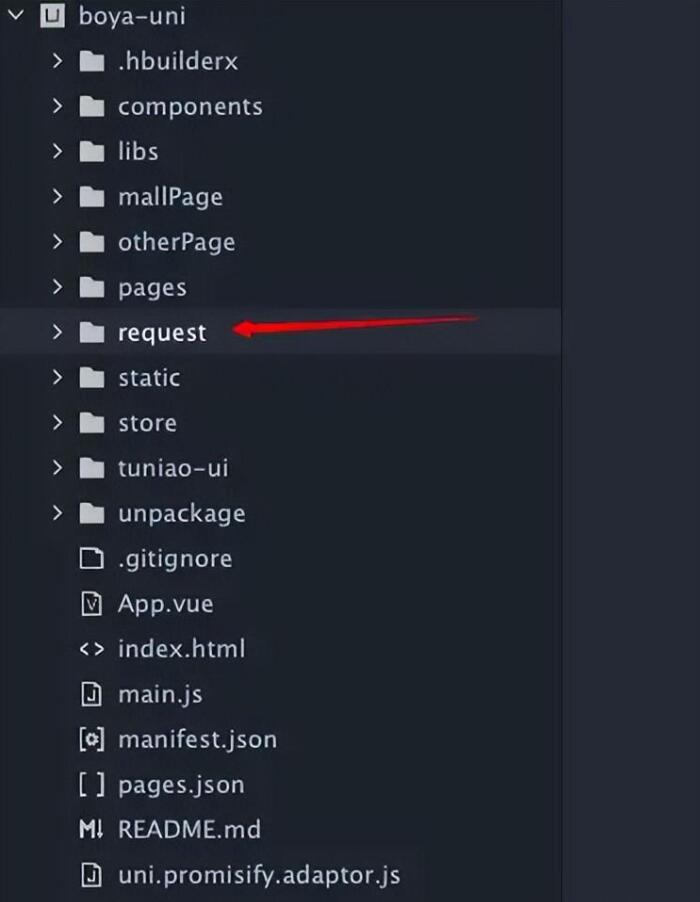
    创建的过程中,会要求我们上传刚才创建的csr文件,上传刚才从本站生成的csr文件,就可以生成cer文件。

    3、创建cer证书成功后,将这个cer证书下载到我们电脑本地。

    4、回到本站(香蕉云编)的控制台,在对应的行里面,上传这个cer文件,就可以生成最终的.p12格式的证书了。

    到这里,p12格式的证书我们已经创建成功了,下面我们来讲述如何生成.mobileprovision描述文件

    1、登录苹果开发者中心控制台,点击Identifiers,点击蓝色加号,创建一个appid,这个appid要跟你在hbuilder打包用的包名一致,假如已经创建,则跳过这一步。

    2、点击profiles,开始创建描述文件,创建的时候选择app store类型,假如你选择的是ad hoc类型,则看第四步。

    3、创建的过程中会要求我们选择第一步创建的appid:。

    4、假如你创建的是ad hoc类型的profile(假如你创建的是app store类型的profile则不需要这一步),则创建过程中,还需要提供测试手机的udid,你可以使用你的iphone手机,打开本站(香蕉云编)的这个获取手机udid的工具,获取手机的udid: https://www.yunedit.com/udid

    到这里,已经介绍完全部的流程,谢谢大家!

  • uni-app跨平台开发app,用Hbuilderx打包安卓应用程序到上架google play 完成l流程

    uni-app跨平台开发app,用Hbuilderx打包安卓应用程序到上架google play 完成l流程

    1 说明

          此文章介绍uni-app跨平台开发时关于安卓的打包到上架的完成流程,同时也会列举在整个过程中的注意事项,阅读文章的前提是是建立在你已经有共可打包的代码和已付费的google play的账号,

    2 uni-app 安卓打包流程

       1  打开项目中manifest.json, 此文件为整个app的配置文件,位于项目的根目录。如下图

    uni-app跨平台开发app,用Hbuilderx打包安卓应用程序到上架google play 完成l流程

     2  对打开左边的选项菜单做简单的介绍,并提供一些注意事项。

         a  基础配置  填写选项信息,appid 是app的唯一标识符至始至终不要去随意改变,应用版本名称和应用版本号在每次正式打包之前的值要比上一个高,否则在上传的时候会出现冲突。

        b  填写即可 , 注意在安卓应用中不要出现有圆角的图标,不然在上架后在手机上会出现黑色填充圆角的情况,如果同一个账号要上传多个app 时图标不能一样,不然审核无法通过。

       c 源码视图  此选项其实就是上选所有选项的代码集合,详细参考https://uniapp.dcloud.io/collocation/manifest

       说明  其他一些选项配置实际上是在开发过程中已经根据需求配置好的,此处省咯,由于google上架时的审核不想ios那么严格,所以一般情况下在完成上面配置和实际开发中的配置都不会存在特别严重的问题,但是涉及到支付时还会涉及到一些其他配置。

    3 点击发行—— 云打包 会出现如下对话框

    uni-app跨平台开发app,用Hbuilderx打包安卓应用程序到上架google play 完成l流程

    关于打包证书的说明, 打包证书可以当前hbuilderx自带的也可以选择自制的,这个不影响上架,区别在于自带的不需要填写任何选项直接编译打包即可,而自制的需要填写当前选项,如果在某些场景下需要app的签名建议使用自制的证书,因为可以直接通过java jdk提供的工具可以从中读取到一个36位的加密字符串的签名.完成上述操作后就可以点击打包了,在打包之前会经过编译的过程,若果代码中出现如document等则会编译失败,因为app不能出现h5的语法,在实际开发注意。

     3  上传

        1  打开https://support.google.com

    uni-app跨平台开发app,用Hbuilderx打包安卓应用程序到上架google play 完成l流程

    2 向下滑动 点击

    uni-app跨平台开发app,用Hbuilderx打包安卓应用程序到上架google play 完成l流程

    3 点击

    uni-app跨平台开发app,用Hbuilderx打包安卓应用程序到上架google play 完成l流程

    4 进入

    uni-app跨平台开发app,用Hbuilderx打包安卓应用程序到上架google play 完成l流程

    5  点击

    uni-app跨平台开发app,用Hbuilderx打包安卓应用程序到上架google play 完成l流程

    说明  最好阅读一下本章内容

    6 点击申请创建

    uni-app跨平台开发app,用Hbuilderx打包安卓应用程序到上架google play 完成l流程6

    7 填写信息 ,注意选择的语言和实际填写的语言,边填写边保存

    uni-app跨平台开发app,用Hbuilderx打包安卓应用程序到上架google play 完成l流程

    8  填写完成后跳转应用发布,箭头所标都是要填写的选项

    uni-app跨平台开发app,用Hbuilderx打包安卓应用程序到上架google play 完成l流程

    说明 如果出现如下报错

    uni-app跨平台开发app,用Hbuilderx打包安卓应用程序到上架google play 完成l流程

    需要修改打包配置文件的

    uni-app跨平台开发app,用Hbuilderx打包安卓应用程序到上架google play 完成l流程

    9  完成上面的配置后 ,直接发布生产版本

    uni-app跨平台开发app,用Hbuilderx打包安卓应用程序到上架google play 完成l流程d

    说明 到此基本上已经完成发布,在发布之前如果出现警告可以忽略,直接发布即可。

    https://www.likecs.com/show-203550407.html

  • uni-app云打包上架谷歌市场

    uni-app云打包上架谷歌市场

    谷歌市场(Google Play)上架的app安装包需要64位,且证书年限需要至少50年以上。要求HBuilderX2.1.5+

    1、修改配置文件

    依次点击“mainifest.json->App常用其他设置->支持CPU类型”,选择上armeabi-v7a、arm64-v8a两个类型。

    对三种类型做一下简单介绍:

    • armeabi-v7a:第7代及以上的ARM处理器(ARM32位),市面上大多数手机使用此CPU类型
    • arm64-v8a:第8代、64位ARM处理器(ARM64位),最近两年新发的设备使用此CPU类型
    • x86:少部分平板使用x86,as模拟器中选了intel x86时也是这种情况。(雷电夜神等三方模拟器模拟的是arm架构,不是x86)

    参考文档:

    Android平台配置支持的CPU类型(64位):https://ask.dcloud.net.cn/article/36195

    2、云打包

    依次点击“发行->原生App-云打包”,在渠道包中选择GooglePlay,生成谷歌可用的64位包,若不勾选或者选择其他渠道包则不能生成符合谷歌的安装包。

    3、等待打包成功生成apk的包即可。

    Google Play 上架

    务必确保将HBulider X升级到3.2.15+版本。离线打包需要将离线打包SDK升级到3.2.15+版本

    App提交云端打包时请务必勾选“GooglePlay(AAB)”渠道

    Google Play上架审核要求比较严格,应用中不能存在以下行为:

    • 不能直接下载apk方式安装应用,需引导用户到Google Play安装
    • 不能存在动态加载代码行为

    uni-app中部分功能模块不符合Google Play审核要求,请仔细阅读下面章节。

    必须适配Android11

    “App常用其它设置”中需要将targetSdkVersion设置值大于等于30

    注意:务必在Android11设备上进行测试,确保应用所有功能可以正常运行

    不能包含安装应用权限

    在App权限配置中不要勾选 android.permission.INSTALL_PACKAGES、android.permission.REQUEST_INSTALL_PACKAGES 权限

    离线打包:

    1. 更新SDK3.2.15+版本
    2. 请查看原生项目中的AndroidManifest.xml。如果包含以下权限请手动删除:
    <uses-permission android:name="android.permission.INSTALL_PACKAGES" />
    <uses-permission android:name="android.permission.REQUEST_INSTALL_PACKAGES" />

    注意:如果使用了uni原生插件,可能会添加安装应用权限,请联系uni原生插件作者确认

    不要使用QQ登录、QQ分享模块

    使用QQ登录、分享功能时,如果当前设备上没有安装QQ应用时,会引导用户下载安装,不符合Google Play的审核要求,因此提交到Google Play时不要勾选QQ登录及QQ分享模块

    离线打包:

    请不要集成qq_mta-sdk-xxx.jar,qq_sdk_vxxx.jar等SDK。如果有请删除

    不要使用国内增强广告SDK

    uni-AD国内增强广告(如穿山甲、广点通、快手等SDK)显示的广告落地页可能会引导用户下载安装apk,不符合Google Play的审核要求,因此提交到Google Play时不要勾选增强广告SDK

    注意:uni-AD 广告基础功能不受影响

    离线打包:

    请不要集成国内增强广告相关依赖库 ks_adsdk-ad.aar、windAd.aar、GDTSDK.unionNormal.aar,open_ad_sdk.aar,torch-adcore-xx.aar。如有请删除

    不要使用X5内核

    腾讯TBS(X5)内核在Android平台解决了很多适配问题(详情可参考:https://ask.dcloud.net.cn/article/36806),但它使用了动态热更新技术,不符合Google Play的审核要求,因此提交Google Play时不要勾选使用“Android X5 Webview(腾讯TBS)”模块

    离线打包:

    请不要集成X5相依赖库webview-x5-release.aar,如有请删除

    其它相关问题

    uni-app 提交 aab 版本到 Google Play 提示 API 级别过低的解决办法

    发现问题
    近日准备发布新版本上架到 Google Play 上时,突然出现了 Change your app’s target API level to at least 31 的提示。

    在查阅相关资料后,得知 新应用必须以 Android 12(API 级别 31)或更高版本为目标平台;Wear OS 应用除外,此类应用必须以 Android 11(API 级别 30)或更高版本为目标平台。自 2023 年 1 月起,应用更新必须以 Android 12 或更高版本为目标平台,并针对 Android 12 中的行为变更进行调整;Wear OS 应用除外,此类应用必须以 Android 11 或更高版本为目标平台。

    详情请看: 符合 Google Play 的目标 API 级别要求 。

    解决问题
    此时只需要将应用配置文件 manifest.json 中的 App常用其他设置 的 targetSdkVersion 设置成 31 ,然后重新提交到云打包,将打包好的 aab 再次去提交到 Google Play 就不会再报错了。

    填好 App 必要信息,提交去审核,大概两个工作日左右就可以上架到 Google Play 了(前提是你的App不违规喔~)。