分类: 技术

  • wordpress 制作api

    wordpress 制作api

    WordPress是一个非常流行的内容管理系统(CMS),被广泛用于博客、新闻网站、电子商务网站等。在Web开发中,API(应用程序接口)是一个非常重要的概念,它可以让不同的应用程序之间进行数据交互。在本文中,我们将讨论如何在WordPress中创建API。

    API的基本原理

    API是应用程序接口的缩写。它是一组定义了不同应用程序之间通信的规则和协议,使得这些应用程序可以相互交互和共享数据。API通常使用标准的Web技术,如HTTP协议和RESTful架构。

    HTTP协议是Web开发中最常用的协议之一。它定义了Web服务器和Web客户端之间的通信方式。RESTful架构则是一种设计Web API的方式,它定义了一组规则和最佳实践,使得Web API可以更加灵活、可扩展和易于维护。

    在RESTful架构中,每个API都是一个资源。资源可以是任何东西,如文章、评论、用户等。每个资源都有一个唯一的标识符(URI),可以通过HTTP请求访问它。HTTP请求可以是GET、POST、PUT、DELETE等。每个请求都对应着一个特定的操作,如获取资源、创建资源、更新资源和删除资源等。

    WordPress API的实现方式

    WordPress是一个基于PHP的CMS,它使用MySQL作为数据库存储数据。在WordPress中,API的实现方式有很多种,如使用插件、使用自定义代码等。下面我们将介绍两种常用的实现方式。

    1. 使用插件

    WordPress社区中有很多插件可以帮助你创建API。其中最流行的插件是WP REST API。这个插件提供了一个RESTful API,可以让你访问WordPress中的所有资源,如文章、页面、分类、标签、评论等。

    WP REST API的安装非常简单。你只需要在WordPress后台中搜索“WP REST API”,然后安装并激活它即可。安装完成后,你可以使用浏览器或者命令行工具来访问API。

    例如,要获取所有文章的列表,你可以使用以下命令:

    curl http://your-site.com/wp-json/wp/v2/posts

    这个命令将返回一个包含所有文章的JSON格式的数据。你可以根据需要自定义API的URL和参数。

    2. 使用自定义代码

    如果你想更加灵活地控制API的行为和数据格式,你可以使用自定义代码来创建API。在WordPress中,你可以使用PHP编写自定义插件或者主题来实现API。

    要创建API,你需要做以下几步:

    – 创建一个自定义路由器来处理API请求

    – 定义API的路由和参数

    – 编写处理API请求的代码

    – 输出API数据

    下面是一个简单的示例,演示如何使用自定义代码创建API:

    // 定义API的路由和参数

    add_action( ‘rest_api_init’, function () {

    register_rest_route( ‘myplugin/v1’, ‘/posts/(?P\d+)’, array(

    ‘methods’ => ‘GET’,

    ‘callback’ => ‘myplugin_get_post’,

    ) );

    } );

    // 处理API请求的代码

    function myplugin_get_post( $request ) {

    $post_id = $request->get_param( ‘id’ );

    $post = get_post( $post_id );

    if ( empty( $post ) ) {

    return new WP_Error( ‘error’, ‘Post not found’, array( ‘status’ => 404 ) );

    }

    $data = array(

    ‘id’ => $post->ID,

    ‘title’ => $post->post_title,

    ‘content’ => $post->post_content,

    );

    return $data;

    }

    // 输出API数据

    function myplugin_rest_output( $data ) {

    if ( is_array( $data ) ) {

    $data = json_encode( $data );

    }

    header( ‘Content-Type: application/json’ );

    echo $data;

    exit;

    }

    在这个示例中,我们创建了一个名为“myplugin”的插件,用于处理API请求。我们定义了一个名为“/posts/(?P\d+)”的路由,用于获取指定ID的文章。我们编写了一个名为“myplugin_get_post”的函数来处理API请求,并返回相应的数据。最后,我们使用“myplugin_rest_output”函数来输出API数据。

    总结

    在本文中,我们介绍了API的基本原理和在WordPress中创建API的两种常用方式。使用插件可以快速地创建API,并提供很多现成的功能和选项。使用自定义代码可以更加灵活地控制API的行为和数据格式。无论你选择哪种方式,都需要遵循RESTful架构的设计原则,并确保API的安全性和可靠性。

  • 织梦dedecms转WordPress方法(脚本一键转换)

    织梦dedecms转WordPress方法(脚本一键转换)

    简介:

    DEDECMS宣布开始对运营类网站收费了,一年5800元,如果不想付费,那就需要转到其他网站程序了,wordpress就是一个不错的选择。最近,大神wordpress果酱牛逼闪闪的Denis和几个程序员制作了一个dedecms转wordpress的插件,有需要的可以去下载使用

    dedecms转wordpress操作

    1、安装好空白全新的 WordPress

    首先要安装好空白全新的 WordPress,不要尝试在现有的 WordPress 中进行导入,虽然我们的程序做了判断,但是不可预知的问题总是可能会发生,所以首先要确保在空白全新的 WordPress 中进行导入操作。

    2、下载 DEDECMS 导入 WordPress 脚本

    下载地址在页尾

    打开下载的 dedecms_to_wordpress.php 文件,修改其中的 DEDECMS 的数据库配置参数:

    // DEDECMS 数据库配置,修改为你自己的
    $cfg_dbhost = ‘localhost’;
    $cfg_dbname = ‘dd’; $cfg_
    dbuser = ‘root’;$cfg_dbpwd = ‘root’;
    $cfg_dbprefix = ‘dd_’;
    $cfg_db_language = ‘gbk’;
    $cfg_db_port = 3306;

    DEDECMS的数据配置参数,可以从DEDECMS的 data/common.inc.php 中获取。

    如果 DEMDECMS 的数据库和 WordPress 的数据库不在同一台服务,并且无法远程连接,则需要把在原来的 DEDECMS 服务器中导出数据库,然后导入到 WordPress 的 MySQL 所在的服务器中。

    3、执行 DEDECMS 导入 WordPress 脚本

    将刚刚修改好的 dedecms_to_wordpress.php 文件上传到刚才全新安装的 WordPress 目录,然后在 SSH 命令行执行下面的命令:

    php dedecms_to_wordpress.php

    执行后后静候迁移完成即可,经过我们实际的测试,4万多篇的文章的 DEDECMS 数据库,迁移花费的时间在1分半内,另外一个测试,近14万多篇文章,也在7分多钟内完成。

    4、固定链接、伪静态

    转换完后,需要在 WordPress 设置固定链接和伪静态,这样转换过来的文章就能正常打开了。

    最后要感谢 wpjam插件开发者 Denis 和众多开发者们的连续熬夜努力,dedecms站长才能免费用上一键转换脚本。

    注意事项:

    首先说明一下,一键迁移脚本是 PHP 命令行脚本,意味着你需要有服务器的 SSH 权限,以便可以ssh登录服务器进行命令行操作。

    为什么这么做呢,因为一般来说使用后台导入会比较久,而使用命令行则飞快,4万多篇文章,使用一键迁移脚本大概仅需1分半就能完成,当然了命令行模式开发比较快一点。

    这个迁移也只是一次性工作,能够顺利快速完成导入工作才是最好的,如果你的服务器没有 SSH 权限,可能要换一下服务器。

    网盘下载地址:?

    这里,我们需要使用下载脚本。

    下载地址:https://pan.baidu.com/s/1a9bPJPCFQvotU8QwsKXq9Q
    提取码:45ah

    同类文章参阅:https://www.banzhuti.com/dedecms-to-wordpress-guide.html

  • 如何通过phpmyadmin数据库中批量替换内容update replace where查询语句使用方法

    如何通过phpmyadmin数据库中批量替换内容update replace where查询语句使用方法

    如何在 WordPress 数据库中一键查找和替换文本

    您是否希望在 WordPress 中进行大规模搜索和替换?无论您是要查找和替换特定文本、URL 还是图像,都可以使用查找和替换 WordPress 插件或简单的 SQL 查询轻松实现。在本文中,我们将向您展示如何在 WordPress 数据库中查找和替换文本。

    我们在修改网站内容或网站更换域名后,有时需要批量修改相同内容,通过网站管理后台去修改可能不太方便,在数据库表中修改将非常方便和快捷。在做批量修改时请先备份下数据库,以免出错
    以下举例说明,将“联系我们”修改成“联系电话”的方法

    方法一:
    1、 进入phpmyadmin,点击搜索,搜索你要替换的内容。在要查找的内容如:联系我们。全选表,在phpmyadmin里面,有很多个表中都有“联系我们”。

    1
    2

    2、 点击其中一个表后面的“浏览”进入,并且找到需替换的内容“联系我们”所在的字段:name。
    3
    4

    3、 进入sql查询界面,并运行以下的MySQL语句:

    5

    笔者尝试过,不行:但下面的语句可以:

    UPDATE table_name SET column_name = REPLACE(column_name, ‘old_keyword’, ‘new_keyword’);

    如下实例:

    UPDATE zbp_post SET log_Content = REPLACE(log_Content, '原内容', '新内容' ) ;

    UPDATE mac_vod SET vod_play_url = REPLACE(vod_play_url, ‘https://cdn.wls911.com:777/’, ‘https://cdn.wlcdn99.com:777/’ ) ;

    当先查询那个表有需要替换的关键词,还是得用上面的方法来查找;

    相关链接文章参考:https://www.ldhost.cn/jc/mysql/409.html

  • Android 权限汇总大全

    Android 权限汇总大全

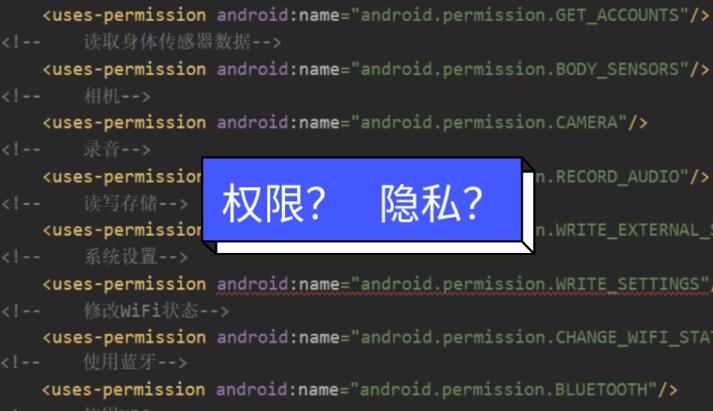
    权限 名称 描述

    android.permission.ACCESS_CHECKIN_PROPERTIES 访问登记属性 读取或写入登记check-in数据库属性表的权限

    android.permission.ACCESS_COARSE_LOCATION 获取错略位置 通过WiFi或移动基站的方式获取用户错略的经纬度信息,定位精度大概误差在30~1500米

    android.permission.ACCESS_FINE_LOCATION 获取精确位置 通过GPS芯片接收卫星的定位信息,定位精度达10米以内

    android.permission.ACCESS_LOCATION_EXTRA_COMMANDS 访问定位额外命令 允许程序访问额外的定位提供者指令

    android.permission.ACCESS_MOCK_LOCATION 获取模拟定位信息 获取模拟定位信息,一般用于帮助开发者调试应用

    android.permission.ACCESS_NETWORK_STATE 获取网络状态 获取网络信息状态,如当前的网络连接是否有效

    android.permission.ACCESS_SURFACE_FLINGER 访问Surface Flinger Android平台上底层的图形显示支持,一般用于游戏或照相机预览界面和底层模式的屏幕截图

    android.permission.ACCESS_WIFI_STATE 获取WiFi状态 获取当前WiFi接入的状态以及WLAN热点的信息

    android.permission.ACCOUNT_MANAGER 账户管理 获取账户验证信息,主要为GMail账户信息,只有系统级进程才能访问的权限

    android.permission.AUTHENTICATE_ACCOUNTS 验证账户 允许一个程序通过账户验证方式访问账户管理ACCOUNT_MANAGER相关信息

    android.permission.BATTERY_STATS 电量统计 获取电池电量统计信息

    android.permission.BIND_APPWIDGET 绑定小插件 允许一个程序告诉appWidget服务需要访问小插件的数据库,只有非常少的应用才用到此权限

    android.permission.BIND_DEVICE_ADMIN 绑定设备管理 请求系统管理员接收者receiver,只有系统才能使用

    android.permission.BIND_INPUT_METHOD 绑定输入法 请求InputMethodService服务,只有系统才能使用

    android.permission.BIND_REMOTEVIEWS 绑定RemoteView 必须通过RemoteViewsService服务来请求,只有系统才能用

    android.permission.BIND_WALLPAPER 绑定壁纸 必须通过WallpaperService服务来请求,只有系统才能用

    android.permission.BLUETOOTH 使用蓝牙 允许程序连接配对过的蓝牙设备

    android.permission.BLUETOOTH_ADMIN 蓝牙管理 允许程序进行发现和配对新的蓝牙设备

    android.permission.BRICK 变成砖头 能够禁用手机,非常危险,顾名思义就是让手机变成砖头

    android.permission.BROADCAST_PACKAGE_REMOVED 应用删除时广播 当一个应用在删除时触发一个广播

    android.permission.BROADCAST_SMS 收到短信时广播 当收到短信时触发一个广播

    android.permission.BROADCAST_STICKY 连续广播 允许一个程序收到广播后快速收到下一个广播

    android.permission.BROADCAST_WAP_PUSH WAP PUSH广播 WAP PUSH服务收到后触发一个广播

    android.permission.CALL_PHONE 拨打电话 允许程序从非系统拨号器里输入电话号码

    android.permission.CALL_PRIVILEGED 通话权限 允许程序拨打电话,替换系统的拨号器界面

    android.permission.CAMERA 拍照权限 允许访问摄像头进行拍照

    android.permission.CHANGE_COMPONENT_ENABLED_STATE 改变组件状态 改变组件是否启用状态

    android.permission.CHANGE_CONFIGURATION 改变配置 允许当前应用改变配置,如定位

    android.permission.CHANGE_NETWORK_STATE 改变网络状态 改变网络状态如是否能联网

    android.permission.CHANGE_WIFI_MULTICAST_STATE 改变WiFi多播状态 改变WiFi多播状态

    android.permission.CHANGE_WIFI_STATE 改变WiFi状态 改变WiFi状态

    android.permission.CLEAR_APP_CACHE 清除应用缓存 清除应用缓存

    android.permission.CLEAR_APP_USER_DATA 清除用户数据 清除应用的用户数据

    android.permission.CWJ_GROUP 底层访问权限 允许CWJ账户组访问底层信息

    android.permission.CELL_PHONE_MASTER_EX 手机优化大师扩展权限 手机优化大师扩展权限

    android.permission.CONTROL_LOCATION_UPDATES 控制定位更新 允许获得移动网络定位信息改变

    android.permission.DELETE_CACHE_FILES 删除缓存文件 允许应用删除缓存文件

    android.permission.DELETE_PACKAGES 删除应用 允许程序删除应用

    android.permission.DEVICE_POWER 电源管理 允许访问底层电源管理

    android.permission.DIAGNOSTIC 应用诊断 允许程序到RW到诊断资源

    android.permission.DISABLE_KEYGUARD 禁用键盘锁 允许程序禁用键盘锁

    android.permission.DUMP 转存系统信息 允许程序获取系统dump信息从系统服务

    android.permission.EXPAND_STATUS_BAR 状态栏控制 允许程序扩展或收缩状态栏

    android.permission.FACTORY_TEST 工厂测试模式 允许程序运行工厂测试模式

    android.permission.FLASHLIGHT 使用闪光灯 允许访问闪光灯

    android.permission.FORCE_BACK 强制后退 允许程序强制使用back后退按键,无论Activity是否在顶层

    android.permission.GET_ACCOUNTS 访问账户Gmail列表 访问GMail账户列表

    android.permission.GET_PACKAGE_SIZE 获取应用大小 获取应用的文件大小

    android.permission.GET_TASKS 获取任务信息 允许程序获取当前或最近运行的应用

    android.permission.GLOBAL_SEARCH 允许全局搜索 允许程序使用全局搜索功能

    android.permission.HARDWARE_TEST 硬件测试 访问硬件辅助设备,用于硬件测试

    android.permission.INJECT_EVENTS 注射事件 允许访问本程序的底层事件,获取按键、轨迹球的事件流

    android.permission.INSTALL_LOCATION_PROVIDER 安装定位提供 安装定位提供

    android.permission.INSTALL_PACKAGES 安装应用程序 允许程序安装应用

    android.permission.INTERNAL_SYSTEM_WINDOW 内部系统窗口 允许程序打开内部窗口,不对第三方应用程序开放此权限

    android.permission.INTERNET 访问网络 访问网络连接,可能产生GPRS流量

    android.permission.KILL_BACKGROUND_PROCESSES 结束后台进程 允许程序调用killBackgroundProcesses(String).方法结束后台进程

    android.permission.MANAGE_ACCOUNTS 管理账户 允许程序管理AccountManager中的账户列表

    android.permission.MANAGE_APP_TOKENS 管理程序引用 管理创建、摧毁、Z轴顺序,仅用于系统

    android.permission.MTWEAK_USER 高级权限 允许mTweak用户访问高级系统权限

    android.permission.MTWEAK_FORUM 社区权限 允许使用mTweak社区权限

    android.permission.MASTER_CLEAR 软格式化 允许程序执行软格式化,删除系统配置信息

    android.permission.MODIFY_AUDIO_SETTINGS 修改声音设置 修改声音设置信息

    android.permission.MODIFY_PHONE_STATE 修改电话状态 修改电话状态,如飞行模式,但不包含替换系统拨号器界面

    android.permission.MOUNT_FORMAT_FILESYSTEMS 格式化文件系统 格式化可移动文件系统,比如格式化清空SD卡

    android.permission.MOUNT_UNMOUNT_FILESYSTEMS 挂载文件系统 挂载、反挂载外部文件系统

    android.permission.NFC 允许NFC通讯 允许程序执行NFC近距离通讯操作,用于移动支持

    android.permission.PERSISTENT_ACTIVITY 永久Activity 创建一个永久的Activity,该功能标记为将来将被移除

    android.permission.PROCESS_OUTGOING_CALLS 处理拨出电话 允许程序监视,修改或放弃播出电话

    android.permission.READ_CALENDAR 读取日程提醒 允许程序读取用户的日程信息

    android.permission.READ_CONTACTS 读取联系人 允许应用访问联系人通讯录信息

    android.permission.READ_FRAME_BUFFER 屏幕截图 读取帧缓存用于屏幕截图

    com.android.browser.permission.READ_HISTORY_BOOKMARKS 读取收藏夹和历史记录 读取浏览器收藏夹和历史记录

    android.permission.READ_INPUT_STATE 读取输入状态 读取当前键的输入状态,仅用于系统

    android.permission.READ_LOGS 读取系统日志 读取系统底层日志

    android.permission.READ_PHONE_STATE 读取电话状态 访问电话状态

    android.permission.READ_SMS 读取短信内容 读取短信内容

    android.permission.READ_SYNC_SETTINGS 读取同步设置 读取同步设置,读取Google在线同步设置

    android.permission.READ_SYNC_STATS 读取同步状态 读取同步状态,获得Google在线同步状态

    android.permission.REBOOT 重启设备 允许程序重新启动设备

    android.permission.RECEIVE_BOOT_COMPLETED 开机自动允许 允许程序开机自动运行

    android.permission.RECEIVE_MMS 接收彩信 接收彩信

    android.permission.RECEIVE_SMS 接收短信 接收短信

    android.permission.RECEIVE_WAP_PUSH 接收Wap Push 接收WAP PUSH信息

    android.permission.RECORD_AUDIO 录音 录制声音通过手机或耳机的麦克

    android.permission.REORDER_TASKS 排序系统任务 重新排序系统Z轴运行中的任务

    android.permission.RESTART_PACKAGES 结束系统任务 结束任务通过restartPackage(String)方法,该方式将在外来放弃

    android.permission.SEND_SMS 发送短信 发送短信

    android.permission.SET_ACTIVITY_WATCHER 设置Activity观察其 设置Activity观察器一般用于monkey测试

    com.android.alarm.permission.SET_ALARM 设置闹铃提醒 设置闹铃提醒

    android.permission.SET_ALWAYS_FINISH 设置总是退出 设置程序在后台是否总是退出

    android.permission.SET_ANIMATION_SCALE 设置动画缩放 设置全局动画缩放

    android.permission.SET_DEBUG_APP 设置调试程序 设置调试程序,一般用于开发

    android.permission.SET_ORIENTATION 设置屏幕方向 设置屏幕方向为横屏或标准方式显示,不用于普通应用

    android.permission.SET_PREFERRED_APPLICATIONS 设置应用参数 设置应用的参数,已不再工作具体查看addPackageToPreferred(String)介绍

    android.permission.SET_PROCESS_LIMIT 设置进程限制 允许程序设置最大的进程数量的限制

    android.permission.SET_TIME 设置系统时间 设置系统时间

    android.permission.SET_TIME_ZONE 设置系统时区 设置系统时区

    android.permission.SET_WALLPAPER 设置桌面壁纸 设置桌面壁纸

    android.permission.SET_WALLPAPER_HINTS 设置壁纸建议 设置壁纸建议

    android.permission.SIGNAL_PERSISTENT_PROCESSES 发送永久进程信号 发送一个永久的进程信号

    android.permission.STATUS_BAR 状态栏控制 允许程序打开、关闭、禁用状态栏

    android.permission.SUBSCRIBED_FEEDS_READ 访问订阅内容 访问订阅信息的数据库

    android.permission.SUBSCRIBED_FEEDS_WRITE 写入订阅内容 写入或修改订阅内容的数据库

    android.permission.SYSTEM_ALERT_WINDOW 显示系统窗口 显示系统窗口

    android.permission.UPDATE_DEVICE_STATS 更新设备状态 更新设备状态

    android.permission.USE_CREDENTIALS 使用证书 允许程序请求验证从AccountManager

    android.permission.USE_SIP 使用SIP视频 允许程序使用SIP视频服务

    android.permission.VIBRATE 使用振动 允许振动

    android.permission.WAKE_LOCK 唤醒锁定 允许程序在手机屏幕关闭后后台进程仍然运行

    android.permission.WRITE_APN_SETTINGS 写入GPRS接入点设置 写入网络GPRS接入点设置

    android.permission.WRITE_CALENDAR 写入日程提醒 写入日程,但不可读取

    android.permission.WRITE_CONTACTS 写入联系人 写入联系人,但不可读取

    android.permission.WRITE_EXTERNAL_STORAGE 写入外部存储 允许程序写入外部存储,如SD卡上写文件

    android.permission.WRITE_GSERVICES 写入Google地图数据 允许程序写入Google Map服务数据

    com.android.browser.permission.WRITE_HISTORY_BOOKMARKS 写入收藏夹和历史记录 写入浏览器历史记录或收藏夹,但不可读取

    android.permission.WRITE_SECURE_SETTINGS 读写系统敏感设置 允许程序读写系统安全敏感的设置项

    android.permission.WRITE_SETTINGS 读写系统设置 允许读写系统设置项

    android.permission.WRITE_SMS 编写短信 允许编写短信
    ————————————————

    安卓权限其他说明链接:

    http://www.xbhp.cn/news/18639.html Android 权限(一):权限大全

    https://blog.csdn.net/gmaaa123/article/details/125796434 安卓操作系统应用权限列表与使用情况说明

    https://www.zhihu.com/tardis/bd/art/513442336?source_id=1001 Android 权限(烂笔头好过好记性)

  • uniapp怎么挂第三方的广告

    uniapp怎么挂第三方的广告

    1、首先,在uniapp中挂载第三方广告,需要在项目中引入第三方广告SDK,比如穿山甲、百度移动联盟等;

    2、然后,在项目中创建一个文件夹,用来存放第三方广告SDK,并在项目中引入SDK;

    3、接着,在项目中创建一个文件夹,用来存放第三方广告代码,并在项目中引入代码;

    4、最后,在项目中添加第三方广告代码,并在项目中调用第三方广告代码,实现第三方广告的挂载。

  • Vue 项目中实现的微信、微博、QQ空间分享功能(亲测有效)

    Vue 项目中实现的微信、微博、QQ空间分享功能(亲测有效)

    需求:文章添加分享功能(包括微信、微博、QQ空间)

    话不多说直接代码(可以封装成组件)

    <template>
      <div class="shareBox">
        分享到:
        <span class="hover-pointer" @click="shareToMicroblog()">
          <img src="@/assets/img/weibo.png" alt="" />
        </span>
        <span class="qqIcon hover-pointer" @click="shareToQQRom()">
          <img src="@/assets/img/QQKJ.png" alt="" />
        </span>
        <span class="hover-pointer" @click="shareToWeChat()">
          <img src="@/assets/img/weixin.png" alt="" />
        </span>
      </div>
    </template>
     
    <script>
    export default {
      props: ["sysInfo"],  //父组件传过来的文章数据
      data() {
        return {
          shareUrl: location.href,
        };
      },
      methods: {
        /**
         * 分享到微博
         */
        shareToMicroblog() {
          //跳转地址
          window.open(
            "https://service.weibo.com/share/share.php?url=" +
              encodeURIComponent(this.shareUrl) +
              "&title=" +
              this.sysInfo
          );
        },
        /**
         * 分享到qq空间
         */
        shareToQQRom() {
          //跳转地址
          window.open(
            "https://sns.qzone.qq.com/cgi-bin/qzshare/cgi_qzshare_onekey?url=" +
              encodeURIComponent(this.shareUrl) +
              "&title=" +
              this.sysInfo +
              "&summary=" +
              this.sysInfo
          );
        },
        /**
         * 分享到微信:需要单独画页面
         */
        shareToWeChat() {
          localStorage.setItem("shareUrl", this.shareUrl); // 存储当前页面地址,前端页面直接根据URL链接生成二维码
          let url = location.href.split("#")[0] + "#/Share/toWechat"; // 注意:#/Share/toWechat: 自己定义的路由
          window.open(url);
        },
      },
    };
    </script>
     
    <style lang="scss" scoped>
    .shareBox {
      .iconfont {
        font-size: 22px !important;
      }
      .qqIcon {
        display: inline-block;
        margin: 0 10px;
      }
    }
    </style>


    注意:

    1.微信分享需要加另外画页面 加前端页面根据URL链接生成二维码功能

    参考:Vue中qrcode的使用方法(生成二维码插件) / 前端页面根据URL链接生成二维码 – 微微一笑绝绝子 – 博客园 (cnblogs.com)

    2.橙色字体需要换成你自己定义的变量(包括图片 路由 props中的值 )

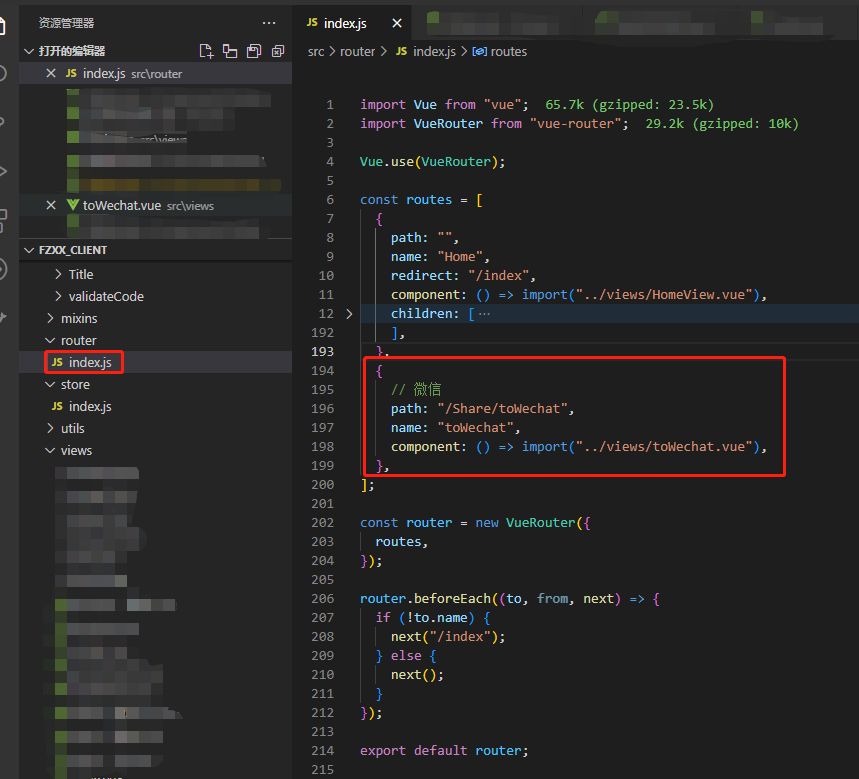
    3.注意微信分享页面的路由设置,最好放在根路由中 (如下图 )并同步到代码中

  • 安卓集成Google Play支付(谷歌支付)最新版本

    安卓集成Google Play支付(谷歌支付)最新版本

    Google Play 支付文档:https://developer.android.com/google/play/billing/integrate

    Google Play 支付库已经升级到5.0了,相对之前的版本有不少的变化,现在记录下!

    接入Google Play 流程还是和之前一样:

    1.去Google console 申请开发者账号  https://play.google.com/console/  

    2.创建项目,上传APK

    3.去Google console项目后台开始设置商品:点击左侧Products—->In-app products(内购商品)或者Subscription(订阅商品)

     4.等Google Pay Console 后台创建好商品后,客户端和后端就可以开始集成了:

      4.1:将 Google Play 结算库依赖项添加到应用的

    dependencies {val billing_version = "5.0.0"implementation("com.android.billingclient:billing:$billing_version")
    }

    4.2:初始化支付SDK(也就是初始化BillingClient):支付过程中BillingClient用的比较多,一般项目中只创建一个BillingClient

    private BillingClient billingClient = BillingClient.newBuilder(context).setListener(purchasesUpdatedListener).enablePendingPurchases().build();

    初始化的时候需要一个:PurchasesUpdatedListener,PurchasesUpdatedListener是监听应用中所有购买交易的更新,这个listener非常重要,当用户购买或者订阅后都会走这个回调

    private PurchasesUpdatedListener purchasesUpdatedListener = new PurchasesUpdatedListener() {@Overridepublic void onPurchasesUpdated(BillingResult billingResult, List<Purchase> purchases) {// To be implemented in a later section.}
    };

    4.3初始化SDK后,需要与 Google Play 建立连接,使用startConnection()方法,startConnection是异步进行,这个时候需要一个BillingClientStateListener进行回调连接的结果,当连接完成会走onBillingSetupFinished()回调,通过返回的billingResult.getResponseCode()去判断是否真正的链接成功,这个code 有下面几个值,这个BillingClientStateListener还有一个Google Play 失去连接的回调,这个时候我们需要实现重试逻辑,就是再次调用startConnection()函数。

        @Retention(RetentionPolicy.SOURCE)public @interface BillingResponseCode {int SERVICE_TIMEOUT = -3;int FEATURE_NOT_SUPPORTED = -2;int SERVICE_DISCONNECTED = -1;int OK = 0;int USER_CANCELED = 1;int SERVICE_UNAVAILABLE = 2;int BILLING_UNAVAILABLE = 3;int ITEM_UNAVAILABLE = 4;int DEVELOPER_ERROR = 5;int ERROR = 6;int ITEM_ALREADY_OWNED = 7;int ITEM_NOT_OWNED = 8;}
      public void startConnection() {mBillingClient.startConnection(new BillingClientStateListener() {@Overridepublic void onBillingSetupFinished(BillingResult billingResult) {if (billingResult.getResponseCode() == BillingClient.BillingResponseCode.OK) {// The BillingClient is ready. You can query purchases here.queryProductDetailsParams();queryOldOrder();}}@Overridepublic void onBillingServiceDisconnected() {// Try to restart the connection on the next request to// Google Play by calling the startConnection() method.}});}

     4.4 获取商品

          当startConnection()回调成功时,这个时候我们就可以根据ProductId去Google Play获取具体的商品了,这个时候一般会通过API去自己的Server 获取一个ProductIdList,然后根据后台返回的productId去Google Play 获取商品详情。

    查询内购的商品:

      List<String> skuList = new ArrayList<>();skuList.add("ProductId01");skuList.add("ProductId02");skuList.add("ProductId03");skuList.add("ProductId04");SkuDetailsParams.Builder params = SkuDetailsParams.newBuilder();params.setSkusList(skuList).setType(BillingClient.SkuType.INAPP);mBillingClient.querySkuDetailsAsync(params.build(), new SkuDetailsResponseListener() {@Overridepublic void onSkuDetailsResponse(BillingResult billingResult, List<SkuDetails> skuDetailsList) {// Process the result.Log.i(TAG, "querySkuDetailsAsync 1 onSkuDetailsResponse billingResult.getResponseCode : " + billingResult.getResponseCode() + " skuDetailsList :" + skuDetailsList);mInAppSkuDetailsHashMap.clear();if (skuDetailsList != null && skuDetailsList.size() > 0) {for (SkuDetails skuDetails : skuDetailsList) {mInAppSkuDetailsHashMap.put(skuDetails.getSku(), skuDetails);}}}});

    查询订阅的商品:

     // The BillingClient is ready. You can query purchases here.List<String> subscribeSkuList = new ArrayList<>();subscribeSkuList.add("Subscribe01");subscribeSkuList.add("Subscribe01");subscribeSkuList.add("Subscribe01");SkuDetailsParams.Builder subscribeParams = SkuDetailsParams.newBuilder();subscribeParams.setSkusList(subscribeSkuList).setType(BillingClient.SkuType.SUBS);mBillingClient.querySkuDetailsAsync(subscribeParams.build(), new SkuDetailsResponseListener() {@Overridepublic void onSkuDetailsResponse(BillingResult billingResult, List<SkuDetails> skuDetailsList) {// Process the result.Log.i(TAG, "querySkuDetailsAsync 2 onSkuDetailsResponse billingResult.getResponseCode : " + billingResult.getResponseCode() + " skuDetailsList :" + skuDetailsList);mSubscribeSkuDetailsHashMap.clear();if (skuDetailsList != null && skuDetailsList.size() > 0) {for (SkuDetails skuDetails : skuDetailsList) {mSubscribeSkuDetailsHashMap.put(skuDetails.getSku(), skuDetails);}}}});

    当商品查询成功后就可以结合Server返回的商品信息给用户展示商品列表了

    注意:有些 Android 设备安装的可能是旧版 Google Play 商店应用,不支持订阅等某些商品类型。在您的应用进入结算流程之前,您可以调用 isFeatureSupported() 以确定设备是否支持您要销售的商品。如需查看可支持的商品类型的列表,请参阅 BillingClient.FeatureType。

    4.5.启动购买流程(开始购买)

       当用户点击某个商品时,从应用发起购买请求,请从应用的主线程调用 launchBillingFlow() 方法。此方法接受对 BillingFlowParams 对象的引用,该对象包含通过调用 queryProductDetailsAsync() 获取的相关 ProductDetails 对象。如需创建 BillingFlowParams 对象,请使用 BillingFlowParams.Builder 类。

    购买内购的商品:

        public void buyInAppProduct(SkuDetails skuDetails) {if (skuDetails == null) {return;}BillingFlowParams billingFlowParams = BillingFlowParams.newBuilder().setSkuDetails(skuDetails).build();mBillingClient.launchBillingFlow(ActivityUtils.getTopActivity(), billingFlowParams).getResponseCode();}

    购买订阅的商品:

      public void buySubscribeProduct(SkuDetails skuDetails) {if (skuDetails == null) {return;}BillingFlowParams billingFlowParams = BillingFlowParams.newBuilder().setSkuDetails(skuDetails).build();mBillingClient.launchBillingFlow(ActivityUtils.getTopActivity(), billingFlowParams).getResponseCode();}
    // An activity reference from which the billing flow will be launched.
    Activity activity = ...;ImmutableList productDetailsParamsList =ImmutableList.of(ProductDetailsParams.newBuilder()// retrieve a value for "productDetails" by calling queryProductDetailsAsync().setProductDetails(productDetails)// to get an offer token, call ProductDetails.getSubscriptionOfferDetails()// for a list of offers that are available to the user.setOfferToken(selectedOfferToken).build());BillingFlowParams billingFlowParams = BillingFlowParams.newBuilder().setProductDetailsParamsList(productDetailsParamsList).build();// Launch the billing flow
    BillingResult billingResult = billingClient.launchBillingFlow(activity, billingFlowParams);

    4.6购买成功的回调

     在咱们4.2初始化SDK的时候添加了一个PurchasesUpdatedListener,当用户购买成功后Google Play 会调用 onPurchasesUpdated(),我们根据responseCode去区分用户购买成功与否.

    如果成功购买商品,系统还会生成一个token,它是一个唯一标识符,表示用户及其所购应用内商品的商品 ID。可以在本地存储token,可以将令牌传递到安全的后端服务器(推荐用该方法)

        private PurchasesUpdatedListener purchasesUpdatedListener = new PurchasesUpdatedListener() {@Overridepublic void onPurchasesUpdated(BillingResult billingResult, List<Purchase> purchases) {if (billingResult == null) {return;}int responseCode = billingResult.getResponseCode();switch (responseCode) {case BillingClient.BillingResponseCode.OK:for (Purchase purchase : purchases) {SkuDetails skuDetails = null;String json = purchase.getOriginalJson();if (!TextUtils.isEmpty(json)) {PurchaseData purchaseData = GsonConverter.fromJson(json, PurchaseData.class);if (purchaseData != null) {skuDetails = getSkuDetailsDependProductId(purchaseData.getProductId());}}handlePurchase(purchase, (skuDetails != null && (BillingClient.SkuType.SUBS.equals(skuDetails.getType()))), "onPurchasesUpdated");}break;case BillingClient.BillingResponseCode.USER_CANCELED:Log.i(TAG, "purchasesUpdatedListener 3 user cancel ");break;default:Log.i(TAG, "purchasesUpdatedListener 4 error  " + responseCode);break;}}};
    @Override
    void onPurchasesUpdated(BillingResult billingResult, List<Purchase> purchases) {if (billingResult.getResponseCode() == BillingResponseCode.OK&& purchases != null) {for (Purchase purchase : purchases) {handlePurchase(purchase);}} else if (billingResult.getResponseCode() == BillingResponseCode.USER_CANCELED) {// Handle an error caused by a user cancelling the purchase flow.} else {// Handle any other error codes.}
    }

    4.7.处理购买交易(消费订单)

    当用户购买成功后,订单必须消费,如果不消费,三天后Google会自动退款,撤销购买交易。
    消费内购的商品:

    void handlePurchase(Purchase purchase) {// Purchase retrieved from BillingClient#queryPurchasesAsync or your PurchasesUpdatedListener.Purchase purchase = ...;// Verify the purchase.// Ensure entitlement was not already granted for this purchaseToken.// Grant entitlement to the user.ConsumeParams consumeParams =ConsumeParams.newBuilder().setPurchaseToken(purchase.getPurchaseToken()).build();ConsumeResponseListener listener = new ConsumeResponseListener() {@Overridepublic void onConsumeResponse(BillingResult billingResult, String purchaseToken) {if (billingResult.getResponseCode() == BillingResponseCode.OK) {// Handle the success of the consume operation.}}};billingClient.consumeAsync(consumeParams, listener);
    }

      消费订阅商品:订阅的处理方式与非消耗型商品类似。您可以使用 Google Play 结算库中的 BillingClient.acknowledgePurchase() 或 Google Play Developer API 中的 Purchases.Subscriptions.Acknowledge 确认订阅。所有初始订阅购买交易都需要确认。订阅续订不需要确认

    BillingClient client = ...
    AcknowledgePurchaseResponseListener acknowledgePurchaseResponseListener = ...void handlePurchase(Purchase purchase) {if (purchase.getPurchaseState() == PurchaseState.PURCHASED) {if (!purchase.isAcknowledged()) {AcknowledgePurchaseParams acknowledgePurchaseParams =AcknowledgePurchaseParams.newBuilder().setPurchaseToken(purchase.getPurchaseToken()).build();client.acknowledgePurchase(acknowledgePurchaseParams, acknowledgePurchaseResponseListener);}}
    }

    4.8 查询历史订单,消费待处理的交易

        public void queryOldOrder() {mBillingClient.queryPurchasesAsync(BillingClient.SkuType.INAPP, new PurchasesResponseListener() {@Overridepublic void onQueryPurchasesResponse(@NonNull BillingResult billingResult, @NonNull List<Purchase> list) {if (billingResult.getResponseCode() == BillingClient.BillingResponseCode.OK) {onHandlerQueryPurchases(list, false);}}});mBillingClient.queryPurchasesAsync(BillingClient.SkuType.SUBS, new PurchasesResponseListener() {@Overridepublic void onQueryPurchasesResponse(@NonNull BillingResult billingResult, @NonNull List<Purchase> list) {if (billingResult.getResponseCode() == BillingClient.BillingResponseCode.OK) {onHandlerQueryPurchases(list, true);}}});

    4.9 处理多件购买交易:

    Google Play 允许客户在一笔交易中购买多件相同的应用内商品,只需在购物车中指定商品数量即可(4.0 及更高版本的 Google Play 结算库支持该功能)。应用应根据指定购买数量来处理多件购买并授予权利。注意:多件购买适用于消耗型应用内商品,即可以购买、消耗及再次购买的产品。请勿为不支持重复购买的商品启用该功能。

    为了实现多件购买,应用的配置逻辑需要检查商品数量。可以从以下 API 访问 quantity 字段:

    • Google Play 结算库中的 getQuantity()。
    • Google Play Developer API 中的 Purchases.products.quantity。

    添加用于处理多件购买的逻辑后,需要在 Google Play 管理中心的应用内商品管理页面上为相应的商品启用多件购买功能。

    注意:请确保应用接受多件购买,然后再在 Play 管理中心启用该功能。您能需要强制更新到提供支持的应用版本,然后才能对商品启用该功能。

  • 阿里云磁盘在线扩容后宝塔面板无法正确显示容量

    阿里云磁盘在线扩容后宝塔面板无法正确显示容量

    阿里云磁盘在线扩容后宝塔面板无法正确显示容量【主要看最下方的阿里云ECS连接,查看官方文档】

    阿里云的服务器 硬盘升配后。宝塔面板 硬盘数值 如何改成新的?

    阿里云服务器扩容后,登陆宝塔面板发现磁盘容量没有变化,解决办法。

    在服务器进行操作前首先做好快照或者重要数据备份以防在硬盘扩容时出现意外导致数据丢失

    首先在阿里云那边在线拓容磁盘之后,【注意不是新购一个磁盘,新购磁盘的话看这篇文章 阿里云磁盘挂载】需要先检查磁盘容量是否正确

    (在线扩容后的容量,扩容部分只是增加了物理容量,分区和文件系统还不能使用)

    查看磁盘实际大小

    运行 fdisk -l 命令查看磁盘实际大小。

    [root@admin]# fdisk -l
    Disk /dev/vda: 107.4 GB, 107374182400 bytes, 209715200 sectorsUnits = sectors of 1 * 512512 = 512 bytesSector size (logical/physical): 512 bytes / 512 bytesI/O size (minimum/optimal): 512 bytes / 512 bytesDisk label type: dosDisk identifier: 0x0008de3eDevice Boot      Start         End      Blocks   Id  System/dev/vda1   *        2048   209715166   104856559+  83  Linux 

    结果说明:磁盘(/dev/vda)实际大小为:100 多G,说明磁盘是真的给你装上了,如果这里跟你购买容量不对的话先重启服务器吧

    查看磁盘分配大小

    运行 df -h 命令查看磁盘分配大小。

    [root@admin]# df -hFilesystem      Size  Used Avail Use% Mounted ondevtmpfs        2.0G     0  2.0G   0% /devtmpfs           2.0G     0  2.0G   0% /dev/shmtmpfs           2.0G  8.5M  2.0G   1% /runtmpfs           2.0G     0  2.0G   0% /sys/fs/cgroup/dev/vda1        25G   17G   78G  68% /tmpfs           395M     0  395M   0% /run/user/0磁盘(/dev/vda1)容量是25G

    第一列Filesystem,磁盘分区

    第二列Size,磁盘分区的大小

    第三列Used,已使用的空间

    第四列Avail,可用的空间

    第五列Use%,已使用的百分比

    第六列Mounted on,挂载点

    安装growpart工具和resize2fs工具

    growpart 是磁盘分区扩容工具

    resize2fs 是扩容文件系统工具

    [root@admin]# yum install -y cloud-utils-growpart

    自适应分区扩容

    运行 growpart 命令,调用 growpart 为需要扩容分区扩容。

    growpart /dev/vda 1 ,表示为系统盘的第一个分区(/dev/vda1)扩容。

    [root@admin]# growpart /dev/vda 1CHANGED: partition=1 start=2048 old: size=52424704 end=52426752 new: size=209713119 end=209715167

    若运行命令后报以下错误,您可以运行LANG=en_US.UTF-8切换ECS实例的字符编码类型,后运行 growpart 命令。

    [root@admin]# growpart /dev/vda 1unexpected output in sfdisk –version [sfdisk,来自 util-linux 2.23.2][root@admin]# LANG=en_US.UTF-8

    扩容重设分区文件系统

    运行 resize2fs 命令调用 resize2fs 扩容文件系统。

    [root@admin]# resize2fs /dev/vda1resize2fs 1.42.9 (28-Dec-2013)Filesystem at /dev/vda1 is mounted on /; on-line resizing requiredold_desc_blocks = 2, new_desc_blocks = 7The filesystem on /dev/vda1 is now 26214139 blocks long.

    备注:
    ***如果您使用的是xfs文件系统,运行xfs_growfs /dev/vda1命令扩容文件系统。
    文件系统检查命令:

    [root@A ~]# blkid /dev/vda1/dev/vda1: UUID="deaab0e3-129e-4c09-86a4-e62d873ae4c0" TYPE="ext4" 

    再次查看磁盘分区大小

    可以看到分区(/dev/vda1)容量已经是100G,表示已经成功扩容。

    [root@admin]# df -h Filesystem      Size  Used Avail Use% Mounted on devtmpfs        2.0G     0  2.0G   0% /dev tmpfs           2.0G     0  2.0G   0% /dev/shm tmpfs           2.0G  8.5M  2.0G   1% /run tmpfs           2.0G     0  2.0G   0% /sys/fs/cgroup /dev/vda1        99G   17G   78G  18% / tmpfs           395M     0  395M   0% /run/user/0

    重启宝塔面板,或者在浏览器面板执行重启面板

    bt 1

    宝塔面板不显示新挂的磁盘或数据盘,如何解决?

    刚开始购买的云服务器选择的是40G的硬盘,后买由于数据量偏大,在服务器上新挂了一块100G的磁盘,但是宝塔面板还是无法显示,新购买的磁盘还是不能用,怎么解决?

    下面给您分享一下方法。

    用putty连接服务器,或者使用其他工具连接也行,只要是 ssh链接服务器就行,连接成功后执行下面命令: yum install wget -y && wget -O auto_disk.sh http://download.bt.cn/tools/auto_disk.sh && bash auto_disk.sh

    系统开始执行自动挂载分区操作,如下图:

    we1.png

    当出线停顿以后输入:y,回车,宝塔服务将自动停止,然后开始安装服务和搬迁数据。

    当出现move disk会停顿很长时间,不要慌,数据不会丢失,继续等待就行。 安装成功后会自动启用宝塔,登录宝塔面板后会自动显示新挂的磁盘。

    点击“文件”后发现“www”文件夹会放在新的磁盘中。如下图所示:

    阿里云ECS扩容分区和文件系统(Linux)

    https://help.aliyun.com/document_detail/25451.html?spm=5176.ecs-console-self-service_ActiveDiagnosisReport.adr.1.7d124df50G9XAh

  • UNIapp 切片,便民查询代码参考备份1

    UNIapp 切片,便民查询代码参考备份1

    便民查询页面VUE.js代码参考:

    完整的vue.js代码如下:

    [content_hide]

    <template>
        <view class="flex-col homepage">
            <view class="flex-col wrapper">
                <text class="text">
                    今日新发现
                </text>
                <view class="flex-row wraper-row">
                    <navigator url="/pages/web-view/web-view?url=https://top.baidu.com/board"><image class="img" src="http://cha.pmself.com/images/chaxun/baidu.png"></image></navigator>
                    <navigator url="/pages/web-view/web-view?url=https://s.weibo.com/top/summary?cate=realtimehot&uc_biz_str=OPT%3ABACK_BTN_STYLE%400%7COPT%3ATOOLBAR_STYLE%401"><image class="img-two" src="http://cha.pmself.com/images/chaxun/weibo2.png"></image></navigator>
                    <navigator url="/pages/web-view/web-view?url=https://m.toutiao.com/?W2atIF=1"><image class="img-three" src="http://cha.pmself.com/images/chaxun/toutiao.png"></image></navigator>
                    <navigator url="/pages/web-view/web-view?url=https://tophub.today/n/DpQvNABoNE"><image class="img-four" src="http://cha.pmself.com/images/chaxun/douyin.png"></image></navigator>
                </view>
                <view class="flex-row wraper-row-two">
                    <text class="text-two">
                <navigator url="/pages/web-view/web-view?url=https://top.baidu.com/board">百度热搜</navigator>
                    </text> <text class="text-three">
                <navigator url="/pages/web-view/web-view?url=https://s.weibo.com/top/summary?cate=realtimehot&uc_biz_str=OPT%3ABACK_BTN_STYLE%400%7COPT%3ATOOLBAR_STYLE%401">微博热搜</navigator>
                    </text> <text class="text-four">
                <navigator url="/pages/web-view/web-view?url=https://m.toutiao.com/?W2atIF=1">头条新闻</navigator>
                    </text> <text class="text-five">
                <navigator url="/pages/web-view/web-view?url=https://tophub.today/n/DpQvNABoNE">抖音热榜</navigator>
                    </text>
                </view>
            </view>
            <view class="flex-col wrapper-two">
                <text class="text-six">
                    常用便民查询
                </text>
                <view class="flex-row wraper-row-three">
                    <navigator url="/pages/web-view/web-view?url=https://map.baidu.com/mobile/webapp/third/transit"><image class="img-five" src="http://cha.pmself.com/images/chaxun/gongjiao.png"></image></navigator>
                    <navigator url="/pages/web-view/web-view?url=https://m.baidu.com/ssid=204c637261776c70773408/s?word=%E6%9F%A5%E5%BF%AB%E9%80%92"><image class="img-six" src="http://cha.pmself.com/images/chaxun/kuaidi.png"></image></navigator>
                    <navigator url="/pages/web-view/web-view?url=https://map.baidu.com/mobile/webapp/third/peccancy"><image class="img-seven" src="http://cha.pmself.com/images/chaxun/weizhang.png"></image></navigator>
                    <navigator url="/pages/web-view/web-view?url=https://touch.train.qunar.com/train_touch/index.html#/"><image class="img-eight" src="http://cha.pmself.com/images/chaxun/huoche.png"></image></navigator>
                </view>
                <view class="flex-row wraper-row-four">
                    <text class="text-seven">
                 <navigator url="/pages/web-view/web-view?url=https://map.baidu.com/mobile/webapp/third/transit">查公交</navigator>
                    </text> <text class="text-eight">
                <navigator url="/pages/web-view/web-view?url=https://m.baidu.com/ssid=204c637261776c70773408/s?word=%E6%9F%A5%E5%BF%AB%E9%80%92">查快递</navigator>
                    </text> <text class="text-nine">
                 <navigator url="/pages/web-view/web-view?url=https://map.baidu.com/mobile/webapp/third/peccancy">查违章</navigator>
                    </text> <text class="text-ten">
                 <navigator url="/pages/web-view/web-view?url=https://touch.train.qunar.com/train_touch/index.html#/">火车票</navigator>
                    </text>
                </view>
                <view class="flex-row wraper-row-five">
                    <navigator url="/pages/web-view/web-view?url=https://touch.qunar.com/h5/flight/?bd_source=hao12302&__rewrite=true"><image class="img-nine" src="http://cha.pmself.com/images/chaxun/feiji.png"></image></navigator>
                    <navigator url="/pages/web-view/web-view?url=https://m.baidu.com/ssid=204c637261776c70773408/s?word=%E5%A4%A9%E6%B0%94"><image class="img-ten" src="http://cha.pmself.com/images/chaxun/tianqi.png"></image></navigator>
                    <navigator url="/pages/web-view/web-view?url=https://m.baidu.com/ssid=204c637261776c70773408/s?word=%E5%8F%8C%E8%89%B2%E7%90%83"><image class="img-eleven" src="http://cha.pmself.com/images/chaxun/ssq.png"></image></navigator>
                    <navigator url="/pages/web-view/web-view?url=https://m.baidu.com/ssid=204c637261776c70773408/s?word=%E6%88%BF%E8%B4%B7%E8%AE%A1%E7%AE%97%E5%99%A8"><image class="img-twelve" src="http://cha.pmself.com/images/chaxun/fangdai.png"></image></navigator>
                </view>
                <view class="flex-row wraper-row-six">
                    <text class="text-eleven">
                <navigator url="/pages/web-view/web-view?url=https://touch.qunar.com/h5/flight/?bd_source=hao12302&__rewrite=true">查航班</navigator>
                    </text> <text class="text-twelve">
                <navigator url="/pages/web-view/web-view?url=https://m.baidu.com/ssid=204c637261776c70773408/s?word=%E5%A4%A9%E6%B0%94">查天气</navigator>
                    </text> <text class="text-thirteen">
                 <navigator url="/pages/web-view/web-view?url=https://m.baidu.com/ssid=204c637261776c70773408/s?word=%E5%8F%8C%E8%89%B2%E7%90%83">双色球</navigator>
                    </text> <text class="text-fourteen">
                 <navigator url="/pages/web-view/web-view?url=https://m.baidu.com/ssid=204c637261776c70773408/s?word=%E6%88%BF%E8%B4%B7%E8%AE%A1%E7%AE%97%E5%99%A8">房贷计算</navigator>
                    </text>
                </view>
            </view>
            <view class="flex-col wrapper-three">
                <text class="text-fifteen">
                    新鲜有趣一览
                </text>
                <view class="flex-row wraper-row-seven">
                    <navigator url="/pages/web-view/web-view?url=https://m.baidu.com/from=1020854c/s?word=%E6%89%8B%E6%9C%BA%E5%A3%81%E7%BA%B8"><image class="img-thirteen" src="http://cha.pmself.com/images/chaxun/bizhi.png"></image></navigator>
                    <navigator url="/pages/web-view/web-view?url=https://m.hao123.com/sitecards/?pt=1"><image class="img-fourteen" src="http://cha.pmself.com/images/chaxun/doutu.png"></image></navigator>
                    <navigator url="/pages/web-view/web-view?url=https://m.youlai.cn/jijiu"><image class="img-fifteen" src="http://cha.pmself.com/images/chaxun/jijiu.png"></image></navigator>
                    <navigator url="/pages/web-view/web-view?url=https://web.shanbay.com/words/op/honor-words"><image class="img-sixteen" src="http://cha.pmself.com/images/chaxun/shanbei.png"></image></navigator>
                </view>
                <view class="flex-row wraper-row-eight">
                    <text class="text-sixteen">
                    <navigator url="/pages/web-view/web-view?url=https://m.baidu.com/from=1020854c/s?word=%E6%89%8B%E6%9C%BA%E5%A3%81%E7%BA%B8">手机壁纸</navigator>
                    </text> <text class="text-seventeen">
                    <navigator url="/pages/web-view/web-view?url=https://m.hao123.com/sitecards/?pt=1">斗图装X</navigator>
                    </text> <text class="text-eighteen">
                    <navigator url="/pages/web-view/web-view?url=https://m.youlai.cn/jijiu">有来急救</navigator>
                    </text> <text class="text-nineteen">
                    <navigator url="/pages/web-view/web-view?url=https://web.shanbay.com/words/op/honor-words">扇贝记单词</navigator>
                    </text>
                </view>
                <view class="flex-row wraper-row-nine">
                    <navigator url="/pages/web-view/web-view?url=https://h5.codefuture.top/widgetbox-h5/quickcard/poetry"><image class="img-seventeen" src="http://cha.pmself.com/images/chaxun/shici2.png"></image></navigator>
                    <navigator url="/pages/web-view/web-view?url=https://ask.dxy.com/index#/activity/honor?dxa_adplatform=honorcardh5&position=1"><image class="img-eighteen" src="http://cha.pmself.com/images/chaxun/dingxiang.png"></image></navigator>
                    <navigator url="/pages/web-view/web-view?url=https://m.smzdm.com/top/?scene=deeplink/"><image class="img-nineteen" src="http://cha.pmself.com/images/chaxun/zdm.png"></image></navigator>
                    <navigator url="/pages/web-view/web-view?url=https://m.baidu.com/sf/vsearch?pd=image_content&atn=page&fr=tab&tn=vsearch&ss=100&sa=tb&rsv_sug4=1512&oq=%E7%BE%8E%E5%A5%B3&word=%E7%BE%8E%E5%A5%B3"><image class="img-twenty" src="http://cha.pmself.com/images/chaxun/meinv.png"></image></navigator>
                </view>
                <view class="flex-row wraper-row-ten">
                    <text class="text-twenty">
                    <navigator url="/pages/web-view/web-view?url=https://h5.codefuture.top/widgetbox-h5/quickcard/poetry">诗词卡片</navigator>
                    </text> <text class="text-20">
                   <navigator url="/pages/web-view/web-view?url=https://ask.dxy.com/index#/activity/honor?dxa_adplatform=honorcardh5&position=1">丁香大实话</navigator>
                    </text> <text class="text-21">
                    <navigator url="/pages/web-view/web-view?url=https://m.smzdm.com/top/?scene=deeplink/">好物值得买</navigator>
                    </text> <text class="text-22">
                    <navigator url="/pages/web-view/web-view?url=https://m.baidu.com/sf/vsearch?pd=image_content&atn=page&fr=tab&tn=vsearch&ss=100&sa=tb&rsv_sug4=1512&oq=%E7%BE%8E%E5%A5%B3&word=%E7%BE%8E%E5%A5%B3">美女图片</navigator>
                    </text>
                </view>
            </view>
    				
            <view class="flex-col wrapper-four">
                <text class="text-23">
                    快递服务查询
                </text>
                <view class="flex-row wraper-row-eleven">
                    <navigator url="/pages/web-view/web-view?url=https://m.baidu.com/ssid=204c637261776c70773408/s?word=%E9%A1%BA%E9%A3%8E%E5%BF%AB%E9%80%92"><image class="img-20" src="http://cha.pmself.com/images/chaxun/shunfeng.png"></image></navigator>
                    <navigator url="/pages/web-view/web-view?url=https://m.baidu.com/ssid=204c637261776c70773408/s?word=%E5%9C%86%E9%80%9A%E5%BF%AB%E9%80%92"><image class="img-21" src="http://cha.pmself.com/images/chaxun/yuantong.png"></image></navigator>
                    <navigator url="/pages/web-view/web-view?url=https://m.baidu.com/ssid=204c637261776c70773408/s?word=%E7%94%B3%E9%80%9A%E5%BF%AB%E9%80%92"><image class="img-22" src="http://cha.pmself.com/images/chaxun/shentong.png"></image></navigator>
                    <navigator url="/pages/web-view/web-view?url=https://m.baidu.com/ssid=204c637261776c70773408/s?word=%E9%9F%B5%E8%BE%BE%E5%BF%AB%E9%80%92"><image class="img-23" src="http://cha.pmself.com/images/chaxun/yunda.png"></image></navigator>
                </view>
                <view class="flex-row wraper-row-twelve">
                    <text class="text-24">
                    <navigator url="/pages/web-view/web-view?url=https://m.baidu.com/ssid=204c637261776c70773408/s?word=%E9%A1%BA%E9%A3%8E%E5%BF%AB%E9%80%92">顺风快递</navigator>
                    </text> <text class="text-25">
                    <navigator url="/pages/web-view/web-view?url=https://m.baidu.com/ssid=204c637261776c70773408/s?word=%E5%9C%86%E9%80%9A%E5%BF%AB%E9%80%92">圆通快递</navigator>
                    </text> <text class="text-26">
                    <navigator url="/pages/web-view/web-view?url=https://m.baidu.com/ssid=204c637261776c70773408/s?word=%E7%94%B3%E9%80%9A%E5%BF%AB%E9%80%92">申通快递</navigator>
                    </text> <text class="text-27">
                    <navigator url="/pages/web-view/web-view?url=https://m.baidu.com/ssid=204c637261776c70773408/s?word=%E9%9F%B5%E8%BE%BE%E5%BF%AB%E9%80%92">韵达快递</navigator>
                    </text>
                </view>
                <view class="flex-row wraper-row-thirteen">
                    <navigator url="/pages/web-view/web-view?url=https://m.baidu.com/ssid=204c637261776c70773408/s?word=%E4%BA%AC%E4%B8%9C%E5%BF%AB%E9%80%92"><image class="img-24" src="http://cha.pmself.com/images/chaxun/jdkd.png"></image></navigator>
                    <navigator url="/pages/web-view/web-view?url=https://m.baidu.com/ssid=204c637261776c70773408/s?word=%E5%BE%B7%E9%82%A6%E5%BF%AB%E9%80%92"><image class="img-25" src="http://cha.pmself.com/images/chaxun/debang.png"></image></navigator>
                    <navigator url="/pages/web-view/web-view?url=https://m.baidu.com/ssid=204c637261776c70773408/s?word=%E9%82%AE%E6%94%BF%E5%BF%AB%E9%80%92"><image class="img-26" src="http://cha.pmself.com/images/chaxun/youzheng.png"></image></navigator>
                    <navigator url="/pages/web-view/web-view?url=https://www.ip138.com/tel.htm"><image class="img-27" src="http://cha.pmself.com/images/chaxun/dianhua.png"></image></navigator>
                </view>
                <view class="flex-row wraper-row-fourteen">
                    <text class="text-28">
                    <navigator url="/pages/web-view/web-view?url=https://m.baidu.com/ssid=204c637261776c70773408/s?word=%E4%BA%AC%E4%B8%9C%E5%BF%AB%E9%80%92">京东快递</navigator>
                    </text> <text class="text-29">
                    <navigator url="/pages/web-view/web-view?url=https://m.baidu.com/ssid=204c637261776c70773408/s?word=%E5%BE%B7%E9%82%A6%E5%BF%AB%E9%80%92">德邦快递</navigator>
                    </text> <text class="text-30">
                    <navigator url="/pages/web-view/web-view?url=https://m.baidu.com/ssid=204c637261776c70773408/s?word=%E9%82%AE%E6%94%BF%E5%BF%AB%E9%80%92">邮政快递</navigator>
                    </text> <text class="text-31">
                     <navigator url="/pages/web-view/web-view?url=https://www.ip138.com/tel.htm">便民电话</navigator>
                    </text>
                </view>
            </view>
            <view class="flex-col wrapper-five">
                <text class="text-32">
                    我的附近区域
                </text>
                <view class="flex-row wraper-row-fifteen">
                    <navigator url="/pages/web-view/web-view?url=https://map.baidu.com/mobile/webapp/index/more/?fromhash=1"><image class="img-28" src="http://cha.pmself.com/images/chaxun/fujin.png"></image></navigator>
                    <navigator url="/pages/web-view/web-view?url=https://map.baidu.com/mobile/webapp/index/index"><image class="img-29" src="http://cha.pmself.com/images/chaxun/meishi.png"></image></navigator>
                    <navigator url="/pages/web-view/web-view?url=https://map.baidu.com/mobile/webapp/index/index"><image class="img-30" src="http://cha.pmself.com/images/chaxun/jiudian.png"></image></navigator>
                    <navigator url="/pages/web-view/web-view?url=https://map.baidu.com/mobile/webapp/index/index"><image class="img-31" src="http://cha.pmself.com/images/chaxun/dianying.png"></image></navigator>
                </view>
                <view class="flex-row wraper-row-sixteen">
                    <text class="text-33">
                 <navigator url="/pages/web-view/web-view?url=https://map.baidu.com/mobile/webapp/index/more/?fromhash=1">查附近</navigator>
                    </text> <text class="text-34">
                 <navigator url="/pages/web-view/web-view?url=https://map.baidu.com/mobile/webapp/index/index">美食</navigator>
                    </text> <text class="text-35">
                 <navigator url="/pages/web-view/web-view?url=https://map.baidu.com/mobile/webapp/index/index">酒店</navigator>
                    </text> <text class="text-36">
                 <navigator url="/pages/web-view/web-view?url=https://map.baidu.com/mobile/webapp/index/index">电影</navigator>
                    </text>
                </view>
                <view class="flex-row wraper-row-seventeen">
                    <navigator url="/pages/web-view/web-view?url=https://map.baidu.com/mobile/webapp/index/moretravel"><image class="img-32" src="http://cha.pmself.com/images/chaxun/fujin.png"></image></navigator>
                    <navigator url="/pages/web-view/web-view?url=https://map.baidu.com/mobile/webapp/index/index"><image class="img-33" src="http://cha.pmself.com/images/chaxun/yinhang.png"></image></navigator>
                    <navigator url="/pages/web-view/web-view?url=https://map.baidu.com/mobile/webapp/index/index"><image class="img-34" src="http://cha.pmself.com/images/chaxun/yiyuan.png"></image></navigator>
                    <navigator url="/pages/web-view/web-view?url=https://map.baidu.com/mobile/webapp/index/index"><image class="img-35" src="http://cha.pmself.com/images/chaxun/jigndian.png"></image></navigator>
                </view>
                <view class="flex-row wraper-row-eighteen">
                    <text class="text-37">
                  <navigator url="/pages/web-view/web-view?url=https://map.baidu.com/mobile/webapp/index/moretravel">查出行</navigator>
                    </text> <text class="text-38">
                  <navigator url="/pages/web-view/web-view?url=https://map.baidu.com/mobile/webapp/index/index">银行</navigator>
                    </text> <text class="text-39">
                   <navigator url="/pages/web-view/web-view?url=https://map.baidu.com/mobile/webapp/index/index">医院</navigator>
                    </text> <text class="text-40">
                   <navigator url="/pages/web-view/web-view?url=https://map.baidu.com/mobile/webapp/index/index">景点</navigator>
                    </text>
                </view>
            </view>
            <view class="flex-col wrapper-six">
                <text class="text-41">
                    其他类别
                </text>
                <image class="img-36" src="http://cha.pmself.com/images/chaxun/it.png"></image></navigator>
                <image class="img-37" src="http://cha.pmself.com/images/chaxun/sina.png"></image></navigator>
                <image class="img-38" src="http://cha.pmself.com/images/chaxun/huanqiu.png"></image></navigator>
                <image class="img-39" src="http://cha.pmself.com/images/chaxun/zhibo8.png"></image></navigator>
                <view class="flex-row wraper-row-nineteen">
                    <text class="text-42">
                <navigator url="/pages/web-view/web-view?url=https://img.ithome.com/app/calendar/event_list.html">IT事件日历</navigator>
                    </text> <text class="text-43">
                  <navigator url="/pages/web-view/web-view?url=https://finance.sina.cn/honor/set.shtml#/hq/">新浪行情</navigator>
                    </text> <text class="text-44">
                <navigator url="/pages/web-view/web-view?url=https://m.zhibo8.cc/news/web/zuqiu/2022-12-05/match878160date2022v.htm">直播8</navigator>
                    </text> <text class="text-45">
                <navigator url="/pages/web-view/web-view?url=https://3w.huanqiu.com/">环球国际</navigator>
                    </text>
                </view>
            </view>
    
    		<view class="flex-col wrapper-four">
    		    <text class="text-23">
    		        民俗星座查询
    		    </text>
    		    <view class="flex-row wraper-row-eleven">
    		        <navigator url="/pages/web-view/web-view?url=https://m.baidu.com/from=1020854c/s?word=%E7%94%9F%E8%82%96"><image class="img-20" src="http://cha.pmself.com/images/chaxun/shengxiao.png"></image></navigator>
    		        <navigator url="/pages/web-view/web-view?url=https://m.baidu.com/from=1020854c/s?word=%E8%A7%A3%E6%A2%A6"><image class="img-21" src="http://cha.pmself.com/images/chaxun/meng.png"></image></navigator>
    		        <navigator url="/pages/web-view/web-view?url=https://m.baidu.com/from=1020854c/s?word=%E6%98%9F%E5%BA%A7"><image class="img-22" src="http://cha.pmself.com/images/chaxun/xingzuo2.png"></image></navigator>
    		        <navigator url="/pages/web-view/web-view?url=https://m.baidu.com/from=1020854c/s?word=24%E8%8A%82%E6%B0%94"><image class="img-23" src="http://cha.pmself.com/images/chaxun/24jieqi.png"></image></navigator>
    		    </view>
    		    <view class="flex-row wraper-row-twelve">
    		        <text class="text-24">
    		        <navigator url="/pages/web-view/web-view?url=https://m.baidu.com/from=1020854c/s?word=%E7%94%9F%E8%82%96">十二生肖</navigator>
    		        </text> <text class="text-25">
    		        <navigator url="/pages/web-view/web-view?url=https://m.baidu.com/from=1020854c/s?word=%E8%A7%A3%E6%A2%A6">周公解梦</navigator>
    		        </text> <text class="text-26">
    		        <navigator url="/pages/web-view/web-view?url=https://m.baidu.com/from=1020854c/s?word=%E6%98%9F%E5%BA%A7">星座图谱</navigator>
    		        </text> <text class="text-27">
    		        <navigator url="/pages/web-view/web-view?url=https://m.baidu.com/from=1020854c/s?word=24%E8%8A%82%E6%B0%94">节气查询</navigator>
    		        </text>
    		    </view>
    		    <view class="flex-row wraper-row-thirteen">
    		        <navigator url="/pages/web-view/web-view?url=http://sm.fatelist.com/?ac=xydd"><image class="img-24" src="http://cha.pmself.com/images/chaxun/qfdd.png"></image></navigator>
    		        <navigator url="/pages/web-view/web-view?url=http://dsqm.fatelist.com/?ac=dashi"><image class="img-25" src="http://cha.pmself.com/images/chaxun/qiming.png"></image></navigator>
    		        <navigator url="/pages/web-view/web-view?url=http://xlcs.biuhealth.com/Exam"><image class="img-26" src="http://cha.pmself.com/images/chaxun/xlcs.png"></image></navigator>
    		        <navigator url="/pages/web-view/web-view?url=https://m.youlai.cn/jijiu"><image class="img-27" src="http://cha.pmself.com/images/chaxun/jijiu.png"></image></navigator>
    		    </view>
    		    <view class="flex-row wraper-row-fourteen">
    		        <text class="text-28">
    		        <navigator url="/pages/web-view/web-view?url=http://sm.fatelist.com/?ac=xydd">祈福点灯</navigator>
    		        </text> <text class="text-29">
    		        <navigator url="/pages/web-view/web-view?url=http://dsqm.fatelist.com/?ac=dashi">从龙起名</navigator>
    		        </text> <text class="text-30">
    		        <navigator url="/pages/web-view/web-view?url=http://xlcs.biuhealth.com/Exam">心理评测</navigator>
    		        </text> <text class="text-31">
    		        <navigator url="/pages/web-view/web-view?url=https://m.youlai.cn/jijiu">有来急救</navigator>
    		        </text>
    		    </view>
    			
    			
    		</view>
    		
        </view>
    </template>
    <script>
        export default {
            data() {
                return {}
            },
            methods: {
    
            }
        }
    </script>
    <style lang="scss" scoped>
        /** 全局样式-开始,建议放在公共css样式文件中,比如common.css 或app.vue文件 */
    
        html,
        body {
            margin: 0;
            width: 100%;
            height: 100%;
            font-size: 16px
        }
    
        view,
        text,
        image {
            position: relative;
            box-sizing: border-box;
            flex-shrink: 0;
        }
    
        .flex-col {
            display: flex;
            align-items: flex-start;
            flex-direction: column;
        }
    
        .flex-row {
            display: flex;
            align-items: flex-start;
        }
    
        .flex-col .flex-row {
            width: 100%
        }
    
        /** 全局样式-结束*/
    
        .homepage {
            padding: 41rpx 24rpx 0rpx 24rpx;
    
            .wrapper {
                width: 100%;
                margin-bottom: 24rpx;
                padding: 30rpx 0rpx 40rpx 40.2rpx;
                border-width: 2rpx;
                border-style: solid;
                border-color: #f8f7f7;
                border-radius: 20rpx;
                background: #F6F6F4;
    
                .text {
                    width: 140rpx;
                    margin-bottom: 24rpx;
                    font-size: 28rpx;
                    line-height: 28rpx;
                }
    
                .wraper-row {
                    width: 578rpx;
                    justify-content: space-between;
                    margin: 0rpx 0rpx 14rpx 20rpx;
                    padding-right: 2rpx;
    
                    .img {
                        width: 100rpx;
                        height: 100rpx;
                        margin-top: 4rpx;
                        border-radius: 60rpx;
                    }
    
                    .img-two {
                        width: 96rpx;
                        height: 100rpx;
                        border-radius: 60rpx;
                    }
    
                    .img-three {
                        width: 96rpx;
                        height: 100rpx;
                        border-radius: 60rpx;
                    }
    
                    .img-four {
                        width: 96rpx;
                        height: 100rpx;
                        border-radius: 60rpx;
                    }
                }
    
                .wraper-row-two {
                    width: 577rpx;
                    justify-content: space-between;
                    margin-left: 20rpx;
                    padding-right: 3rpx;
    
                    .text-two {
                        font-size: 24rpx;
                        line-height: 28rpx;
                    }
    
                    .text-three {
                        font-size: 24rpx;
                        line-height: 28rpx;
                    }
    
                    .text-four {
                        font-size: 24rpx;
                        line-height: 28rpx;
                    }
    
                    .text-five {
                        font-size: 24rpx;
                        line-height: 28rpx;
                    }
                }
            }
    
            .wrapper-two {
                width: 100%;
                height: 450rpx;
                margin-bottom: 24rpx;
                padding: 30rpx 0rpx 0rpx 41rpx;
                border-radius: 20rpx;
                background: #ffffff;
    
                .text-six {
                    width: 168rpx;
                    margin-bottom: 24rpx;
                    font-size: 28rpx;
                    line-height: 28rpx;
                }
    
                .wraper-row-three {
                    width: 580.2rpx;
                    justify-content: space-between;
                    margin: 0rpx 0rpx 10rpx 18rpx;
                    padding-right: 4.2rpx;
    
                    .img-five {
                        width: 100rpx;
                        height: 100rpx;
                        margin-top: 6rpx;
                        border-radius: 60rpx;
                    }
    
                    .img-six {
                        width: 100rpx;
                        height: 100rpx;
                        margin-top: 6rpx;
                        border-radius: 60rpx;
                    }
    
                    .img-seven {
                        width: 100rpx;
                        height: 100rpx;
                        border-radius: 60rpx;
                    }
    
                    .img-eight {
                        width: 100rpx;
                        height: 100rpx;
                        border-radius: 60rpx;
                    }
                }
    
                .wraper-row-four {
                    width: 552.2rpx;
                    justify-content: space-between;
                    margin: 0rpx 0rpx 30rpx 32rpx;
                    padding-right: 4.2rpx;
    
                    .text-seven {
                        font-size: 24rpx;
                        line-height: 28rpx;
                    }
    
                    .text-eight {
                        font-size: 24rpx;
                        line-height: 28rpx;
                    }
    
                    .text-nine {
                        font-size: 24rpx;
                        line-height: 28rpx;
                    }
    
                    .text-ten {
                        font-size: 24rpx;
                        line-height: 28rpx;
                    }
                }
    
                .wraper-row-five {
                    width: 580.2rpx;
                    justify-content: space-between;
                    margin: 0rpx 0rpx 16rpx 18rpx;
                    padding-right: 4.2rpx;
    
                    .img-nine {
                        width: 100rpx;
                        height: 100rpx;
                        border-radius: 60rpx;
                    }
    
                    .img-ten {
                        width: 100rpx;
                        height: 100rpx;
                        border-radius: 60rpx;
                    }
    
                    .img-eleven {
                        width: 100rpx;
                        height: 100rpx;
                        border-radius: 60rpx;
                    }
    
                    .img-twelve {
                        width: 100rpx;
                        height: 100rpx;
                        border-radius: 60rpx;
                    }
                }
    
                .wraper-row-six {
                    width: 567.2rpx;
                    justify-content: space-between;
                    margin: 1rpx 0rpx 0rpx 32rpx;
                    padding-right: 3.2rpx;
    
                    .text-eleven {
                        font-size: 24rpx;
                        line-height: 28rpx;
                    }
    
                    .text-twelve {
                        font-size: 24rpx;
                        line-height: 28rpx;
                    }
    
                    .text-thirteen {
                        font-size: 24rpx;
                        line-height: 28rpx;
                    }
    
                    .text-fourteen {
                        width: 100rpx;
                        font-size: 24rpx;
                        line-height: 28rpx;
                    }
                }
            }
    
            .wrapper-three {
                width: 100%;
                margin-bottom: 24rpx;
                padding: 30rpx 0rpx 31rpx 41rpx;
                border-radius: 20rpx;
                background: #ffffff;
    
                .text-fifteen {
                    width: 168rpx;
                    margin-bottom: 30rpx;
                    font-size: 28rpx;
                    line-height: 28rpx;
                }
    
                .wraper-row-seven {
                    width: 585rpx;
                    justify-content: space-between;
                    margin: 0rpx 0rpx 24rpx 20rpx;
                    padding-right: 1rpx;
    
                    .img-thirteen {
                        width: 100rpx;
                        height: 100rpx;
                        border-radius: 60rpx;
                    }
    
                    .img-fourteen {
                        width: 100rpx;
                        height: 100rpx;
                        border-radius: 60rpx;
                    }
    
                    .img-fifteen {
                        width: 100rpx;
                        height: 100rpx;
                        border-radius: 60rpx;
                    }
    
                    .img-sixteen {
                        width: 100rpx;
                        height: 100rpx;
                        border-radius: 60rpx;
                    }
                }
    
                .wraper-row-eight {
                    width: 595rpx;
                    justify-content: space-between;
                    margin: 0rpx 0rpx 36rpx 20rpx;
                    padding-right: 1rpx;
    
                    .text-sixteen {
                        width: 100rpx;
                        font-size: 24rpx;
                        line-height: 28rpx;
                    }
    
                    .text-seventeen {
                        font-size: 24rpx;
                        line-height: 28rpx;
                    }
    
                    .text-eighteen {
                        width: 100rpx;
                        font-size: 24rpx;
                        line-height: 28rpx;
                    }
    
                    .text-nineteen {
                        font-size: 24rpx;
                        line-height: 28rpx;
                    }
                }
    
                .wraper-row-nine {
                    width: 580rpx;
                    justify-content: space-between;
                    margin: 0rpx 0rpx 14rpx 20rpx;
                    padding-right: 1rpx;
    
                    .img-seventeen {
                        width: 100rpx;
                        height: 100rpx;
                        border-radius: 60rpx;
                    }
    
                    .img-eighteen {
                        width: 100rpx;
                        height: 100rpx;
                        border-radius: 60rpx;
                    }
    
                    .img-nineteen {
                        width: 100rpx;
                        height: 100rpx;
                        border-radius: 60rpx;
                    }
    
                    .img-twenty {
                        width: 100rpx;
                        height: 100rpx;
                        border-radius: 60rpx;
                    }
                }
    
                .wraper-row-ten {
                    width: 581rpx;
                    justify-content: space-between;
                    margin-left: 20rpx;
                    padding-right: 2rpx;
    
                    .text-twenty {
                        width: 100rpx;
                        font-size: 24rpx;
                        line-height: 28rpx;
                    }
    
                    .text-20 {
                        font-size: 24rpx;
                        line-height: 28rpx;
                    }
    
                    .text-21 {
                        font-size: 24rpx;
                        line-height: 28rpx;
                    }
    
                    .text-22 {
                        width: 100rpx;
                        font-size: 24rpx;
                        line-height: 28rpx;
                    }
                }
            }
    
            .wrapper-four {
                width: 100%;
                margin-bottom: 24rpx;
                padding: 30rpx 0rpx 39rpx 41rpx;
                border-radius: 20rpx;
                background: #ffffff;
    
                .text-23 {
                    width: 168rpx;
                    margin-bottom: 30rpx;
                    font-size: 28rpx;
                    line-height: 28rpx;
                }
    
                .wraper-row-eleven {
                    width: 581rpx;
                    justify-content: space-between;
                    margin: 0rpx 0rpx 12rpx 18rpx;
                    padding-right: 1rpx;
    
                    .img-20 {
                        width: 100rpx;
                        height: 100rpx;
                        border-radius: 60rpx;
                    }
    
                    .img-21 {
                        width: 96rpx;
                        height: 100rpx;
                        margin-top: 2rpx;
                        border-radius: 60rpx;
                    }
    
                    .img-22 {
                        width: 96rpx;
                        height: 100rpx;
                        margin-top: 2rpx;
                        border-radius: 60rpx;
                    }
    
                    .img-23 {
                        width: 96rpx;
                        height: 100rpx;
                        margin-top: 2rpx;
                        border-radius: 60rpx;
                    }
                }
    
                .wraper-row-twelve {
                    width: 581rpx;
                    justify-content: space-between;
                    margin: 0rpx 0rpx 40rpx 20rpx;
                    padding-right: 1rpx;
    
                    .text-24 {
                        font-size: 24rpx;
                        line-height: 28rpx;
                    }
    
                    .text-25 {
                        font-size: 24rpx;
                        line-height: 28rpx;
                    }
    
                    .text-26 {
                        font-size: 24rpx;
                        line-height: 28rpx;
                    }
    
                    .text-27 {
                        font-size: 24rpx;
                        line-height: 28rpx;
                    }
                }
    
                .wraper-row-thirteen {
                    width: 581rpx;
                    justify-content: space-between;
                    margin: 0rpx 0rpx 12rpx 20rpx;
    
                    .img-24 {
                        width: 96rpx;
                        height: 100rpx;
                        border-radius: 60rpx;
                    }
    
                    .img-25 {
                        width: 96rpx;
                        height: 100rpx;
                        border-radius: 60rpx;
                    }
    
                    .img-26 {
                        width: 96rpx;
                        height: 100rpx;
                        border-radius: 60rpx;
                    }
    
                    .img-27 {
                        width: 96rpx;
                        height: 100rpx;
                        border-radius: 60rpx;
                    }
                }
    
                .wraper-row-fourteen {
                    width: 580rpx;
                    justify-content: space-between;
                    margin-left: 20rpx;
    
                    .text-28 {
                        font-size: 24rpx;
                        line-height: 28rpx;
                    }
    
                    .text-29 {
                        font-size: 24rpx;
                        line-height: 28rpx;
                    }
    
                    .text-30 {
                        font-size: 24rpx;
                        line-height: 28rpx;
                    }
    
                    .text-31 {
                        font-size: 24rpx;
                        line-height: 28rpx;
                    }
                }
            }
    
            .wrapper-five {
                width: 100%;
                margin-bottom: 24rpx;
                padding: 30rpx 0rpx 41rpx 40rpx;
                border-radius: 20rpx;
                background: #ffffff;
    
                .text-32 {
                    width: 168rpx;
                    margin-bottom: 30rpx;
                    font-size: 28rpx;
                    line-height: 28rpx;
                }
    
                .wraper-row-fifteen {
                    width: 582rpx;
                    justify-content: space-between;
                    margin: 0rpx 0rpx 16rpx 20rpx;
    
                    .img-28 {
                        width: 100rpx;
                        height: 100rpx;
                        border-radius: 60rpx;
                    }
    
                    .img-29 {
                        width: 100rpx;
                        height: 100rpx;
                        border-radius: 60rpx;
                    }
    
                    .img-30 {
                        width: 100rpx;
                        height: 100rpx;
                        border-radius: 60rpx;
                    }
    
                    .img-31 {
                        width: 100rpx;
                        height: 100rpx;
                        border-radius: 60rpx;
                    }
                }
    
                .wraper-row-sixteen {
                    width: 544rpx;
                    margin: 0rpx 0rpx 32rpx 32rpx;
    
                    .text-33 {
                        margin-right: 96rpx;
                        font-size: 24rpx;
                        line-height: 28rpx;
                    }
    
                    .text-34 {
                        margin-right: 120rpx;
                        font-size: 24rpx;
                        line-height: 28rpx;
                    }
    
                    .text-35 {
                        margin-right: 112rpx;
                        font-size: 24rpx;
                        line-height: 28rpx;
                    }
    
                    .text-36 {
                        font-size: 24rpx;
                        line-height: 28rpx;
                    }
                }
    
                .wraper-row-seventeen {
                    width: 582rpx;
                    justify-content: space-between;
                    margin: 0rpx 0rpx 16rpx 20rpx;
    
                    .img-32 {
                        width: 100rpx;
                        height: 100rpx;
                        border-radius: 60rpx;
                    }
    
                    .img-33 {
                        width: 100rpx;
                        height: 100rpx;
                        border-radius: 60rpx;
                    }
    
                    .img-34 {
                        width: 100rpx;
                        height: 100rpx;
                        border-radius: 60rpx;
                    }
    
                    .img-35 {
                        width: 100rpx;
                        height: 100rpx;
                        border-radius: 60rpx;
                    }
                }
    
                .wraper-row-eighteen {
                    width: 544rpx;
                    margin-left: 32rpx;
    
                    .text-37 {
                        margin-right: 94rpx;
                        font-size: 24rpx;
                        line-height: 28rpx;
                    }
    
                    .text-38 {
                        margin-right: 120rpx;
                        font-size: 24rpx;
                        line-height: 28rpx;
                    }
    
                    .text-39 {
                        margin-right: 112rpx;
                        font-size: 24rpx;
                        line-height: 28rpx;
                    }
    
                    .text-40 {
                        font-size: 24rpx;
                        line-height: 28rpx;
                    }
                }
            }
    
            .wrapper-six {
                width: 100%;
                height: 294rpx;
                padding: 30rpx 0rpx 0rpx 40rpx;
                border-radius: 20rpx;
                background: #ffffff;
    
                .text-41 {
                    width: 112rpx;
                    margin-bottom: 30rpx;
                    font-size: 28rpx;
                    line-height: 28rpx;
                }
    
                .img-36 {
                    width: 100rpx;
                    height: 100rpx;
                    margin: 0rpx 0rpx -100rpx 20rpx;
                    border-radius: 60rpx;
                }
    
                .img-37 {
                    width: 100rpx;
                    height: 100rpx;
                    margin: 0rpx 0rpx -100rpx 176rpx;
                    border-radius: 60rpx;
                }
    
                .img-38 {
                    width: 100rpx;
                    height: 100rpx;
                    margin: 0rpx 0rpx -100rpx 502rpx;
                    border-radius: 60rpx;
                }
    
                .img-39 {
                    width: 100rpx;
                    height: 100rpx;
                    margin: 0rpx 0rpx 16rpx 338rpx;
                    border-radius: 60rpx;
                }
    
                .wraper-row-nineteen {
                    width: 587rpx;
                    margin-left: 10rpx;
    
                    .text-42 {
                        margin-right: 46rpx;
                        font-size: 24rpx;
                        line-height: 28rpx;
                    }
    
                    .text-43 {
                        width: 100rpx;
                        margin-right: 84rpx;
                        font-size: 24rpx;
                        line-height: 28rpx;
                    }
    
                    .text-44 {
                        margin-right: 80rpx;
                        font-size: 24rpx;
                        line-height: 28rpx;
                    }
    
                    .text-45 {
                        width: 100rpx;
                        font-size: 24rpx;
                        line-height: 28rpx;
                    }
                }
            }
        }
    </style>
    <script>
    	export default{
    		data(){
    			return{
    				term:[],
    				posts:[],
    				pages:0,
    				paged:1,
    				loadingStatus:true,
    				loadmore:'waiting',
    				loadLocked:false
    			}
    		},
    		onReady() {
    			uni.setNavigationBarColor({
    				frontColor: "#000000",	//文字颜色
    				backgroundColor: "#ffffff"	//底部背景色
    			})
    			uni.setNavigationBarTitle({
    				title:this.opt.mNames.circle_name
    			})
    		},
    		computed:{
    			opt(){
    				return this.$store.state.opt
    			}
    		},
    		onShareAppMessage(res){
    			return {
    			  title: this.opt.mNames.circle_name,
    			  path: '/pages/circle/index'
    			}
    		},
    
    
    	}
    </script>

    [/content_hide]

  • UNIapp 切片,轻应用页面代码参考备份1

    UNIapp 切片,轻应用页面代码参考备份1

    卡片服务快应用VUE.js代码参考:

    完整的vue.js代码如下:

    [content_hide]

    
    <template>
        <view class="flex-col homepage">
            <view class="flex-col wrapper">
                <text class="txt01">
                    快捷服务
                </text>
                <view class="flex-row wraper-row">
                    <navigator url="/pages/web-view/web-view?url=http://wnl.fatelist.com/wnl/"><image class="icon10" src="http://cha.pmself.com/images/kyinyon/wnl.png"></image></navigator>
                    <navigator url="/pages/web-view/web-view?url=https://weatherat.com/#/"><image class="icon10" src="http://cha.pmself.com/images/kyinyon/tianqi.png"></image></navigator>
                    <navigator url="/pages/web-view/web-view?url=http://xlcs.biuhealth.com/Exam"><image class="icon10" src="http://cha.pmself.com/images/kyinyon/xlcs.png"></image>
    </navigator>
                    <navigator url="/pages/web-view/web-view?url=https://m.baidu.com/ssid=204c637261776c70773408/s?word=%E5%B0%8F%E8%AF%B4"><image class="icon10" src="http://cha.pmself.com/images/kyinyon/xiaoshuo.png"></image></navigator>
                    <navigator url="/pages/web-view/web-view?url=http://wnl.fatelist.com/faxian/chisha/"><image class="icon10" src="http://cha.pmself.com/images/kyinyon/chisha.png"></image></navigator>
                </view>
                <view class="flex-row wraper-row-two">
                    <text class="txt010">
                    <navigator url="/pages/web-view/web-view?url=http://wnl.fatelist.com/wnl/">日历黄历</navigator>
                    </text> <text class="txt010">
                    <navigator url="/pages/web-view/web-view?url=https://weatherat.com/#/">新天气象</navigator>
                    </text> <text class="txt010">
                    <navigator url="/pages/web-view/web-view?url=http://xlcs.biuhealth.com/Exam">心理评测</navigator>
                    </text> <text class="txt010">
                    <navigator url="/pages/web-view/web-view?url=https://m.baidu.com/ssid=204c637261776c70773408/s?word=%E5%B0%8F%E8%AF%B4">免费小说</navigator>
                    </text> <text class="txt010">
                    <navigator url="/pages/web-view/web-view?url=http://wnl.fatelist.com/faxian/chisha/">今天吃啥</navigator>
                    </text>
                </view>
                <view class="flex-row wraper-row-three">
                    <navigator url="/pages/web-view/web-view?url=https://h5.codefuture.top/widgetbox-h5/quickcard/poetry"><image class="icon10" src="http://cha.pmself.com/images/kyinyon/yulu.png"></image></navigator>
                    <navigator url="/pages/web-view/web-view?url=http://m.hao123.com/next/website"><image class="icon10" src="http://cha.pmself.com/images/kyinyon/wzdq.png"></image></navigator>
                    <navigator url="/pages/web-view/web-view?url=https://www.hipdf.cn/all-tools"><image class="icon10" src="http://cha.pmself.com/images/kyinyon/pdf.png"></image></navigator>
                    <navigator url="/pages/web-view/web-view?url=https://finance.sina.cn/honor/set.shtml#/hq/"><image class="icon10" src="http://cha.pmself.com/images/kyinyon/sina.png"></image></navigator>
                    <navigator url="/pages/web-view/web-view?url=https://piaofang.maoyan.com/box-office"><image class="icon10" src="http://cha.pmself.com/images/kyinyon/maoyan.png"></image></navigator>
                </view>
                <view class="flex-row wraper-row-four">
                    <text class="txt010">
                    <navigator url="/pages/web-view/web-view?url=https://h5.codefuture.top/widgetbox-h5/quickcard/poetry">每日诗词</navigator>
                    </text> <text class="txt010">
                    <navigator url="/pages/web-view/web-view?url=http://m.hao123.com/next/website">网址大全</navigator>
                    </text> <text class="txt010">
                    <navigator url="/pages/web-view/web-view?url=https://www.hipdf.cn/all-tools">文档转换</navigator>
                    </text> <text class="txt010">
                    <navigator url="/pages/web-view/web-view?url=https://finance.sina.cn/honor/set.shtml#/hq/">财经行情</navigator>
                    </text> <text class="txt010">
                    <navigator url="/pages/web-view/web-view?url=https://piaofang.maoyan.com/box-office">猫眼票房</navigator>
                    </text>
                </view>
            </view><text class="txt02">
                卡片服务
            </text>
            <view class="flex-row wrapper-two">
                <view class="flex-col ka1">
                    <image class="pic001" src="http://cha.pmself.com/images/kyinyon/xlcs.png"></image><text class="text013">
                        不好的心情随时有
                    </text> <text class="text014">
                        娱乐却常在
                    </text>
                    <view class="box">
                        <text class="text015">
                            <navigator url="/pages/web-view/web-view?url=http://xlcs.biuhealth.com/Exam">去评测</navigator>
                        </text>
                    </view><text class="text011">
                        <navigator url="/pages/web-view/web-view?url=http://xlcs.biuhealth.com/Exam">心理评测</navigator>
                    </text>
                </view>
                <view class="flex-col ka2">
                    <view class="flex-row box-two">
                        <text class="text012">
                        <navigator url="/pages/web-view/web-view?url=https://img.ithome.com/app/calendar/event_list.html">IT事件日历</navigator>
                        </text>
                        <image class="pic002" src="http://cha.pmself.com/images/kyinyon/it.png"></image>
                    </view><text class="text016">
                        <navigator url="/pages/web-view/web-view?url=https://img.ithome.com/app/calendar/event_list.html">互联网耀新品发布大会...</navigator>
                    </text> <text class="text02">
                        12:09 19:25 线上
                    </text> <text class="text017">
                        <navigator url="/pages/web-view/web-view?url=https://img.ithome.com/app/calendar/event_list.html">寒冬之日投资该如何做...</navigator>
                    </text> <text class="text04">
                        12:09 19:25 线上
                    </text>
                </view>
            </view>
            <view class="flex-row wrapper-three">
                <navigator url="/pages/web-view/web-view?url=https://m.baidu.com/ssid=204c637261776c70773408/s?word=%E6%98%9F%E5%BA%A7"><view class="ka3"></view></navigator>
                <view class="wraper-col">
                    <navigator url="/pages/web-view/web-view?url=https://m.cctv.com/"><view class="ka4"></view></navigator>
                    <navigator url="/pages/web-view/web-view?url=http://sm.fatelist.com/?ac=bazijp"><view class="ka5"></view></navigator>
                </view>
            </view>
            <view class="flex-row wrapper-four">
                <navigator url="/pages/web-view/web-view?url=http://scm.artupu.com"><view class="ka6"></view></navigator>
                <navigator url="/pages/web-view/web-view?url=https://m.baidu.com/ssid=204c637261776c70773408/s?word=%E7%BE%8E%E5%A5%B3%E5%A3%81%E7%BA%B8"><view class="ka7"></view></navigator>
            </view>
            <view class="flex-col ka8">
                <text class="text021">
                    <navigator url="/pages/web-view/web-view?url=http://dsxinli.fatelist.com/?ac=dashi">岁月如水,心事如何述说...</navigator>
                </text> <text class="text">
                    人生一场,输了什么,不能输了心情
                </text> <text class="text021">
                    <navigator url="/pages/web-view/web-view?url=http://dsxinli.fatelist.com/?ac=dashi">倾听心声,世界与你同在...</navigator>
                </text> <text class="text-two">
                    倾听师一对一只为与你交流
                </text>
                <image class="pic003" src="http://cha.pmself.com/images/kyinyon/xlcs.png"></image><text class="text019">
                <navigator url="/pages/web-view/web-view?url=http://dsxinli.fatelist.com/?ac=dashi">倾听烦恼有谁说 - 倾愈</navigator>
                </text>
                <navigator url="/pages/web-view/web-view?url=http://dsxinli.fatelist.com/?ac=dashi"><image class="pic002-two" src="http://cha.pmself.com/images/kyinyon/hxq.png"></image></navigator>
            </view><text class="text035">
                生活服务
            </text>
            <view class="flex-row wrapper-five">
                <view class="flex-row ka9">
    				<navigator url="/pages/web-view/web-view?url=https://m.baidu.com/ssid=204c637261776c70773408/s?word=%E8%87%B4%E6%95%AC%E6%88%91%E4%BB%AC%E7%9A%84%E5%A9%9A%E5%A7%BB%E5%92%8C%E6%9B%BE%E7%BB%8F%E5%B9%B4%E8%BD%BB%E5%8B%87%E6%95%A2%E7%9A%84%E6%88%91%E4%BB%AC&ts=0&t_kt=0&ie=utf-8&rsv_iqid=2711515598&rsv_t=9a0agJrBqUdPDLgj3AR5yg1qZPj9XwUWqfqA8VqClS2HMQKQADMg&sa=ib&rsv_pq=2711515598&rsv_sug4=1670490223683&tj=1&ss=110&inputT=1670490224075&sugid=5832823035201"><image class="pic0006" src="http://cha.pmself.com/images/kyinyon/pic/hunyin.jpg"></image></navigator>
                    <text class="text022">
                        <navigator url="/pages/web-view/web-view?url=https://m.baidu.com/ssid=204c637261776c70773408/s?word=%E8%87%B4%E6%95%AC%E6%88%91%E4%BB%AC%E7%9A%84%E5%A9%9A%E5%A7%BB%E5%92%8C%E6%9B%BE%E7%BB%8F%E5%B9%B4%E8%BD%BB%E5%8B%87%E6%95%A2%E7%9A%84%E6%88%91%E4%BB%AC&ts=0&t_kt=0&ie=utf-8&rsv_iqid=2711515598&rsv_t=9a0agJrBqUdPDLgj3AR5yg1qZPj9XwUWqfqA8VqClS2HMQKQADMg&sa=ib&rsv_pq=2711515598&rsv_sug4=1670490223683&tj=1&ss=110&inputT=1670490224075&sugid=5832823035201">致敬我们的婚姻和曾经年轻勇敢的我们</navigator>
                    </text>
                </view>
                <navigator url="/pages/web-view/web-view?url=http://dsqm.fatelist.com/?ac=dashi"><view class="ka10">
                </view></navigator>
            </view>
            <view class="flex-col ka11">
                <view class="flex-row wraper-row-five">
                    <view class="flex-col flex-row box-three">
                        <view class="flex-row box-row">
                            <image class="pic009" src="http://cha.pmself.com/images/kyinyon/jijiu.png"></image><text class="text025">
                                <navigator url="/pages/web-view/web-view?url=https://m.youlai.cn/jijiu">急救百科</navigator>
                            </text>
                        </view><text class="text026">
                            人生必学急救术
                        </text>
                    </view>
                    <navigator url="/pages/web-view/web-view?url=http://m.douyu.com/"><image class="icon20" src="http://cha.pmself.com/images/kyinyon/douyu.png"></image></navigator>
                    <navigator url="/pages/web-view/web-view?url=http://sm.fatelist.com/?ac=xydd"><image class="icon21" src="http://cha.pmself.com/images/kyinyon/qfdd.png"></image></navigator>
                </view>
                <view class="flex-row wraper-row-six">
                    <text class="text027">
                        心肺复苏 海姆立克
                    </text>
                    <navigator url="/pages/web-view/web-view?url=http://wnl.fatelist.com/wnl/"><image class="icon22" src="http://cha.pmself.com/images/kyinyon/wnl.png"></image></navigator>
                    <navigator url="/pages/web-view/web-view?url=http://dsqm.fatelist.com/?ac=dashi"><image class="icon23" src="http://cha.pmself.com/images/kyinyon/qiming.png"></image></navigator>
                </view>
                <view class="wraper-row-seven">
                    <text class="text028">
                        <navigator url="/pages/web-view/web-view?url=https://m.youlai.cn/jijiu">GET急救技能</navigator>
                    </text>
                </view>
            </view>
            <view class="flex-col ka12">
                <view class="flex-row wraper-row-eight">
                    <image class="pic009" src="http://cha.pmself.com/images/kyinyon/yunshi.png"></image><text class="text030">
                        禅定心神
                    </text>
                </view>
                <view class="flex-row wraper-row-nine">
                    <navigator url="/pages/web-view/web-view?url=http://xinli.biuhealth.com/mx/chanding.html"><image class="icon13" src="http://cha.pmself.com/images/kyinyon/chanyin.png"></image></navigator>
                    <navigator url="/pages/web-view/web-view?url=http://xlcs.biuhealth.com/Exam"><image class="icon13" src="http://cha.pmself.com/images/kyinyon/xlcs.png"></image></navigator>
                    <navigator url="/pages/web-view/web-view?url=http://dsxinli.fatelist.com/?ac=dashi"><image class="icon13" src="http://cha.pmself.com/images/kyinyon/qingyu.png"></image></navigator>
                    <navigator url="/pages/web-view/web-view?url=http://xinli.biuhealth.com/mx/muyu.html"><image class="icon14" src="http://cha.pmself.com/images/kyinyon/muyu.png"></image></navigator>
                </view>
                <view class="flex-row wraper-row-ten">
                    <text class="text039">
                        <navigator url="/pages/web-view/web-view?url=http://xinli.biuhealth.com/mx/chanding.html">禅音缭绕</navigator>
                    </text> <text class="text039">
                        <navigator url="/pages/web-view/web-view?url=http://xlcs.biuhealth.com/Exam">心理评测</navigator>
                    </text> <text class="text039">
                        <navigator url="/pages/web-view/web-view?url=http://dsxinli.fatelist.com/?ac=dashi">倾听语聊</navigator>
                    </text> <text class="text039">
                        <navigator url="/pages/web-view/web-view?url=http://xinli.biuhealth.com/mx/muyu.html">电子木鱼</navigator>
                    </text>
                </view>
            </view><text class="text035">
                更多应用
            </text>
            <view class="flex-row wrapper-six">
                <navigator url="/pages/web-view/web-view?url=http://game.qvkanwen.com/allegoricalIndex"><view class="ka14"></view></navigator>
                <view class="flex-col ka13">
                    <view class="flex-row box-four">
                        <navigator url="/pages/web-view/web-view?url=http://sm.fatelist.com/"><image class="icon18" src="http://cha.pmself.com/images/kyinyon/cesuan-logo.png"></image></navigator>
                        <navigator url="/pages/web-view/web-view?url=http://wnl.fatelist.com/wnl/"><image class="icon18" src="http://cha.pmself.com/images/kyinyon/wnl.png"></image></navigator>
                    </view>
                    <view class="flex-row box-five">
                        <text class="text039">
                            <navigator url="/pages/web-view/web-view?url=http://sm.fatelist.com/">永乐测算</navigator>
                        </text> <text class="text039">
                            <navigator url="/pages/web-view/web-view?url=http://wnl.fatelist.com/wnl/">万年历</navigator>
                        </text>
                    </view>
                </view>
            </view>
            <view class="flex-row wrapper-seven">
                <view class="flex-col ka15">
                    <view class="flex-row box-six">
                        <navigator url="/pages/web-view/web-view?url=http://dsqm.fatelist.com/?ac=dashi"><image class="icon18" src="http://cha.pmself.com/images/kyinyon/qiming.png"></image></navigator><text class="text040">
                        <navigator url="/pages/web-view/web-view?url=http://dsxinli.fatelist.com/?ac=dashi">倾愈倾诉</navigator>
                        </text>
                    </view>
                    <view class="flex-row box-seven">
                        <text class="text039">
                        <navigator url="/pages/web-view/web-view?url=http://dsqm.fatelist.com/?ac=dashi">从龙起名</navigator>
                        </text>
                        <navigator url="/pages/web-view/web-view?url=http://dsxinli.fatelist.com/?ac=dashi"><image class="icon18" src="http://cha.pmself.com/images/kyinyon/qingyu.png"></image></navigator>
                    </view>
                </view>
                <navigator url="/pages/web-view/web-view?url=https://m.baidu.com/from=1020854c/s?word=%E4%B8%AD%E5%8C%BB"><view class="ka16"></view></navigator>
            </view>
            <view class="flex-row wrapper-eight">
                <navigator url="/pages/web-view/web-view?url=https://m.kanabc.com/mf/list?aid=3a4g78zb"><view class="ka17"></view></navigator>
                <navigator url="/pages/web-view/web-view?url=https://m.baidu.com/ssid=204c637261776c70773408/s?word=%E6%9D%A8%E5%B9%82"><view class="ka18"></view></navigator>
            </view>
    		<text class="text035">
    	
    		</text>
        </view>
    </template>
    <script>
        export default {
            data() {
                return {}
            },
            methods: {
    
            }
        }
    </script>
    <style lang="scss" scoped>
        /** 全局样式-开始,建议放在公共css样式文件中,比如common.css 或app.vue文件 */
    
        html,
        body {
            margin: 0;
            width: 100%;
            height: 100%;
            font-size: 16px
        }
    
        view,
        text,
        image {
            position: relative;
            box-sizing: border-box;
            flex-shrink: 0;
        }
    
        .flex-col {
            display: flex;
            align-items: flex-start;
            flex-direction: column;
        }
    
        .flex-row {
            display: flex;
            align-items: flex-start;
        }
    
        .flex-col .flex-row {
            width: 100%
        }
    
        /** 全局样式-结束*/
    
        .homepage {
            padding: 24rpx 24rpx 0rpx 24rpx;
    
            .wrapper {
                width: 100%;
                height: 412rpx;
                margin-bottom: 112rpx;
                padding: 20rpx 0rpx 0rpx 31rpx;
                border-radius: 20rpx;
                background: #ffffff;
    
                .txt01 {
                    width: 128rpx;
                    margin-bottom: 26rpx;
                    font-size: 32rpx;
                    font-weight: 700;
                }
    
                .wraper-row {
                    width: 601.6rpx;
                    justify-content: space-between;
                    margin: 0rpx 0rpx 10rpx 18rpx;
                    padding-right: 1.6rpx;
    
                    .icon10 {
                        width: 80rpx;
                        height: 80rpx;
                        border-radius: 20rpx;
                        box-shadow: 1px 2px 5px #BCBEBE;
                    }
                }
    
                .wraper-row-two {
                    width: 618.6rpx;
                    justify-content: space-between;
                    margin: 0rpx 0rpx 40rpx 10rpx;
                    padding-right: 2.6rpx;
    
                    .txt010 {
                        font-size: 24rpx;
                        line-height: 28rpx;
                    }
                }
    
                .wraper-row-three {
                    width: 602.6rpx;
                    justify-content: space-between;
                    margin: 0rpx 0rpx 10rpx 18rpx;
                    padding-right: 2.6rpx;
    
                    .icon10 {
                        width: 80rpx;
                        height: 80rpx;
                        border-radius: 20rpx;
                        box-shadow: 1px 2px 5px #BCBEBE;
                    }
                }
    
                .wraper-row-four {
                    width: 618.6rpx;
                    justify-content: space-between;
                    margin-left: 10rpx;
                    padding-right: 2.6rpx;
    
                    .txt010 {
                        font-size: 24rpx;
                        line-height: 28rpx;
                    }
                }
            }
    
            .wrapper-two {
                width: 670rpx;
                justify-content: space-between;
                margin-right: auto;
                margin-bottom: 30rpx;
                margin-left: auto;
    
                .ka1 {
                    width: 320rpx;
                    height: 320rpx;
                    padding: 24rpx 0rpx 0rpx 25rpx;
                    border-radius: 40rpx;
                    background: #67CFCD;
                    box-shadow: 1px 2px 5px #BCBEBE;
    
                    .pic001 {
                        width: 40rpx;
                        height: 40rpx;
                        margin: 0rpx 0rpx 34rpx 220rpx;
                        border-radius: 40rpx;
                    }
    
                    .text013 {
                        width: 192rpx;
                        margin-bottom: 20rpx;
                        font-size: 24rpx;
                        line-height: 28rpx;
                        color: #ffffff;
                    }
    
                    .text014 {
                        width: 120rpx;
                        margin-bottom: 34rpx;
                        font-size: 24rpx;
                        line-height: 28rpx;
                        color: #ffffff;
                    }
    
                    .box {
                        width: 200rpx;
                        margin-left: 30rpx;
                        padding: 11rpx 0rpx;
                        border-radius: 40rpx;
                        background: #ffffff;
                        text-align: center;
    
                        .text015 {
                            font-size: 28rpx;
                            line-height: 28rpx;
                            color: #67CFCD;
                        }
                    }
    
                    .text011 {
                        top: 30rpx;
                        left: 24rpx;
                        font-size: 28rpx;
                        position: absolute;
                        line-height: 28rpx;
                        font-weight: 600;
                        color: #ffffff;
                    }
                }
    
                .ka2 {
                    width: 320rpx;
                    height: 320rpx;
                    padding: 24rpx 0rpx 0rpx 25rpx;
                    border-width: 2rpx;
                    border-color: #f0e0e0;
                    border-radius: 40rpx;
                    background: #ffffff url(http://cha.pmself.com/images/kyinyon/pic/it.png);
                    box-shadow: 1px 1px 5px #BCBEBE;
    
                    .box-two {
                        width: 261rpx;
                        justify-content: space-between;
                        margin-bottom: 36rpx;
                        padding-right: 1rpx;
    
                        .text012 {
                            margin-top: 6rpx;
                            font-size: 28rpx;
                            line-height: 28rpx;
                            font-weight: 600;
                            color: #000000;
                        }
    
                        .pic002 {
                            width: 40rpx;
                            height: 40rpx;
                            border-radius: 20rpx;
                        }
                    }
    
                    .text016 {
                        width: 262rpx;
                        margin-bottom: 6rpx;
                        font-size: 24rpx;
                        line-height: 28rpx;
                        font-weight: 600;
                        color: #000000;
                    }
    
                    .text02 {
                        width: 188rpx;
                        margin-bottom: 24rpx;
                        font-size: 20rpx;
                        line-height: 28rpx;
                        color: #a5a1a1;
                    }
    
                    .text017 {
                        width: 262rpx;
                        margin-bottom: 8rpx;
                        font-size: 24rpx;
                        line-height: 28rpx;
                        font-weight: 600;
                        color: #000000;
                    }
    
                    .text04 {
                        width: 188rpx;
                        font-size: 20rpx;
                        line-height: 28rpx;
                        color: #a5a1a1;
                    }
                }
            }
    
            .wrapper-three {
                width: 670rpx;
                justify-content: space-between;
                margin-right: auto;
                margin-bottom: 30rpx;
                margin-left: auto;
    
                .ka3 {
                    width: 320rpx;
                    height: 320rpx;
                    border-radius: 40rpx;
                    background: #C1EAEC url(http://cha.pmself.com/images/kyinyon/pic/xingzuo.jpg);
                    background-size: 100% 100%;
                    box-shadow: 1px 2px 5px #BCBEBE;
                }
    
                .wraper-col {
                    width: 320rpx;
    
                    .ka4 {
                        width: 100%;
                        height: 144rpx;
                        margin-bottom: 30rpx;
                        border-radius: 40rpx;
                        background: #ffffff url(http://cha.pmself.com/images/kyinyon/pic/yangshi.jpg);
                        background-size: 100% 100%;
                        box-shadow: 1px 1px 5px #BCBEBE;
                    }
    
                    .ka5 {
                        width: 100%;
                        height: 146rpx;
                        border-radius: 40rpx;
                        background: #ffffff url(http://cha.pmself.com/images/kyinyon/pic/jinnang2022.jpg);
                        background-size: 100% 100%;
                        box-shadow: 1px 1px 5px #BCBEBE;
                    }
                }
            }
    
            .wrapper-four {
                width: 670rpx;
                justify-content: space-between;
                margin-right: auto;
                margin-bottom: 30rpx;
                margin-left: auto;
    
                .ka6 {
                    width: 320rpx;
                    height: 320rpx;
                    border-radius: 40rpx;
                    background: #BCBEBE url(http://cha.pmself.com/images/kyinyon/pic/shici.jpg);
                    background-size: 100% 100%;
                    box-shadow: 1px 2px 5px #BCBEBE;
                }
    
                .ka7 {
                    width: 320rpx;
                    height: 320rpx;
                    border-radius: 40rpx;
                    background: #C1EAEC url(http://cha.pmself.com/images/kyinyon/pic/hmz_b.jpg);
                    background-size: 100% 100%;
                    box-shadow: 1px 1px 5px #BCBEBE;
                }
            }
    
            .ka8 {
                width: 670rpx;
                margin-right: auto;
                margin-bottom: 40rpx;
                margin-left: auto;
                padding: 98rpx 0rpx 48rpx 25rpx;
                border-radius: 40rpx;
                background: #ffffff url(http://cha.pmself.com/images/kyinyon/pic/xinqing.png);
                box-shadow: 1px 2px 5px #BCBEBE;
    
                .text021 {
                    width: 332rpx;
                    margin-bottom: 10rpx;
                    font-size: 28rpx;
                    line-height: 28rpx;
                    font-weight: 600;
                    color: #000000;
                }
    
                .text {
                    width: 384rpx;
                    margin-bottom: 32rpx;
                    font-size: 24rpx;
                    line-height: 28rpx;
                    color: #b2aeae;
                }
    
                .text-two {
                    width: 288rpx;
                    font-size: 24rpx;
                    line-height: 28rpx;
                    color: #a39f9f;
                }
    
                .pic003 {
                    width: 40rpx;
                    height: 40rpx;
                    border-radius: 40rpx;
                    top: 30rpx;
                    left: 24rpx;
                    position: absolute;
                }
    
                .text019 {
                    top: 36rpx;
                    left: 84rpx;
                    font-size: 28rpx;
                    position: absolute;
                    line-height: 28rpx;
                    font-weight: 700;
                    color: #000000;
                }
    
                .pic002-two {
                    width: 160rpx;
                    height: 160rpx;
                    border-radius: 20rpx;
                    bottom: 70rpx;
                    right: 90rpx;
                    box-shadow: 1px 2px 5px #BCBEBE;
                    position: absolute;
                }
            }
    
            .text035 {
                width: 128rpx;
                margin: 0rpx 0rpx 40rpx 26rpx;
                font-size: 32rpx;
                font-weight: 700;
            }
    
            .wrapper-five {
                width: 670rpx;
                justify-content: space-between;
                margin-right: auto;
                margin-bottom: 30rpx;
                margin-left: auto;
    
                .ka9 {
                    width: 320rpx;
                    height: 320rpx;
                    padding: 20rpx 0rpx 0rpx 18rpx;
                    border-radius: 40rpx;
                    background: #E5625A;
                    box-shadow: 1px 2px 5px #BCBEBE;
    
                    .pic0006 {
                        width: 282rpx;
                        height: 180rpx;
                        border-radius: 40rpx;
                    }
    
                    .text022 {
                        bottom: 46rpx;
                        left: 20rpx;
                        font-size: 28rpx;
                        position: absolute;
                        line-height: 28rpx;
                        color: #ffffff;
                    }
                }
    
                .ka10 {
                    width: 320rpx;
                    height: 320rpx;
                    border-radius: 40rpx;
                    background: #C1EAEC url(http://cha.pmself.com/images/kyinyon/pic/qmad.jpg);
                    background-size: 100% 100%;
                    box-shadow: 1px 1px 5px #BCBEBE;
                }
            }
    
            .ka11 {
                width: 670rpx;
                height: 310rpx;
                margin-right: auto;
                margin-bottom: 30rpx;
                margin-left: auto;
                padding: 24rpx 0rpx 0rpx 24rpx;
                border-radius: 40rpx;
                background: #9DA1EB;
                box-shadow: 1px 2px 5px #BCBEBE;
    
                .wraper-row-five {
                    width: 576rpx;
                    margin-bottom: 10rpx;
    
                    .box-three {
                        width: 252rpx;
                        margin-right: 104rpx;
    
                        .box-row {
                            width: 172rpx;
                            justify-content: space-between;
                            margin-bottom: 44rpx;
    
                            .pic009 {
                                width: 40rpx;
                                height: 40rpx;
                                border-radius: 40rpx;
                            }
    
                            .text025 {
                                margin-top: 6rpx;
                                font-size: 28rpx;
                                line-height: 28rpx;
                                font-weight: 700;
                                color: #ffffff;
                            }
                        }
    
                        .text026 {
                            font-size: 36rpx;
                            line-height: 28rpx;
                            color: #ffffff;
                        }
                    }
    
                    .icon20 {
                        width: 100rpx;
                        height: 100rpx;
                        margin: 22rpx 20rpx 0rpx 0rpx;
                        border-radius: 20rpx;
                        box-shadow: 1px 2px 5px #BCBEBE;
                    }
    
                    .icon21 {
                        width: 100rpx;
                        height: 100rpx;
                        margin-top: 22rpx;
                        border-radius: 20rpx;
                        box-shadow: 1px 2px 5px #BCBEBE;
                    }
                }
    
                .wraper-row-six {
                    width: 576rpx;
    
                    .text027 {
                        margin-right: 156rpx;
                        font-size: 24rpx;
                        line-height: 28rpx;
                        color: #ffffff;
                        outline: 0rpx;
                    }
    
                    .icon22 {
                        width: 100rpx;
                        height: 100rpx;
                        margin: 10rpx 20rpx 0rpx 0rpx;
                        border-radius: 20rpx;
                        box-shadow: 1px 2px 5px #BCBEBE;
                    }
    
                    .icon23 {
                        width: 100rpx;
                        height: 100rpx;
                        margin-top: 10rpx;
                        border-radius: 20rpx;
                        box-shadow: 1px 2px 5px #BCBEBE;
                    }
                }
    
                .wraper-row-seven {
                    width: 200rpx;
                    padding: 9rpx 0rpx 13rpx 0rpx;
                    border-radius: 40rpx;
                    bottom: 40rpx;
                    left: 40rpx;
                    background: #ffffff;
                    position: absolute;
                    text-align: center;
    
                    .text028 {
                        font-size: 24rpx;
                        line-height: 28rpx;
                        color: #9DA1EB;
                    }
                }
            }
    
            .ka12 {
                width: 670rpx;
                height: 310rpx;
                margin-right: auto;
                margin-bottom: 40rpx;
                margin-left: auto;
                padding: 24rpx 0rpx 0rpx 30rpx;
                border-radius: 40rpx;
                background: #ffffff url(http://cha.pmself.com/images/kyinyon/pic/chan.png);
                box-shadow: 1px 2px 5px #BCBEBE;
    
                .wraper-row-eight {
                    width: 178rpx;
                    justify-content: space-between;
                    margin-bottom: 40rpx;
    
                    .pic009 {
                        width: 40rpx;
                        height: 40rpx;
                        border-radius: 40rpx;
                    }
    
                    .text030 {
                        margin-top: 6rpx;
                        font-size: 28rpx;
                        line-height: 28rpx;
                        font-weight: 700;
                    }
                }
    
                .wraper-row-nine {
                    width: 550rpx;
                    justify-content: space-between;
                    margin: 0rpx 0rpx 16rpx 20rpx;
                    padding-right: 2rpx;
    
                    .icon13 {
                        width: 100rpx;
                        height: 100rpx;
                        border-radius: 20rpx;
                        box-shadow: 1px 2px 5px #BCBEBE;
                    }
    
                    .icon14 {
                        width: 100rpx;
                        height: 100rpx;
                        border-radius: 20rpx;
                        box-shadow: 11px 2px 5px #BCBEBEpx 1px 2px #EFF1F9;
                    }
                }
    
                .wraper-row-ten {
                    width: 562rpx;
                    justify-content: space-between;
                    margin: 1rpx 0rpx 0rpx 14rpx;
                    padding-right: 2rpx;
    
                    .text039 {
                        font-size: 28rpx;
                        line-height: 28rpx;
                    }
                }
            }
    
            .wrapper-six {
                width: 670rpx;
                justify-content: space-between;
                margin-right: auto;
                margin-bottom: 30rpx;
                margin-left: auto;
    
                .ka14 {
                    width: 320rpx;
                    height: 320rpx;
                    border-radius: 40rpx;
                    background: #fff url(http://cha.pmself.com/images/kyinyon/pic/kaixin001.jpg);
                    background-size: 100% 100%;
                    box-shadow: 1px 2px 5px #BCBEBE;
                }
    
                .ka13 {
                    width: 320rpx;
    				height: 320rpx;
                    padding: 100rpx 0rpx 58rpx 28rpx;
                    border-radius: 40rpx;
                    background: #C1EAEC;
                    box-shadow: 1px 1px 5px #BCBEBE;
    
                    .box-four {
                        width: 250rpx;
                        justify-content: space-between;
                        margin: 0rpx 0rpx 24rpx 2rpx;
    
                        .icon18 {
                            width: 110rpx;
                            height: 110rpx;
                            border-radius: 20rpx;
                            box-shadow: 1px 2px 5px #BCBEBE;
                        }
                    }
    
                    .box-five {
                        width: 239rpx;
                        justify-content: space-between;
                        padding-right: 1rpx;
    
                        .text039 {
                            font-size: 28rpx;
                            line-height: 28rpx;
                        }
                    }
                }
            }
    
            .wrapper-seven {
                width: 670rpx;
                justify-content: space-between;
                margin-right: auto;
                margin-bottom: 30rpx;
                margin-left: auto;
    
                .ka15 {
                    width: 320rpx;
    				height: 320rpx;
                    padding: 30rpx 0rpx 40rpx 29rpx;
                    border-radius: 40rpx;
                    background: #9DA1EB;
                    box-shadow: 1px 2px 5px #BCBEBE;
    
                    .box-six {
                        width: 249rpx;
                        justify-content: space-between;
                        margin: 0rpx 0rpx 30rpx 2rpx;
                        padding-right: 1rpx;
    
                        .icon18 {
                            width: 110rpx;
                            height: 110rpx;
                            border-radius: 20rpx;
                            box-shadow: 1px 2px 5px #BCBEBE;
                        }
    
                        .text040 {
                            margin-top: 82rpx;
                            font-size: 28rpx;
                            line-height: 28rpx;
                        }
                    }
    
                    .box-seven {
                        width: 251rpx;
                        justify-content: space-between;
                        padding-right: 1rpx;
    
                        .text039 {
                            font-size: 28rpx;
                            line-height: 28rpx;
                        }
    
                        .icon18 {
                            width: 110rpx;
                            height: 110rpx;
                            border-radius: 20rpx;
                            box-shadow: 1px 2px 5px #BCBEBE;
                        }
                    }
                }
    
                .ka16 {
                    width: 320rpx;
                    height: 320rpx;
                    border-radius: 40rpx;
                    background: #eef1ef url(http://cha.pmself.com/images/kyinyon/pic/zhongyi.jpg);
                    background-size: 100% 100%;
                    box-shadow: 1px 1px 5px #BCBEBE;
                }
            }
    
            .wrapper-eight {
                width: 670rpx;
                justify-content: space-between;
                margin-right: auto;
                margin-left: auto;
    
                .ka17 {
                    width: 320rpx;
                    height: 320rpx;
                    border-radius: 40rpx;
                    background: #BCBEBE url(http://cha.pmself.com/images/kyinyon/pic/kaixin002.jpg);
                    background-size: 100% 100%;
                    box-shadow: 1px 2px 5px #BCBEBE;
                }
    
                .ka18 {
                    width: 320rpx;
                    height: 320rpx;
                    border-radius: 40rpx;
                    background: #FCEEE1 url(http://cha.pmself.com/images/kyinyon/pic/ymi.jpg);
                    background-size: 100% 100%;
                    background-position: 0% 0%;
                    box-shadow: 1px 1px 5px #BCBEBE;
                }
            }
    
            .txt02 {
                top: 466rpx;
                left: 50rpx;
                font-size: 32rpx;
                position: absolute;
                font-weight: 700;
            }
        }
    </style>
    <script>
    	export default{
    		data(){
    			return{
    				term:[],
    				posts:[],
    				pages:0,
    				paged:1,
    				loadingStatus:true,
    				loadmore:'waiting',
    				loadLocked:false
    			}
    		},
    		onReady() {
    			uni.setNavigationBarColor({
    				frontColor: "#000000",	//文字颜色
    				backgroundColor: "#ffffff"	//底部背景色
    			})
    			uni.setNavigationBarTitle({
    				title:this.opt.mNames.shop_name
    			})
    		},
    		computed:{
    			opt(){
    				return this.$store.state.opt
    			}
    		},
    		onShareAppMessage(res){
    			return {
    			  title: this.opt.mNames.shop_name,
    			  path: '/pages/shop/index'
    			}
    		},
    
    
    	}
    </script>

    [/content_hide]

  • google play帐号连续被封?

    google play帐号连续被封?

    一、Google账号被封原因推测及建议。

    谷歌账号被封,Google公司发送的被封邮件中不会明确解释具体的被封原因,可以通过申诉的方式去获取具体被封原因,但是这个有几率得不到Google的回复,在发送申诉邮件时态度一定要诚恳,首先先承认自己错了,然后再表明自己认真阅读了开发者政策,最后在说明自己不太清楚违反了哪一个政策,希望能给到原因和建议等。

    推测会有以下几个原因:

    1、APK被判定为马甲包:APK在代码,UI,应用描述等方面和商店其他产品相似度高引起的封号。

    (1)代码结构相似度高:框架封装的相似度高;类名方法名变量名等起名规则具有唯一性;使用了相同的域名;使用了非常多第三方框架等等。

    (2)UI相似度高:APK中的图片图标很多被用过;界面、主题、布局等和其他产品相似度高。

    (3)应用的logo、商店的宣传图、文字描述侵权或者高仿别人的。

    建议的解决方案:

    修改代码、UI和商店中可能重复度较高的部分。(为了减少再次被封的风险,尽量重新设计)

    类名方法名变量名等起名时不要起的具有唯一性(假如你开发了两款产品,因为起的名字很容易产生关联)

    2、关联问题:

    (1)有使用过的高风险的账号和主账号有关联;

    (2)测试账号测试过有问题的产品(以前我们一款产品因为违规被封,其他产品使用了同一个测试账号也被封了);

    (3)多个刚注册的账号和主账号有关联。

    (4)测试过被封账号的设备测试现有产品。

    (5)收付款信息绑定过高风险账号。

    建议的解决方案:

    规范账号的申请和使用;不允许使用刚申请的账号;购买稳定的老账号作为主账号,使用固定的VPS登录一段时间后,再操作;测试账号不要使用多部手机登录;尽量一台设备登录一个测试账号,一个测试账号绑定一个主账号。

    3、IP问题。账号的IP多次更改,比如使用VPN登录主账号,且多次更改VPN结点;

    建议的解决方案:

    不要使用VPN去登录主账号,使用VPS。测试账号也不要多次更换IP;发现有风险的账号第一时间和主账号解绑。

    4、应用被判定为违规项目。(由被投诉,被判定色情和第三方支付等原因引起多次下架后被封)

    建议的解决方案:

    发现应用被下架后,不要第一时间更包,停个两天,再去更。根据商店给的原因具体修改,定位到问题的位置需要重构。

    二、Google应用提审被拒、被下架的原因及解决方案:

    1、引入违规的第三方导致被拒被下架:目前碰到的是个推的SDK和bugly的热更新等部分功能。

    建议的解决方案:

    移除相关的SDK。

    2、内容分级填写不正确导致的提审被拒:

    建议的解决方案:

    社交方面的应用内容等级18+,更改内容分级重新提交即可。

    3、因为投诉引起的下架:

    (1)差评太多,导致稍微有用户投诉,就会被Google盯上,导致下架。

    (2)投诉太多引起的下架。

    建议的解决方案:

    (1)积极且及时回复用户在Google商店各种评论,尤其是差评。

    (2)应用内设置投诉、举报、客服、联系我们等入口,减少用户在商店的差评或者投诉。

    (3)刷好评。

    4、因为第三方支付引起的下架:

    像印度印尼等国家可能使用Google支付的人群不太多,需要接入第三方支付,这就有可能导致产品因为第三方支付原因被下架:

    建议的解决方案:

    (1)重构支付相关的代码;

    (2)将第三方支付以webView的形式加载。

    (3)对Google办事处所在位置进行屏蔽。

    5、色情暴力图片引起的下架:

    应用中存在用户上传的暴露/暴力/血腥等图片,违反了Google规则。

    建议的解决方案:

    对用户上传的图片进行审核,审核通过后的图片才能展示给其他用户看。

    6、Https引起的安全漏洞警告:

    这个一般不会导致下架,会以警告的形式出现,但是如果多次警告不改,就会引起下架:

    建议的解决方案:

    当验证SSL证书回调无效后,弹出一个对话框,让用户去判断的是否继续访问网页。

    7、Beta版引起的提审被拒:

    在使用时可能会出现一些警告,正式版会把警告改掉,但是有时会把Beta给遗忘没有更改,这就造成在提包时很有可能被拒,被拒原因只是说明你有警告没有处理,并没有说明是Beta版导致的,这就导致开发人员很难想到是Beta版导致的。所以再出现警告时,一定要想着把Beta版的包也做更新,或者直接把Beta版下掉。

    作者:谷歌开发者 来自知乎

      很多跨境卖家在Google搜索引擎上打广告,以此来获得精准流量,但是操作不当容易封号。那么Google账户为什么老是封号呢?今天就来分析一下Google账户封号的原因。

      首先是登录设备问题。有的跨境小伙伴在一台电脑上登录多个Google账户,这么操作是非常危险的,容易引起账号关联,导致封号。如果涉及到多个Google账号需要打理,建议使用指纹浏览器如Hubstudio,指纹浏览器可以为每个Google账号创建独立的窗口,每个窗口里面的浏览器cookie、帆布指纹、WebGL指纹、音频指纹、WebRTC指纹等各种信息都不一样,相当于一台全新的电脑,用指纹浏览器无论登录多少个Google账户都不会产生关联,非常安全。

      然后就是登录ip问题。有的卖家在一个ip下登录了多个Google账号,这种行为也会被系统检测到的,会被判定为垃圾号,建议使用代理ip,确保每个Google账号都能对应一个固定ip地址登录。

    Facebook和Google,是国内出海业务必须跨过的两座大山,Facebook掌管着全世界优质的用户流量, Google掌管着app的上架入口,而这两者又有着非常严密且变态的审查机制,折磨着很多开发者。

    Google Play 的app上架一般是出海要解决的第一个问题,其实接触过Google Play的开发者应该都有所体验,上架容易在架难,上架成功只是红军长征的第一步,保证长久在架才是最难的。

    常有人问我,有没有什么方法是可以万无一失,确保能长久在架的。有时候确实有一些方法,能钻谷歌的漏洞,让app的在架时间尽可能长一些,但谷歌的风控也一直在学习、进步、升级,就像一套AI智能系统,不断的查bug,修bug,毕竟这是谷歌吃饭的家伙,以谷歌的技术水平,只要想做也没什么是它做不到的。

    本期主要是给大家科普一下,为什么你的开发者账号会被移除,以及到底怎么避免关联下架。

    一、上架流程

    上架的流程我专门发过一篇推文讲过,在上架这一步你需要做的就是确保全部环境和信息都是绝对干净的,手机号、银行卡、网络环境等等都是完全没有关联的。

    干净账号

    上架的基本流程如下图,详细步骤可以查看我之前发的推文。

    Google Play 上架全流程_2023年谷歌应用商店上架流程

    二、关联下架

    关联下架是大部分谷歌开发者都会遇到的问题,下面这封邮件大家应该都不陌生。

    这是一封谷歌关联下架的模板邮件,即使你尝试去询问具体的下架原因或申诉自己没有违规,都是没啥用的,一旦被关联就是封号下架。

    为什么会被关联?

    账户关联是指Google Play识别到你的多个app可能是类似的马甲包,存在违反谷歌开发者政策的情况,一旦被发现就会一撸到底的全部下架、封号。

    如果你有且仅有一个包上过架,却出现被关联的情况,账号不干净没跑了。只上架一个包,不做马甲包的情况下,自己去注册开发者,是最最稳妥的方法。

    在保证环境干净的条件下,还有哪些部分是上架必须要注意的呢?

    1、隐私链接

    隐私链接要使用与违规账号不同的域名,隐私链接内涉及到的邮箱等联系方式要记得更换。

    2、账号密码&辅助邮箱

    多个开发者账号,密码不要用一样的,每一个账号都要有不同的密码,同时辅助邮箱也不要用与违规账号有关联的,都可能会被GG查出来。

    3、素材图/宣传文案

    商店素材图和宣传文案是每次必换的,可以做的简单些,但一定不能相似度太高。

    4、app名字/logo/UI

    如果你的应用曾被多次下架,就一定要更换App名字/logo/UI等素材内容,避免因为产品样式与违规产品相似度过高而被关联下架。

    5、后端接口

    ip要换新的, 域名也要换新的,更改接口结构, 加密数据传输。

    如果你提交的包被封了,那么下次提交时一定要更换服务器的IP地址和域名,一般游戏的HTTP请求是明文的,就是客户端发送给服务器的HTTP请求会把服务器的域名写的很清楚,Google会毫不客气地封掉这个域名,所以光换IP地址,不换服务器域名,是没有用的!

    6、客户端

    代码结构相似度过高,框架封装的相似度高,类名方法名变量名等起名规则具有唯一性;使用了相同的域名;使用了非常多第三方框架等等。

    拿资源包来举例, apk解压后assetsinData下的文件(以Unity工程为例)Google是通过比较文件名和文件内容的相似度来判断两个包是否是马甲包,不管你是用mono方式打包,还是IL2CPP方式打包,这个目录下会有一大堆用hash值命名的二进制文件,hash值来源于原始的文件名,这意味着如果两个apk里面有大量的二进制文件同名,那么对应的也就会有大量的实体资源文件同名,这个很危险。

    为了规避这个风险,可以把资源单独打一个AssetBundle包,并对这个包进行加密(简单的按位取反就行),这样就不会有太多二进制文件暴露在assetsinData目录下了,但这样处理也有个问题,就是如果这次提的包被封了,下次提的包AssetBundle文件就和这次相同了,需要更换一种加密方式。

    总结一句话:代码混淆不到位。混淆能做到什么程度就做到什么程度,不要抱有侥幸心理。

    对谷歌上架这件事,一定要仔细研读Google Play的上架政策,同时在不断的实践里出真知。谷歌的政策在不断升级,我们的策略也必须得跟上脚步。

    作者:出海掘金妙脆仙 来自知乎

    分析一下,Google Play开发者账号关联封号的原因

    很多朋友上架googleplay 会出现账户被封的情况,这个是最严重的封号现象,一般google给你的邮件原文如下

    ==========================
    This is a notification that your Google Play Publisher account has been terminated.

    REASON FOR TERMINATION: Prior violations of the Content Policy and Developer Distribution Agreement by this or associated accounts as outlined in previous emails sent to the registered email address(es) of the Publisher account(s).

    Please note that Google Play Publisher suspensions are associated with developers, and may span multiple account registrations and related Google services. If you feel we have made an error, you can visit the Google Play Help Center article for additional information regarding this termination.

    Do not attempt to register a new developer account. We will not be restoring your account at this time.

    The Google Play Team

    可能是google开发者号的问题也有可能是APP代码关联的问题。**

    如果你想再注册个新账号怎么办?

    言归正传,如果你被封号了,还想再注册账户,怎么办呢?我的建议是,不要注册新账户了,因为Google的邮件说的是真的,无论你怎么换其它信息,总会被他抓到。

    首先解释下什么是关联,就是当你的谷歌开发者账号因为各种原因被封停了,此时如果你再注册新的开发者账号也会被谷歌封停。
    谷歌邮件中已经说了,请不要尝试注册新的开发者账号,就是说你再次注册也会被关联封停。
    我们此时肯定需要一个新的谷歌开发者账号,可以自己注册,可以购买谷歌开发者账号,买一个肯定就不是自己注册的了,这里主要说下自己注册需要注意的地方。
    有这么几条是必须要注意的:
    1 在新的电脑注册,也可以是虚拟机,最好是实体电脑。
    2 使用新的 ip 注册
    3 应用 logo,展示图,title,应用里面使用的图片资源必须要换
    4 如果应用用到了服务端,那么服务端域名必须要变
    5 代码重复度,也是大家最容易忽略的,不是直接上传你之前被封的应用就行了,要改
    6 程序的改动:首先程序使用的类名必须要改,另外最好改一下程序布局,比如之前用的抽屉栏,现在改成底部tab,这都是比较好的
    7 慎用开源框架: 不要大段的使用开源程序,开源的东西很多人已经用过了,可能已经被标记了如做到以上可以不被关联,
    8 谷歌开发者账号在运营过程中避免交叉关联,比如设备,ip,浏览器等这些很容易被忽略。(谷歌开发者代注册申请可联系W:heyan1105)

    对于较高分值的字段,目前的判断是:设备相关,付款/收款相关,主动关联信息。

    1、设备相关

    这一块不用多说,有很多介绍的文章。很多开发者都有在本地电脑登录开发者账号导致封号的经历(前提是本地电脑曾经登陆过被封账号)。我们曾经尝试过重置系统,清除缓存等策略。但是依然有中招的,后来就不敢再验证了(成本太高,而且无法确定是什么规则导致了关联),后来就直接采用VPS服务器的方式进行。这也是目前避免账号关联的基础操作。

    设备这块,VPS服务器已经是最好的解决方案了。当然,如果你只有唯一一个开发者账号,而且从未有过违规记录。还是可以在本地登录的,配备一个稳定的ip环境就没有任何问题。

    3、主动关联信息

    不知道大家是否注意到,开发者账号可以主动关联AdMob,Google Analytics,Firebase这些平台,还有就是添加测试账号这些内容。假设你没有主动关联的时候,谷歌也知道你所使用的这些账号。但是它不会非常确定说你们是一起的,当你主动关联的时候。它的规则就明确说,你们是一起的!

    假设你有一个AdMob账号,之前给某一个APP对接广告,后来这个APP违规被下架了,然后APP对应的开发者账号被封了。这个时候,重新做了一个APP,对接的依然是这个AdMob账号,新的APP被关联的情况是多大呢?当在新App对应的开发者账号后台关联了此AdMob账号,这是不是直接主动告诉了Google你们是同一个人?我想这个时候,谷歌的机器肯定是要把这个账号关闭掉!

    2、付款/收款相关;

    关于付款,指的是开通开发者计划所支付的25刀所使用的付款卡,去年很多人都可以使用自己的信用卡支付(需要是VISA或Master),但是最近一段时间来,经常会出现支付失败的情况,这个具体是什么原因不得而知。我相信依然还是有很多是采用这种支付方式的,也是可以支付成功的。

    如果是采用自己的卡支付,那么卡相关的信息已经被记录了。如果使用同样的卡支付其它的开发者账号,那么这个关联关系是非常强的。如果让我去指定账号关联关系,支付卡这一条信息,肯定也是首选的。

    为了避免这种情况,最好的办法就是一个账号对应一张卡。最好是每个账号对应的人都是不一样的。如果实在做不到,可以尝试一个人不同卡进行支付。

    其它还有找人代付或者是买卡。这块这里就不多说了。如果想要了解的,可以联系我

    收款卡,这一块主要就是当你的APP有付费项目时,一定要慎重填写。填写的收款信息一定要是干净的,可以使用自己的收款卡。

    这里的原则就是,不同开发者账号,收款信息分开。不要混用

    总结

    图中列出的字段,在申请开发者账号的时候,最好是做到彻底独立,与过往有黑历史的账号区别开来。想要真正搞清楚谷歌的判定规则,是非常难得。而且在不同的时候,判断规则也会有所侧重。同样的游戏APP、金融APP、工具APP也会有不一样的判定,具体还需要开发者通过经验不断的摸索。

    对于开发者来说,最大的问题就是被判定关联,直接封号,没有任何的机会(如果有开发者申诉成功了,可以留言给大家分享下经验),这才是我们不能接受的。也就是很多时候都不知道自己是怎么死的,唯有慎重才能降低被关联的风险。

    以上这些内容,希望能给大家带来帮助,如果大家有同样的情况也可以互相交流。对于开发者来说,要在Google Play平台上发布应用,需要遵守他们的规则。如果因为触犯规则导致账号被封,那就得不偿失了。(谷歌开发者代注册申请可联系W:heyan1105)

    在谷歌目前的机器规则下,你一次是坏人,那么永远就是坏人,把曾经违规的账号相关信息永远封存,不再用于新的开发者账号中是最优策略。不知道谷歌开发者黑名单有没有有效期的这种说法,如果又不知道是2年还是5年。可是对于开发者来说,肯定是没有任何成本或时间去试探和等待的。

  • 苹果审核不过出现”您的 App 包含 NSUserTrackingUsageDescription….”解决办法

    苹果审核不过出现”您的 App 包含 NSUserTrackingUsageDescription….”解决办法

    最近在提交苹果APP进行审核,提交审核版本的时候,就提交不了。主要报错:

    您的 App 包含 NSUserTrackingUsageDescription,这表示您将会请求追踪用户。要在 App 产品页上更新此信息,您必须注明哪些数据类型会追踪用户。如果此描述有误,请更新您的 App 二进制文件,并将新的构建版本上传到 App Store Connect。

    具体原因:

    12年9月份iOS6发布,IDFA面世,主要用于给开发者跟踪应用中广告的投放效果,但很多应用(或三方SDK)会获取IDFA作为设备唯一标识使用。

    iOS14.5 发布之后,苹果要求应用获取 IDFA 时,需弹出用户许可收集跟踪数据的授权框,如果没有弹出授权框则可能会被App Store审核拒绝,提示违反5.1.2规则:

    解决办法:取消勾选该服务

    配置开启广告标识(IDFA)

    在 manifest.json 文件的 “App常用其它设置” 中可勾选开启(注意HBuilder X 2.4以上为默认勾选),需提交云端打包才会生效

    在低版本的HBuilder是默认勾选,可以将这个勾选给去掉,重新打包后提交应用到AppStore。

    Guideline 5.1.2 - Legal - Privacy - Data Use and Sharing
    
    
    We noticed you do not use App Tracking Transparency to request the user's permission before tracking their activity across apps and websites. The app privacy information you provided in App Store Connect indicates you collect data in order to track the user, including Device ID and Precise Location.
    
    Starting with iOS 14.5, apps on the App Store need to receive the user’s permission through the AppTrackingTransparency framework before collecting data used to track them. This requirement protects the privacy of App Store users.
    
    Next Steps
    
    Here are two ways to resolve this issue:
    
    - You can remove the tracking functionality from your app and update your app privacy information in App Store Connect.
    - If you decide to continue tracking users, you must implement App Tracking Transparency and request permission before collecting data used to track the user or device.
    
    Resources
    
    - See Frequently Asked Questions about the new requirements for apps that track users.
    - Learn more about designing appropriate permission requests.

    如果上架App Store遇到上述问题,请按本文步骤配置开启IDFA,重新打包后再提交审核

    • 确保更新到HBuilderX3.2.9或以上版本,建议使用最新版本
    • 如果是 cli 命令创建的项目,需要将 cli 升级到最新版本,参考cli命令行

    如何判断是否需要开启广告标识(IDFA)

    官网说明指南:https://uniapp.dcloud.net.cn/tutorial/app-ios-idfa.html#